In this guide
- Choose the installation route
- Route A: prepare inside Plasma
- Route B: prepare from Minimal
- Shared installation: system files and home files
- Kanagawa Dragon: install the GTK theme
- Monitors, wallpapers and the cursor
- Route A: test first, then remove Plasma
- What startx manages
- XMonad: mouse movement, tiling and fullscreen
- Kitty, Xmobar, notifications and audio
- Fastfetch: image, modules and your own system age
- VS Code and optional applications
- Complete configuration file library
- Troubleshooting and recovery
- Evidence, image credits and sources
Cthulhu is my everyday Linux workstation: a Ryzen 7 5800X3D, a Radeon RX 9060 XT and two very different monitors. In this rebuild I returned to XMonad. I wanted a desktop whose window placement, launcher, notifications and startup I could understand by reading a handful of files. Kanagawa Dragon ties those pieces together: near-black surfaces, warm text and quiet green accents.
A tiling window manager arranges windows instead of asking me to position every new application. That does not mean abandoning the mouse. This configuration focuses the monitor under the pointer, resizes tile boundaries with the mouse and lets me drag a window across monitors before it tiles again. The result is the desktop documented here, based on my working files from 19 October 2026.
Removing Plasma removes its complete desktop session from this startup path; XMonad, Xmobar, Dunst and Picom take specific jobs. This is a choice about control and workflow. I have not measured RAM savings or improved game performance. X11 remains the basis, including for OBS and Steam; this guide cannot establish compatibility for every game, GPU or capture workflow.
Choose the installation route
Both routes start with an already installed, bootable NixOS system and converge at the same desktop module and home files. This is not a disk-partitioning guide. Keep the installation's bootloader, network, existing account, hostname, locale, storage mounts, hardware-configuration.nix and system.stateVersion. The desktop module deliberately contains none of my drive labels or kernel choices.
| Route | Starting point | First graphical test | Final session |
|---|---|---|---|
| A — recommended for newcomers | Graphical NixOS installation with Plasma, working browser | Choose XMonad in SDDM, then separately verify startx from a TTY | TTY login → startx → XMonad |
| B — experienced users | Successfully installed NixOS Minimal, network and TTY login | startx from the local TTY | TTY login → startx → XMonad |
The examples target the NixOS 26.05 option layout. CI evaluates a recorded nixpkgs revision; it is a check of these examples, not a pin applied to your installed system. Keep your own channel or flake inputs. Newer revisions may require adaptation. Flake users must add newly imported files to their tracked configuration source before rebuilding with their existing --flake target.
Route A: prepare inside Plasma
Install NixOS using its graphical installer and select Plasma. Reboot into that installation, check networking and open this tutorial in Firefox. Open Konsole beside the browser. The following commands work in Bash and Fish; execute them in order, one block at a time. Existing directories are never assumed disposable.
Install Git temporarily and clone the real repository. If ~/cthulhu already exists, inspect it instead of cloning over it.
nix-shell -p git
git clone --single-branch --branch main https://github.com/dennishilk/cthulhu.git "$HOME/cthulhu"
cd "$HOME/cthulhu/WM/xmonad/nixos-kanagawa-dragon"
Keep Plasma and SDDM enabled throughout preparation. Do not set standalone = true yet. Continue with the shared installation section below, then return to the migration section after the first rebuild.
Route B: prepare from Minimal
Start after the Minimal installation has booted from disk, with working networking and your normal user logged into a local TTY. Your account needs sudo permission. A remote SSH session is useful for editing, but startx belongs on the local virtual terminal. You never need to install Plasma for this route.
The temporary shell supplies Git and Nano even on a small installation. If you already use Fish, entering nix-shell normally starts a Bash subshell; exit returns to Fish.
nix-shell -p git nano
git clone --single-branch --branch main https://github.com/dennishilk/cthulhu.git "$HOME/cthulhu"
cd "$HOME/cthulhu/WM/xmonad/nixos-kanagawa-dragon"
Use the same files and commands below. In cthulhu-local.nix set standalone = true immediately: this route has no Plasma installation to preserve. After the first successful rebuild, reboot so Fish, groups and session variables come from a fresh login. Then run startx as your normal user.
Shared installation: system files and home files
Back up /etc/nixos before editing it. The dated destination must not already exist; choose another suffix if you repeat this step. These are copies, not replacements for the generated hardware file.
sudo cp -a /etc/nixos "/etc/nixos.before-cthulhu-$(date +%Y%m%d-%H%M%S)"
First check whether the two destination filenames already exist. If either exists, compare it and choose a fresh filename or consciously merge it before continuing. GNU cp -n below skips an existing destination rather than overwriting it; verify what was actually installed.
ls -l /etc/nixos/desktop.nix /etc/nixos/cthulhu-local.nix
A missing-file message is expected on a fresh installation. Copy the modules and open your local options:
sudo cp -n nixos/desktop.nix nixos/cthulhu-local.nix /etc/nixos/
sudo nano /etc/nixos/cthulhu-local.nix
Replace YOUR_LOGIN with your existing account name (check with whoami). Choose your X11 keyboard layout. Route A keeps standalone false; Route B uses true. Set personalApps = true to install Chrome, VS Code, OBS and Kdenlive and reproduce all their launcher shortcuts. With false, Firefox and the essential desktop tools remain available; M-b/M-o/M-v require either those optional packages or your own replacement commands. gaming = true adds Steam, Lutris and 32-bit graphics/audio support. Both optional switches allow unfree packages; virtualization, Ledger support, printer services and my personal disks are not prerequisites.
whoami
sudo nano /etc/nixos/configuration.nix
Add ./cthulhu-local.nix to the EXISTING imports list. On an installation whose only import is the generated hardware file, that list becomes the following. Preserve any other imports and every unrelated setting in your file:
imports = [ ./hardware-configuration.nix ./cthulhu-local.nix ];
Do not copy a new system.stateVersion from this article. Keep the value already generated for your installation. Keep your own graphics driver configuration too: this module enables the graphics stack but does not replace an NVIDIA driver setup or choose a new kernel for you. If an option conflicts with an existing declaration, read the reported files and merge that specific setting; do not paste another complete machine configuration over it.
Review the user installer before running it, without sudo:
less scripts/install-user.sh
bash scripts/install-user.sh
It copies only the published home/ files, marks the helpers executable and creates your own Fastfetch age marker once. It preflights the complete set and refuses differing existing files, destination symlinks and an existing ~/.config/xmonad directory that would take precedence over ~/.xmonad. It never removes Plasma or edits /etc/nixos. If it reports a conflict, copy the named file to a backup, compare it and move it aside deliberately. An identical rerun leaves file contents and the marker timestamp intact. Once you customize a file, a rerun reports that difference instead of undoing your work.
Inspect and build your system before activating it. For a channel-based installation:
sudo nixos-rebuild build
sudo nixos-rebuild switch
Use your existing --flake argument for a flake-managed host. Changes to NixOS services/packages require a rebuild. Editing a home file does not require a NixOS rebuild.
Kanagawa Dragon: install the GTK theme
The GTK source is Fausto-Korpsvart/Kanagawa-GKT-Theme. It was archived on 3 October 2026 and uses GPL-3.0. The installer requires sassc; upstream also lists Murrine and gnome-themes-extra for legacy GTK rendering. The desktop module supplies these packages. We fetch upstream source rather than embedding its theme assets in this repository.
mkdir -p "$HOME/.local/share"
git clone https://github.com/Fausto-Korpsvart/Kanagawa-GKT-Theme.git "$HOME/.local/share/kanagawa-gtk-source"
Use the audited upstream revision for this reproduction. An existing source checkout should be reviewed before changing its revision.
git -C "$HOME/.local/share/kanagawa-gtk-source" checkout --detach 55ca4ba249eba21f861b9866b71ab41bb8930318
Run as your normal user. The upstream installer replaces existing theme directories of the same name; back up any customized Kanagawa theme first. This is the command used on my desktop:
nix-shell -p sassc --run 'bash ~/.local/share/kanagawa-gtk-source/themes/install.sh -n Kanagawa -t green -c dark --tweaks dragon'
The explicit -n Kanagawa fixes the theme name. During setup the Nix shell environment produced an unintended name without it. Check that ~/.themes/Kanagawa-Green-Dark-Dragon exists. GTK 3 applications such as Thunar and Mousepad read settings.ini when started; close and reopen them after theme changes. No Plasma or GNOME settings panel is required.
GTK 4's settings file now also uses Bibata-Modern-Classic; the private snapshot still said breeze_cursors. This is a deliberate publication correction. A theme name alone does not guarantee GTK 4 or libadwaita styling. Upstream offers gtk-4.0 CSS/assets and an -l option, but that option replaces existing GTK 4 CSS links. We do not enable it automatically. Applications using libadwaita or sandboxed runtimes may retain their own appearance. GTK 3 Thunar/Mousepad are the reliable core of this reproduction; global GTK_THEME overrides are unnecessary here.
The palette has specific jobs: #181616 is the dark base, #c5c9c5 the text, #87a987 the focus/selection accent, #393836 the inactive border and #c4746e a critical notification. Kitty uses a real, credited Kanagawa Dragon palette file; GTK, Rofi, Dunst, Xmobar and XMonad use matching choices rather than one application magically theming the others.
Monitors, wallpapers and the cursor
Inside the first graphical XMonad session, inspect your outputs:
xrandr
My first monitor is DP-2, 3440×1440 at 144 Hz, with HDMI-1 at 1920×1080 and 60 Hz to its right. Those connector names and modes are hardware-specific. The published monitors.sh defaults to configure_layout=false and preserves the current layout. Edit the names, supported modes and positions before setting that switch to true. A single-monitor setup can keep it false and use the working Xorg layout, or replace the two-output command with a command for its one output.
nano "$HOME/.config/cthulhu/monitors.sh"
Use your own images. 1.png is my first monitor's wallpaper; 2.png is the second monitor's wallpaper. On one monitor, 1.png is enough. The helper passes only files that exist; with no images it sets a solid Dragon background. feh uses Xinerama's monitor order; if images land on the wrong screens, check that order with feh --list-xinerama and swap the file order. --primary does not universally redefine feh's ordering.
mkdir -p "$HOME/Bilder/wallpaper"
Copy your chosen PNGs there with Thunar or cp, keeping these filenames. For example, after placing a picture at ~/Pictures/my-wallpaper.png:
cp -n "$HOME/Pictures/my-wallpaper.png" "$HOME/Bilder/wallpaper/1.png"
Apply immediately from an X11 terminal:
bash "$HOME/.config/cthulhu/monitors.sh"
feh --bg-max scales to fit without cropping and can leave margins. --bg-fill fills the screen and crops whatever exceeds its aspect ratio. My startup uses --bg-max. The directory name Bilder is just this configuration's convention, not a requirement for a German locale; change the helper if you prefer another directory.
Bibata-Modern-Classic is the black cursor. NixOS exports XCURSOR_THEME and XCURSOR_SIZE=24 at login; both GTK settings files match them, and xsetroot -cursor_name left_ptr initializes the root-window pointer. The package makes the cursor theme available. A fresh login/startx session is required for changed session variables; reloading XMonad alone cannot replace its inherited environment.
Route A: test first, then remove Plasma
After preparation, log out of Plasma and choose the XMonad session in SDDM. Test Kitty (Super+Return), Rofi, Thunar, dialogs, fullscreen and your monitor arrangement. This verifies the window manager while the graphical login still offers a recovery route.
Next log out of XMonad. Switch to a TTY with Ctrl+Alt+F3 and log in as your normal user. From that TTY stop SDDM temporarily, after saving all graphical work:
sudo systemctl stop display-manager
The generated system-wide xinitrc is used only if ~/.xinitrc is absent and XINITRC is unset. Inspect an existing file and move it to your own backup if you want to use the generated script. Do not create a separate minimal exec xmonad file: it bypasses the managed session initialization.
Bash, if XINITRC was set:
unset XINITRC
Fish, if XINITRC was set:
set -e XINITRC
startx
Do not use sudo startx and do not start it inside an existing desktop terminal. Verify the Polkit agent, USB mounting, notifications, audio and opening files. In an XMonad terminal:
systemctl --user status nixos-fake-graphical-session.target cthulhu-polkit.service
If this test fails, exit XMonad with Super+Shift+Q and restore the login manager from the TTY:
sudo systemctl start display-manager
Only after the standalone session works, edit /etc/nixos/cthulhu-local.nix and set standalone=true. Save your work, exit XMonad, rebuild from the TTY and reboot. That explicit switch overrides Plasma/SDDM enablement and selects multi-user.target. It does not delete your Plasma files or user data.
sudo nano /etc/nixos/cthulhu-local.nix
sudo nixos-rebuild build
sudo nixos-rebuild switch
sudo reboot
At the console, log in and run startx. Route B arrives at exactly this point after its own first rebuild and reboot; it skips the SDDM testing and removal steps entirely.
What startx manages
NixOS generates /etc/X11/xinit/xinitrc from the enabled XMonad session. Our extraCommands identify this session as XMonad and import the display/desktop environment into D-Bus and systemd. The generated script imports DISPLAY and XDG_SESSION_ID, starts nixos-fake-graphical-session.target, runs the XMonad session, waits for it and stops the target when the session exits. The Polkit agent follows this target. UDisks2, GVfs and the GTK portal provide the supporting desktop services.
The target name is NixOS implementation terminology, not an extra desktop to install. Do not independently start another D-Bus session or a second copy of Picom/Polkit on top. The complete module below supplies the customization; the generated xinitrc stays owned by NixOS. Inspect the actual result on your installation with:
cat /etc/X11/xinit/xinitrc
The GTK portal handles supported desktop requests such as file dialogs. It does not provide a Wayland screencast backend; OBS capture on this X11 setup must be checked using the available X11 sources, for example XSHM, and the application's actual permissions.
XMonad: mouse movement, tiling and fullscreen
The full Haskell configuration is in the file library below. Super/Windows is Mod4. focusFollowsMouse handles windows; focusOnMouseMove from xmonad-contrib updates focus on pointer movement. The custom root MotionEvent hook also examines screen rectangles when the pointer is over empty desktop space and switches to the workspace currently visible on that monitor. This is why monitor focus does not depend on clicking a window.
With Super+left-drag, mouseMoveWindow temporarily floats the window. afterDrag schedules the final action after release. queryPointer and pointScreen find the destination monitor; W.shiftWin sends the window to that monitor's visible workspace and W.sink returns it to tiling. This logic is retained from my working configuration. Dropping a deliberately floating window with this gesture also tiles it. Super+right-drag uses the ordinary floating resize action; use Super+F to return it to tiling.
MouseResizableTile and its mirrored variant provide draggable tile dividers. Use the separator handles between tiled windows to change their proportions; resizing a floating rectangle is a different operation. spacingRaw adds outer 8-pixel and window 6-pixel borders; avoidStruts reserves Xmobar's area. Navigation2D supplies directional window swapping. Dialogs float through isDialog. ewmh and ewmhFullscreen support application fullscreen requests; the Full layout selected with Super+Space still has this configuration's spacing and bar reservation and is not the same thing as application fullscreen.
Workspaces 1–9 form one global set. Each monitor shows a different workspace; they are not two independent sets of nine. Super+number uses the inherited greedy-view behavior, so selecting a workspace already visible on the other monitor can exchange the displayed workspaces. Super+Shift+number moves the focused window there. The screen shortcuts below refer to XMonad screen indices, which need not match connector numbering.
| Shortcut | Action |
|---|---|
| Super+Return / Super+Shift+Return | Kitty (explicit / inherited default) |
| Super+T / Super+M | Thunar / Mousepad |
| Super+B / Super+O / Super+V | Chrome / OBS / VS Code (personalApps) |
| Super+D | Rofi application launcher |
| Super+Q | Close focused window; this overrides the default restart key |
| Super+F | Toggle floating at a centered 70% size / sink back to tiling |
| Super+Left / Super+Right | Focus under pointer, then swap window left/right |
| Super+left mouse | Drag; release on destination monitor and tile |
| Super+middle mouse | Promote focused window to master |
| Super+right mouse | Resize as a floating window |
| Super+Space | Cycle MouseResizableTile, mirrored variant and Full |
| Super+J / Super+K | Inherited next/previous focus |
| Super+1…9 / Super+Shift+1…9 | View workspace / move window |
| Super+W / Super+E / Super+R | Focus screen 0 / 1 / 2, if present |
| Super+Shift+W / E / R | Send window to workspace on screen 0 / 1 / 2 |
| Select screenshot region; save under ~/Bilder/Screenshots | |
| Volume up/down, mute, microphone mute | PipeWire helper and Dunst feedback |
| Super+Ctrl+R | Recompile, then restart only if compilation succeeds |
| Super+Shift+Q | Exit the XMonad session (inherited default) |
After editing xmonad.hs, use Super+Ctrl+R or the command below inside XMonad. Compilation errors are reported without intentionally replacing the running configuration; keep an open terminal while testing.
xmonad --recompile && xmonad --restart
spawnOnce remembers commands across normal XMonad restarts. It will not rerun your monitor setup or replace an already started Xmobar, Dunst or Picom after this restart. Run the monitor helper explicitly for wallpaper changes. For daemon configuration changes, close/restart that component deliberately, or exit the X session and run startx again. Session environment changes require a new login.
Kitty, Xmobar, notifications and audio
Kitty includes current-theme.conf and sets background_opacity 0.8. On X11, transparency needs a compositor. This desktop starts picom --backend xrender --daemon from XMonad; there is no separate working picom.conf in the source handoff. XRender is the recorded choice, not a claim that it is best for every GPU. Existing ~/.config/picom.conf or ~/.config/picom/picom.conf can still be picked up by Picom: review an old config if the command behaves differently. Avoid running a second compositor while testing.
Xmobar appears on screen index 0, with a 28-pixel height, Hack font, clock and volume. The clock opens gsimplecal with a left click; right-clicking volume opens pavucontrol. The source's tiny shell volume formatter displayed 0.05 as 05% and ignored mute. The published version asks the shared audio helper for a read-only status so 5% and MUTE are accurate. Its 10-tick interval updates about once a second. Dunst uses the same Dragon background/green frame and red critical notifications.
cthulhu-audio controls the default WirePlumber sink/source via wpctl. Volume moves in five-percent steps and increases are capped at 1.0 (100%). Output mute and microphone mute use different notification replacement IDs, preventing a long queue of volume popups. LC_ALL=C stabilizes decimal parsing. The visible notification labels remain German, matching my actual files; change those strings if desired. wpctl status and pavucontrol help select the correct device when HDMI audio becomes the default.
wpctl status
Hack is explicitly installed for Xmobar, Dunst, Rofi and VS Code. Nerd Font packages provide Fastfetch's symbols. Missing glyphs are a font/fallback issue, not evidence that the system-information module has failed.
Fastfetch: image, modules and your own system age
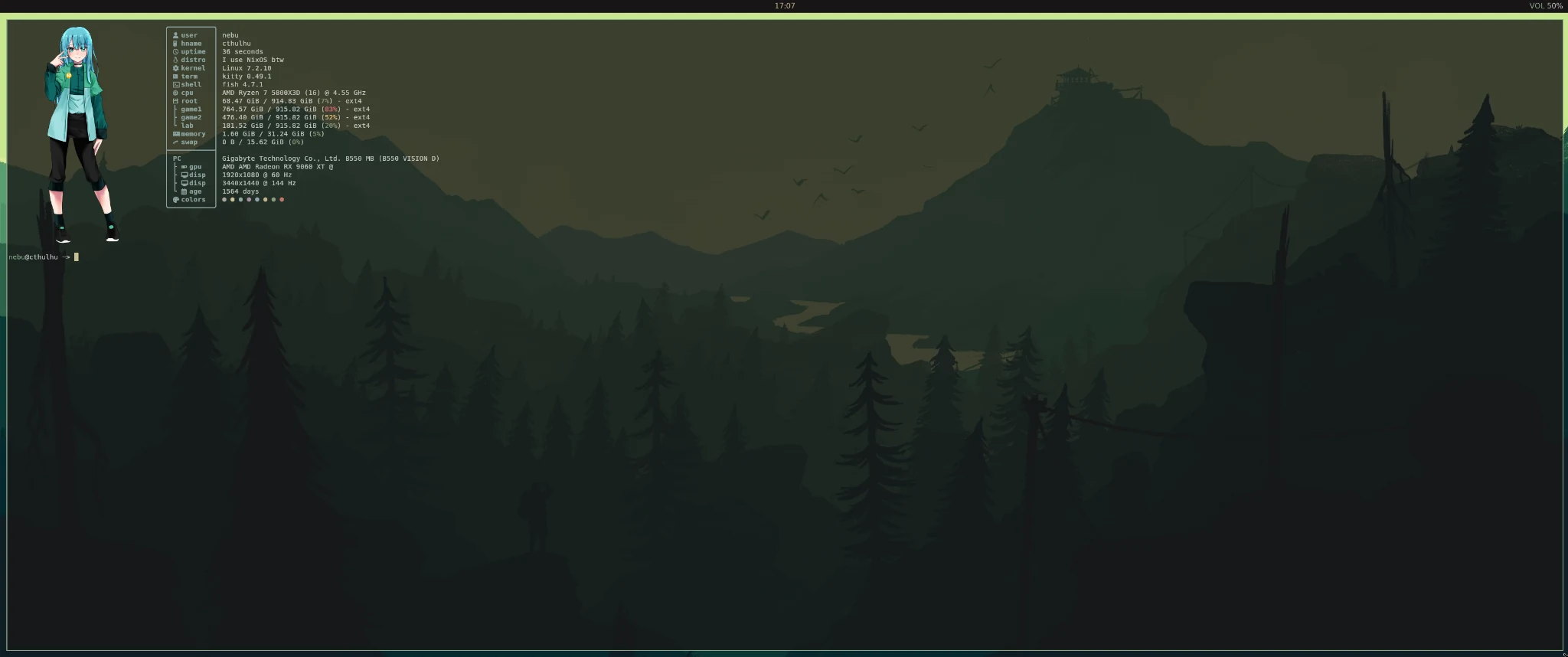
The full JSONC retains the framed information layout: user/host, uptime, OS, kernel, WM, terminal, shell, CPU, root disk, memory/swap, host, GPU, displays, age and colors. The personal Games.Vol1/Games.Vol2/Homelab rows have been removed from the portable default. Add disk modules with your own mounted paths if you need them; the root disk module already works without my drives. The GPU format's numbered placeholders are inherited from the source and can produce empty fields when a driver does not report that information.
Use an image you own or are permitted to redistribute at ~/.config/fastfetch/1.png. This filename is independent of the wallpaper directory. kitty-icat sends it through Kitty's image protocol, using width 30 and height 15 character cells, top padding 1, left 2 and right 4. It requires a suitable graphical Kitty terminal and its kitten helper; a plain Linux console, unsupported terminal or some multiplexer sessions will not render it the same way. Without an image yet, test the information layout with fastfetch --logo none.
fastfetch --logo none
After adding your image, run fastfetch in Kitty. The installer creates ~/.config/fastfetch/cthulhu-born only if absent. The command module subtracts its modification time from the current time and reports whole days. This is a user-maintained installation marker, not automatically the age of the motherboard or Nix store. The private marker dated back to July 2022; new users do not inherit that date. If you create it yourself, use touch once at installation time and avoid touching it again unless you mean to reset the counter.
VS Code and optional applications
settings.json selects Kanagawa Dragon, Material Icon Theme and Hack. Install the extensions from their actual publishers after enabling personalApps. The source handoff did not include an extension inventory; the following verified theme package provides the required theme label:
code --install-extension metaphore.kanagawa-vscode-color-theme
code --install-extension PKief.material-icon-theme
Restart VS Code if the theme is not applied immediately. VS Code settings are not NixOS modules. Steam/Lutris support is opt-in; existing Proton prefixes, library mounts, game compatibility and my ongoing Radeon troubleshooting are separate from reproducing the desktop. OBS and Kdenlive are installed through the personal-app switch, with no invented performance results.
Complete configuration file library
The following are the complete published files, not fragments. The GitHub and raw links point to the matching setup tree. This reusable desktop module is the safe alternative to publishing my complete host-specific configuration.nix as an installer. Your original configuration.nix imports it and retains all installation-specific decisions.
nixos/desktop.nix
{ config, lib, pkgs, ... }:
let cfg = config.cthulhu.desktop;
in {
  options.cthulhu.desktop = {
    enable = lib.mkEnableOption "the Cthulhu Kanagawa Dragon X11 desktop";
    user = lib.mkOption {
      type = lib.types.str;
      description = "An existing normal login account; this module does not create accounts.";
    };
    keyboardLayout = lib.mkOption { type = lib.types.str; default = "de"; };
    standalone = lib.mkOption {
      type = lib.types.bool;
      default = false;
      description = "Explicitly disable Plasma/SDDM after testing startx from a TTY.";
    };
    personalApps = lib.mkOption {
      type = lib.types.bool;
      default = false;
      description = "Install Chrome, VS Code, OBS, Kdenlive and media tools; allows unfree software.";
    };
    gaming = lib.mkOption {
      type = lib.types.bool;
      default = false;
      description = "Install Steam/Lutris and 32-bit graphics/audio support; allows unfree software.";
    };
  };
  config = lib.mkIf cfg.enable (lib.mkMerge [ {
    assertions = [ {
      assertion = cfg.user != "YOUR_LOGIN" && config.users.users.${cfg.user}.isNormalUser;
      message = "Set cthulhu.desktop.user to an existing normal account from your installation.";
    } ];
    services.xserver = {
      enable = true;
      xkb.layout = cfg.keyboardLayout;
      desktopManager.xterm.enable = false;
      windowManager.xmonad = {
        enable = true;
        enableContribAndExtras = true;
      };
      displayManager.startx = {
        enable = true;
        generateScript = true;
        extraCommands = ''
          export XDG_CURRENT_DESKTOP=XMonad
          export XDG_SESSION_DESKTOP=xmonad
          export XDG_SESSION_TYPE=x11
          dbus-update-activation-environment --systemd DISPLAY XAUTHORITY \
            XDG_CURRENT_DESKTOP XDG_SESSION_DESKTOP XDG_SESSION_TYPE
        '';
      };
    };
    programs.fish.enable = true;
    users.users.${cfg.user}.shell = pkgs.fish;
    environment.sessionVariables = {
      XCURSOR_THEME = "Bibata-Modern-Classic";
      XCURSOR_SIZE = "24";
    };
    hardware.graphics.enable = true;
    services.pipewire = {
      enable = true;
      alsa.enable = true;
      pulse.enable = true;
      wireplumber.enable = true;
    };
    services.pulseaudio.enable = lib.mkForce false;
    security.rtkit.enable = true;
    services.dbus.enable = true;
    services.udisks2.enable = true;
    services.gvfs.enable = true;
    security.polkit.enable = true;
    systemd.user.services.cthulhu-polkit = {
      description = "Polkit agent for the generated startx session";
      wantedBy = [ "nixos-fake-graphical-session.target" ];
      partOf = [ "nixos-fake-graphical-session.target" ];
      serviceConfig = {
        ExecStart = "${pkgs.polkit_gnome}/libexec/polkit-gnome-authentication-agent-1";
        Restart = "on-failure";
      };
    };
    programs.thunar.enable = true;
    services.tumbler.enable = true;
    xdg.portal = {
      enable = true;
      extraPortals = [ pkgs.xdg-desktop-portal-gtk ];
      config.xmonad.default = [ "gtk" ];
    };
    fonts.fontconfig.enable = true;
    fonts.packages = with pkgs; [
      hack-font nerd-fonts.jetbrains-mono nerd-fonts.fira-code
      noto-fonts noto-fonts-color-emoji
    ];
    environment.systemPackages = with pkgs; [
      bash git curl nano kitty xterm firefox mousepad rofi xmobar dunst
      picom feh xrandr xsetroot maim gsimplecal pavucontrol
      wireplumber libnotify fastfetch bibata-cursors kdePackages.breeze-icons
      sassc gtk-engine-murrine gnome-themes-extra
    ];
  }
  (lib.mkIf cfg.personalApps {
    nixpkgs.config.allowUnfree = true;
    environment.systemPackages = with pkgs; [
      google-chrome vscode obs-studio kdePackages.kdenlive vlc ffmpeg-full
    ];
  })
  (lib.mkIf cfg.gaming {
    nixpkgs.config.allowUnfree = true;
    programs.steam.enable = true;
    hardware.graphics.enable32Bit = true;
    services.pipewire.alsa.support32Bit = true;
    environment.systemPackages = [ pkgs.lutris pkgs.vulkan-tools pkgs.libva-utils ];
  })
  (lib.mkIf cfg.standalone {
    services.desktopManager.plasma6.enable = lib.mkForce false;
    services.displayManager.sddm.enable = lib.mkForce false;
    systemd.defaultUnit = "multi-user.target";
  }) ]);
}
nixos/cthulhu-local.nix
{ ... }: {
  imports = [ ./desktop.nix ];
  cthulhu.desktop = {
    enable = true;
    user = "YOUR_LOGIN"; # Your existing account; do not create a second user.
    keyboardLayout = "de"; # e.g. "us"; keep locale/timezone in configuration.nix.
    standalone = false; # Path A: keep Plasma/SDDM until startx has been tested.
    personalApps = false; # true enables Chrome/Code/OBS/Kdenlive shortcuts.
    gaming = false; # true adds Steam/Lutris and 32-bit support.
  };
}
home/.xmonad/xmonad.hs
import XMonad
import Data.List (find)
import Data.Monoid (All(..))
import qualified Data.Map as M
import qualified XMonad.StackSet as W

import XMonad.Actions.AfterDrag (afterDrag)
import XMonad.Actions.Navigation2D (withNavigation2DConfig, windowSwap, Direction2D(..))
import XMonad.Actions.UpdateFocus (focusOnMouseMove, focusUnderPointer)
import XMonad.Hooks.EwmhDesktops (ewmh, ewmhFullscreen)
import XMonad.Hooks.ManageDocks (avoidStruts, docks)
import XMonad.Hooks.ManageHelpers (isDialog)
import XMonad.Layout.MouseResizableTile (mouseResizableTile, mouseResizableTileMirrored)
import XMonad.Layout.Spacing (spacingRaw, Border(..))
import XMonad.Util.EZConfig (additionalKeysP)
import XMonad.Util.SpawnOnce (spawnOnce)

myStartupHook :: X ()
myStartupHook = do
  spawnOnce "bash \"$HOME/.config/cthulhu/monitors.sh\""
  spawnOnce "picom --backend xrender --daemon"
  spawnOnce "dunst"
  spawnOnce "xsetroot -cursor_name left_ptr"
  spawnOnce "xmobar ~/.xmobarrc"

mouseScreenHook :: Event -> X All
mouseScreenHook MotionEvent { ev_x = x, ev_y = y, ev_window = w } = do
  root <- asks theRoot
  if w /= root then pure (All True) else do
    ws <- gets windowset
    let screens = W.current ws : W.visible ws
        inside sc =
          let r = screenRect (W.screenDetail sc)
              px = fromIntegral x :: Int
              py = fromIntegral y :: Int
              left = fromIntegral (rect_x r) :: Int
              top = fromIntegral (rect_y r) :: Int
              right = left + fromIntegral (rect_width r)
              bottom = top + fromIntegral (rect_height r)
          in px >= left && px < right && py >= top && py < bottom
    case find inside screens of
      Just sc | W.screen sc /= W.screen (W.current ws) ->
        windows (W.view (W.tag (W.workspace sc)))
      _ -> pure ()
    pure (All True)
mouseScreenHook _ = pure (All True)

moveToScreenAndTile :: Window -> X ()
moveToScreenAndTile w = do
  d <- asks display
  root <- asks theRoot
  (_, _, _, px, py, _, _, _) <- io $ queryPointer d root
  destination <- pointScreen (fromIntegral px) (fromIntegral py)
  case destination of
    Just sc -> windows (W.sink w . W.shiftWin (W.tag (W.workspace sc)) w)
    Nothing -> windows (W.sink w)

myMouseBindings (XConfig { modMask = modm }) = M.fromList
  [ ((modm, button1), \w -> focus w >> mouseMoveWindow w >> afterDrag (moveToScreenAndTile w))
  , ((modm, button2), \w -> focus w >> windows W.shiftMaster)
  , ((modm, button3), \w -> focus w >> mouseResizeWindow w >> windows W.shiftMaster)
  ]

toggleFloat :: Window -> X ()
toggleFloat w = do
  floating <- gets (W.floating . windowset)
  if M.member w floating
    then windows (W.sink w)
    else windows (W.float w (W.RationalRect 0.15 0.15 0.7 0.7))

main :: IO ()
main = xmonad $ ewmhFullscreen $ ewmh $ withNavigation2DConfig def $ docks $ def
  { modMask     = mod4Mask
  , terminal    = "kitty"
  , borderWidth = 2
  , normalBorderColor = "#393836"
  , focusedBorderColor = "#87a987"
  , startupHook = myStartupHook
  , focusFollowsMouse = True
  , mouseBindings = myMouseBindings
  , rootMask = rootMask def .|. pointerMotionMask
  , handleEventHook = handleEventHook def <+> focusOnMouseMove <+> mouseScreenHook
  , manageHook = manageHook def <+> (isDialog --> doFloat)
  , layoutHook = avoidStruts $ spacingRaw False (Border 8 8 8 8) True (Border 6 6 6 6) True $ (mouseResizableTile ||| mouseResizableTileMirrored ||| Full)
  }
  `additionalKeysP`
  [ ("M-t",        spawn "thunar")
  , ("M-m",        spawn "mousepad")
  , ("M-f", withFocused toggleFloat)
  , ("M-<Left>", focusUnderPointer >> windowSwap L False)
  , ("M-<Right>", focusUnderPointer >> windowSwap R False)
  , ("M-<Return>", spawn "kitty")
  , ("M-q",        kill)
  , ("M-b",        spawn "google-chrome-stable")
  , ("M-o",        spawn "obs")
  , ("M-v",        spawn "code")
  , ("M-d",        spawn "rofi -show drun")
  , ("<Print>", spawn "mkdir -p ~/Bilder/Screenshots && maim -s ~/Bilder/Screenshots/$(date +%Y-%m-%d_%H-%M-%S).png")

  , ("<XF86AudioRaiseVolume>", spawn "$HOME/.local/bin/cthulhu-audio up")
  , ("<XF86AudioLowerVolume>", spawn "$HOME/.local/bin/cthulhu-audio down")
  , ("<XF86AudioMute>",        spawn "$HOME/.local/bin/cthulhu-audio mute")
  , ("<XF86AudioMicMute>",     spawn "$HOME/.local/bin/cthulhu-audio mic")

  , ("M-C-r", spawn "xmonad --recompile && xmonad --restart")
  ]
home/.xmobarrc
Config
  { font = "xft:Hack:size=11"
  , bgColor = "#181616"
  , fgColor = "#c5c9c5"
  , position = OnScreen 0 (TopSize C 100 28)
  , lowerOnStart = False
  , hideOnStart = False
  , overrideRedirect = True
  , allDesktops = True
  , persistent = True
  , sepChar = "%"
  , alignSep = "}{"
  , template = " }<action=`gsimplecal` button=1><fc=#c4b28a>%date%</fc></action>{  <action=`pavucontrol` button=3><fc=#87a987>VOL</fc> %volume%</action>   "
  , commands =
      [ Run Date "%H:%M" "date" 100
      , Run Com "sh" ["-c", "\"$HOME/.local/bin/cthulhu-audio\" status"] "volume" 10
      ]
  }
home/.config/kitty/kitty.conf
# Transparenz

# Schriftgröße (falls du sie anpassen willst)
font_size 11.0

# Scrollback-Puffer (wie weit du hochscrollen kannst)
scrollback_lines 10000

# Klickbare Links aktivieren
detect_urls yes

background_opacity 0.8


# BEGIN_KITTY_THEME
# Kanagawa_dragon
include current-theme.conf
# END_KITTY_THEME
home/.config/kitty/current-theme.conf
# vim:ft=kitty

## name: Kanagawa_dragon
## license: MIT
## author: Tommaso Laurenzi
## upstream: https://github.com/rebelot/kanagawa.nvim/
## blurb: NeoVim dark colorscheme inspired by the colors of the famous painting
## by Katsushika Hokusai. Dragon version.

#: The basic colors

foreground                      #c5c9c5
background                      #181616
selection_foreground            #c8c093
selection_background            #2d4f67

#: Cursor colors

cursor                          #c8c093

#: URL underline color when overing with mouse

url_color                       #72a7bc

#: Tab bar colors

active_tab_foreground           #c8c093
active_tab_background           #12120f
inactive_tab_foreground         #a6a69c
inactive_tab_background         #12120f

#: The basic 16 colors

#: black
color0  #0d0c0c
color8  #a6a69c

#: red
color1  #c4746e
color9  #e46876

#: green
color2  #8a9a7b
color10 #87a987

#: yellow
color3  #c4b28a
color11 #e6c384

#: blue
color4  #8ba4b0
color12 #7fb4ca

#: magenta
color5  #a292a3
color13 #938aa9

#: cyan
color6  #8ea4a2
color14 #7aa89f

#: white
color7  #c8c093
color15 #c5c9c5


#: You can set the remaining 240 colors as color16 to color255.

color16 #b6927b
color17 #b98d7b
home/.config/dunst/dunstrc
[global]
    monitor = 0
    follow = none
    origin = top-right
    offset = (16, 44)
    width = 320
    height = (0, 180)
    notification_limit = 3

    font = Hack 10
    corner_radius = 10
    frame_width = 2
    separator_height = 4
    padding = 12
    horizontal_padding = 14
    gap_size = 6

    transparency = 5
    progress_bar = true
    progress_bar_height = 7
    progress_bar_frame_width = 0
    progress_bar_corner_radius = 3
    highlight = "#87a987"

[urgency_low]
    background = "#181616"
    foreground = "#c5c9c5"
    frame_color = "#737c73"
    timeout = 3

[urgency_normal]
    background = "#181616"
    foreground = "#c5c9c5"
    frame_color = "#87a987"
    timeout = 4

[urgency_critical]
    background = "#181616"
    foreground = "#c4746e"
    frame_color = "#c4746e"
    timeout = 0
home/.config/rofi/config.rasi
configuration {
    modi: "drun,run";
    show-icons: true;
    font: "Hack 11";
    drun-display-format: "{name}";
}

* {
    bg: #181616;
    bg-alt: #282727;
    fg: #c5c9c5;
    green: #87a987;
    muted: #737c73;
    selected: #393836;
}

window {
    width: 650px;
    location: center;
    anchor: center;
    background-color: @bg;
    border: 2px;
    border-color: @green;
    border-radius: 12px;
    padding: 16px;
}

mainbox {
    spacing: 12px;
    children: [ inputbar, listview ];
}

inputbar {
    background-color: @bg-alt;
    border-radius: 8px;
    padding: 12px;
    spacing: 10px;
    children: [ prompt, entry ];
}

prompt {
    text-color: @green;
}

entry {
    text-color: @fg;
    placeholder: "Anwendung suchen...";
    placeholder-color: @muted;
}

listview {
    lines: 8;
    columns: 1;
    spacing: 5px;
    scrollbar: false;
}

element {
    padding: 9px;
    spacing: 12px;
    border-radius: 7px;
}

element normal.active {
    background-color: @bg;
    text-color: @green;
}

element selected.normal {
    background-color: @selected;
    text-color: @green;
}

element-icon {
    size: 22px;
}

element-text {
    text-color: @fg;
}
home/.local/bin/cthulhu-audio
#!/usr/bin/env bash
set -euo pipefail
export LC_ALL=C

case "${1:-}" in
  up)   wpctl set-volume -l 1.0 @DEFAULT_AUDIO_SINK@ 5%+ ;;
  down) wpctl set-volume @DEFAULT_AUDIO_SINK@ 5%- ;;
  mute) wpctl set-mute @DEFAULT_AUDIO_SINK@ toggle ;;
  mic)  wpctl set-mute @DEFAULT_AUDIO_SOURCE@ toggle ;;
  status) ;; # Read-only mode used by Xmobar; no notification.
  *) printf 'Usage: cthulhu-audio {up|down|mute|mic|status}\n' >&2; exit 2 ;;
esac

if [[ "$1" == mic ]]; then
  state="$(wpctl get-volume @DEFAULT_AUDIO_SOURCE@)"
  if [[ "$state" == *"[MUTED]"* ]]; then
    dunstify -a Cthulhu -r 41002 -t 1800 "Mikrofon" "Stummgeschaltet"
  else
    dunstify -a Cthulhu -r 41002 -t 1800 "Mikrofon" "Aktiv"
  fi
else
  state="$(wpctl get-volume @DEFAULT_AUDIO_SINK@)"
  percent="$(awk '{printf "%.0f", $2 * 100}' <<< "$state")"
  if [[ "$1" == status ]]; then
    if [[ "$state" == *"[MUTED]"* ]]; then printf 'MUTE\n'; else printf '%s%%\n' "$percent"; fi
  elif [[ "$state" == *"[MUTED]"* ]]; then
    dunstify -a Cthulhu -r 41001 -t 1800 -h int:value:0 "Audio" "Stummgeschaltet"
  else
    dunstify -a Cthulhu -r 41001 -t 1800 -h "int:value:$percent" "Lautstärke" "$percent%"
  fi
fi
home/.config/gtk-3.0/settings.ini
[Settings]
gtk-theme-name=Kanagawa-Green-Dark-Dragon
gtk-application-prefer-dark-theme=true
gtk-button-images=true
gtk-cursor-blink=true
gtk-cursor-blink-time=1000
gtk-cursor-theme-name=Bibata-Modern-Classic
gtk-cursor-theme-size=24
gtk-decoration-layout=icon:minimize,maximize,close
gtk-enable-animations=true
gtk-font-name=Noto Sans,  10
gtk-icon-theme-name=breeze-dark
gtk-menu-images=true
gtk-primary-button-warps-slider=true
gtk-sound-theme-name=ocean
gtk-toolbar-style=3
gtk-xft-dpi=98304
home/.config/gtk-4.0/settings.ini
[Settings]
gtk-application-prefer-dark-theme=true
gtk-cursor-blink=true
gtk-cursor-blink-time=1000
gtk-cursor-theme-name=Bibata-Modern-Classic
gtk-cursor-theme-size=24
gtk-decoration-layout=icon:minimize,maximize,close
gtk-enable-animations=true
gtk-font-name=Noto Sans,  10
gtk-icon-theme-name=breeze-dark
gtk-primary-button-warps-slider=true
gtk-sound-theme-name=ocean
gtk-xft-dpi=98304
home/.config/fastfetch/config.jsonc
{
"$schema": "https://github.com/fastfetch-cli/fastfetch/raw/dev/doc/json_schema.json",
"logo": "~/.config/fastfetch/1.png",
"logoType": "kitty-icat",
"logoWidth": 30,
"logoHeight": 15,
"logoPadding": {
"top": 1,
"left": 2,
"right": 4
},
"display": {
"separator": " "
},
"modules": [
{
"key": "╭───────────╮",
"type": "custom"
},
{
"key": "│ user │",
"type": "title",
"format": "{user-name}"
},
{
"key": "│ hname │",
"type": "title",
"format": "{host-name}"
},
{
"key": "│ uptime │",
"type": "uptime"
},
{
"key": "│ distro │",
"type": "os",
"format": "I use NixOS btw"
},
{
"key": "│ kernel │",
"type": "kernel"
},
{
"key": "│ wm │",
"type": "wm"
},
{
"key": "│ term │",
"type": "terminal"
},
{
"key": "│ shell │",
"type": "shell"
},
{
"key": "│ cpu │",
"type": "cpu",
"showPeCoreCount": true
},
{
"key": "│ root │",
"type": "disk",
"folders": "/"
},
{
"key": "│ memory │",
"type": "memory"
},
{
"key": "│ swap │",
"type": "swap"
},
{
"key": "├───────────┤",
"type": "custom"
},
{
"key": "│ PC │",
"type": "host",
"format": "{5} {1} ({2})"
},
{
"key": "│ ├ gpu │",
"type": "gpu",
"format": "{1} {2} @ {12}"
},
{
"key": "│ ├ disp │",
"type": "display",
"order": "desc",
"format": "{1}x{2} @ {3} Hz"
},
{
"key": "│ └ age │",
"type": "command",
"text": "marker=\"$HOME/.config/fastfetch/cthulhu-born\"; if [ -f \"$marker\" ]; then birth_install=$(stat -c %Y \"$marker\"); current=$(date +%s); echo $(((current - birth_install) / 86400)) days; else printf \"marker missing\\n\"; fi"
},
{
"key": "│ colors │",
"type": "colors",
"symbol": "circle"
},
{
"key": "╰───────────╯",
"type": "custom"
}
]
}
home/.config/Code/User/settings.json
{
    "workbench.colorTheme": "Kanagawa Dragon",
    "workbench.iconTheme": "material-icon-theme",
    "editor.fontFamily": "'Hack', monospace"
}
home/.config/cthulhu/monitors.sh
#!/usr/bin/env bash
set -euo pipefail

# Run xrandr, adapt outputs/modes, then opt in. False preserves your layout.
configure_layout=false
primary=DP-2
secondary=HDMI-1
if "$configure_layout"; then
  if ! xrandr --output "$primary" --primary --mode 3440x1440 --rate 144 --pos 0x0 \
      --output "$secondary" --mode 1920x1080 --rate 60 --pos 3440x0; then
    printf 'Monitor layout failed; check xrandr output and supported modes.\n' >&2
  fi
fi

# Supply your own artwork. feh's Xinerama monitor order decides assignment.
wallpaper_dir="${1:-$HOME/Bilder/wallpaper}"
images=()
for image in "$wallpaper_dir/1.png" "$wallpaper_dir/2.png"; do
  [[ ! -f "$image" ]] || images+=("$image")
done
if ((${#images[@]})); then
  feh --bg-max "${images[@]}"
else
  xsetroot -solid '#181616'
fi
scripts/install-user.sh
#!/usr/bin/env bash
# Installs home/ only. No sudo, package management or display-manager changes.
set -euo pipefail
source_root="$(cd -- "$(dirname -- "${BASH_SOURCE[0]}")/.." && pwd)"
target="${1:-$HOME}"
[[ $# -le 1 && "$target" = /* && "$target" != / && -d "$target" ]] || {
  printf 'Usage: bash install-user.sh [existing-absolute-home-directory]\n' >&2; exit 2;
}
target="$(realpath -- "$target")"
[[ "$target" != / ]] || { printf 'Refusing filesystem root.\n' >&2; exit 2; }
[[ ! -d "$target/.config/xmonad" ]] || {
  printf 'Existing .config/xmonad takes precedence. Review it before installing .xmonad.\n' >&2; exit 1;
}
mapfile -d '' files < <(find "$source_root/home" -type f -print0 | sort -z)
# Check all conflicts before creating files. Never traverse destination symlinks.
for file in "${files[@]}"; do
  relative="${file#"$source_root/home/"}"
  destination="$target/$relative"
  parent="$destination"
  while [[ "$parent" != "$target" ]]; do
    [[ ! -L "$parent" ]] || { printf 'Refusing symlink: %s\n' "$parent" >&2; exit 1; }
    parent="$(dirname -- "$parent")"
    [[ ! -e "$parent" || -d "$parent" ]] || {
      printf 'Not a directory: %s\n' "$parent" >&2; exit 1;
    }
  done
  if [[ -e "$destination" ]] && ! cmp -s -- "$file" "$destination"; then
    printf 'Conflict: %s\nBack it up and move it aside, then rerun. No files installed.\n' "$destination" >&2
    exit 1
  fi
done
for file in "${files[@]}"; do
  destination="$target/${file#"$source_root/home/"}"
  mkdir -p -- "$(dirname -- "$destination")"
  if [[ ! -e "$destination" ]]; then
    (set -o noclobber; cat -- "$file" > "$destination")
    printf 'Installed %s\n' "$destination"
  fi
done
chmod +x -- "$target/.local/bin/cthulhu-audio" "$target/.config/cthulhu/monitors.sh"
marker="$target/.config/fastfetch/cthulhu-born"
if [[ ! -e "$marker" && ! -L "$marker" ]]; then
  (set -o noclobber; : > "$marker")
fi
printf 'Done. Add your own artwork; edit monitors.sh and review the installation guide.\n'
Troubleshooting and recovery
| Symptom | Check and recovery |
|---|---|
| Nix evaluation fails | Read the option/file named in the error. Confirm YOUR_LOGIN is replaced, the user already exists, imports are tracked for flakes and your revision supports these options. Do not activate a failed build. |
| startx uses an old session | Check ~/.xinitrc and XINITRC; either overrides the generated script. Review ~/.config/xmonad as well as ~/.xmonad. |
| Black screen or an X error | Switch to a TTY with Ctrl+Alt+F3. Inspect ~/.local/share/xorg/Xorg.0.log and journalctl -b. Confirm a local login, your existing driver configuration and supported xrandr modes. |
| No authentication prompt or portal | Check systemctl --user status cthulhu-polkit.service and journalctl --user -b. Start through the generated startx session and avoid duplicate agents. |
| Wallpaper or bar unchanged after restart | spawnOnce does not repeat after an ordinary XMonad restart. Run monitors.sh directly or start a new X session. |
| Cursor is Breeze or tiny | Confirm both GTK files and XCURSOR_THEME/XCURSOR_SIZE after a fresh login. Apps can have their own cursor behavior. |
| Kitty is opaque | Check Picom is running once, inspect its terminal error output and any old Picom configuration, then open a new Kitty window. |
| Fastfetch artwork missing | Supply your own PNG in the correct directory and run in Kitty. Test text independently with --logo none. |
| Volume is on the wrong device | Use wpctl status and pavucontrol; the helper intentionally targets the current default sink/source. |
To return to the previous generation from a TTY:
sudo nixos-rebuild switch --rollback
If the current system cannot be used, select an earlier NixOS generation in the boot menu. Keep those generations while migrating; do not garbage-collect your recovery path mid-installation. To return permanently to Plasma, set standalone=false again, preserve or restore your original Plasma/SDDM declarations and rebuild. The switch only forces them off while true; it does not create a Plasma installation on the Minimal route. Home-file backups are restored separately because NixOS rollback does not roll back manually copied dotfiles.
Evidence, image credits and sources
The configuration derives from my actual working files; I reported that dragging, resizing and the rebooted session worked. Automated source/configuration checks are listed in the repository's validation record. They do not test my Radeon, two physical displays or a complete graphical session on a fresh machine. Readers still need to verify those behaviors on their own hardware.
The current forest-background screenshot was supplied by Dennis Hilk on 19 October 2026 specifically for this documentation. It shows the real desktop with Kitty and Fastfetch. Earlier Fuji screenshots belong to an earlier state and are not used to represent this version. The screenshot is documentation, not a separately licensed wallpaper or Fastfetch asset pack. Artwork visible inside it retains its original rights; the downloadable setup contains no extracted artwork. Use your own images for 1.png and 2.png. See ATTRIBUTION.md for the separate theme licenses and the publication corrections.
Primary technical references:
- NixOS startx module and generated-session behavior
- NixOS XMonad module and contrib packages
- XMonad AfterDrag
- XMonad UpdateFocus
- XMonad MouseResizableTile
- Kitty configuration
- feh manual, wallpaper modes and Xinerama
- Fastfetch JSON schema
- Kanagawa GTK source and license
- Kanagawa original palette
- Kanagawa VS Code theme
- Material Icon Theme
- GTK 4 Settings