In this article
- 1. Recover files you are authorized to access
- 2. What genuinely runs inside the browser?
- 3. Supported ZIP, RAR, 7Z and PDF variants
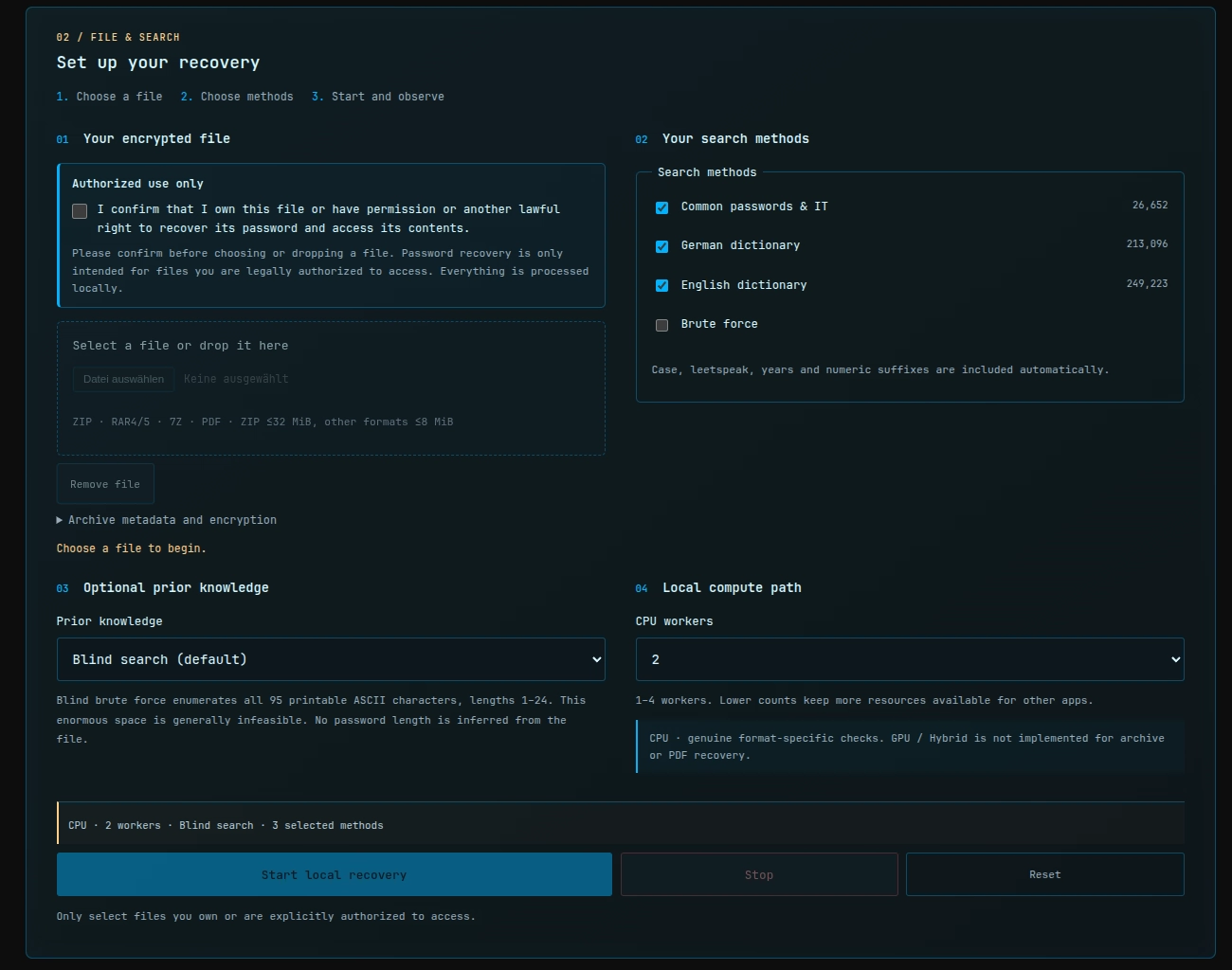
- 4. Step-by-step: recover an encrypted archive
- 5. Real numbers, with the runs kept separate
- 6. Why encryption types change the search cost
- 7. Why wordlists can beat a blind search
- 8. Privacy benefits and limits of browser-local recovery
- 9. Generate a genuinely encrypted test ZIP
- 10. Frequently asked questions
- 11. Try the recovery tool
- Sources and technical references
>
An old backup turns up. The archive is still there, but the password isn't. Maybe it is a ZIP of photographs, a WinRAR file you created years ago, a 7z backup, or a PDF that asks for an opening password. Search for help and you quickly encounter two uncomfortable suggestions: download an unfamiliar password-cracking executable or upload the entire private document to somebody else's website.
For supported files, there is another route. The Archive Recovery Lab lets your browser test real password candidates on your own computer. It needs no separate recovery executable and does not upload your selected file to a cloud-unlocking service. It also does not magically strip strong encryption: it can only find a password that falls inside the search you actually configure.
1. Recover files you are authorized to access
Only use this tool on your own files, or files you are explicitly permitted to access. Before the file picker becomes available, the application asks you to confirm your authorization. That checkbox is a useful reminder, not legal proof of ownership or permission.
This is offline password verification against a selected encrypted file. It does not log into remote accounts, reset somebody else's credentials, or test passwords against third-party servers. Those are very different tasks.
2. What genuinely runs inside the browser?
The website serves static HTML, JavaScript, dictionaries and any WebAssembly dependencies the format-specific engines require. You explicitly provide one local file using the browser's file chooser or drag and drop. The File/Blob APIs let the app read that selection without automatically posting it to a server.
The application identifies the container and its supported encryption variant. A search coordinator then creates password candidates from chosen wordlists, transformations, year suffixes, number suffixes or a specified brute-force space. The default is two CPU Web Workers, with a manual 1–16 worker choice subject to memory admission. Supported ZIP-ZipCrypto, ZIP-AES and a defined RAR5 subset can also perform genuine WebGPU cryptographic checks, in manually selected GPU or Hybrid mode on compatible hardware. RAR4, 7Z and PDF stay CPU-only. No automatic GPU selection or silent CPU fallback occurs. This is measurable local work, not an animated simulation.
Finding a plausible header or cryptographic check is not the end. The result goes through a separate confirmation path: the selected archive is parsed afresh, encrypted contents are recovered and extraction/integrity checks are applied. Only after those checks pass does the UI reveal the recovered password and enable the applicable local downloads.
There is a meaningful privacy boundary here: the browser downloads the code and dictionaries, but the application does not upload the selected archive or candidate passwords through its intended processing path. That does not mean the site performs zero network requests. It also does not prove that all browsers, extensions, delivered scripts or supply chains are perfectly safe.
3. Supported ZIP, RAR, 7Z and PDF variants
| Type | Currently documented implementation | Evidence status |
|---|---|---|
| ZIP / ZipCrypto | Historical ZIP encryption and verified recovery | Successful real-world screenshot available |
| ZIP / WinZip AES-128/192/256 | AE-1/AE-2, Stored and Deflate; supported GPU checks | Browser downloads and real cryptographic GPU tests passed |
| RAR4 | Supported encrypted-header variants, CPU | Real Chrome extraction acceptance passed |
| RAR5 | Supported encrypted-header variants, narrow GPU-eligible subset | Browser acceptance and limited GPU tests passed |
| 7Z / AES-256 | Supported encrypted-header and data cases with Copy, LZMA2 and Zstandard, CPU | Original Zstandard archive recovered; output checks passed |
| PDF / older encryption | Supported Standard Security Handler R2/RC4-40, R3/RC4-128, R4/AES-128, CPU | Automated real-browser tests passed |
| PDF / AES-256 | Supported Standard Security Handler R6/AES-256, CPU | Original AES-256 PDF decrypted and validated using two PDF readers |
The name of a format is not a guarantee that every possible archive with that extension works. Multi-volume archives, exotic compression codecs, unverified PDF revisions and unsupported encryption may be rejected. PDF opening passwords must also be distinguished from owner/printing/copying restrictions: a PDF that opens without a password does not need the same recovery procedure.
The current version accepts ZIP input up to 32 MiB, and RAR/7Z/PDF input up to 8 MiB. Other limits include 256 entries, 16 MiB per extracted file, 32 MiB total output and an expansion ratio of 200:1. Suspicious paths, duplicate output names and symlinks may be rejected. Password candidate enumeration is presently ASCII-based. These are intentional limits, not universal properties of the file formats.
4. Step-by-step: recover an encrypted archive
- Open the Archive Recovery Lab. There is no separate installer.
- Check the authorization confirmation to enable file selection.
- Select or drag in one encrypted ZIP, RAR, 7Z or PDF. Read the detected format and encryption notes.
- Start with appropriate dictionaries if you expect a memorable human-made password. You can also select brute force, but exhaustive combinations become huge.
- If you remember something, try the optional prior-knowledge mode to narrow the search using characteristics that the interface offers.
- Start with the default two CPU workers; manually choose 1–16 if the memory admission check allows it. With compatible hardware you can explicitly check GPU support and select GPU or Hybrid for supported formats. More workers or GPU do not guarantee a faster result.
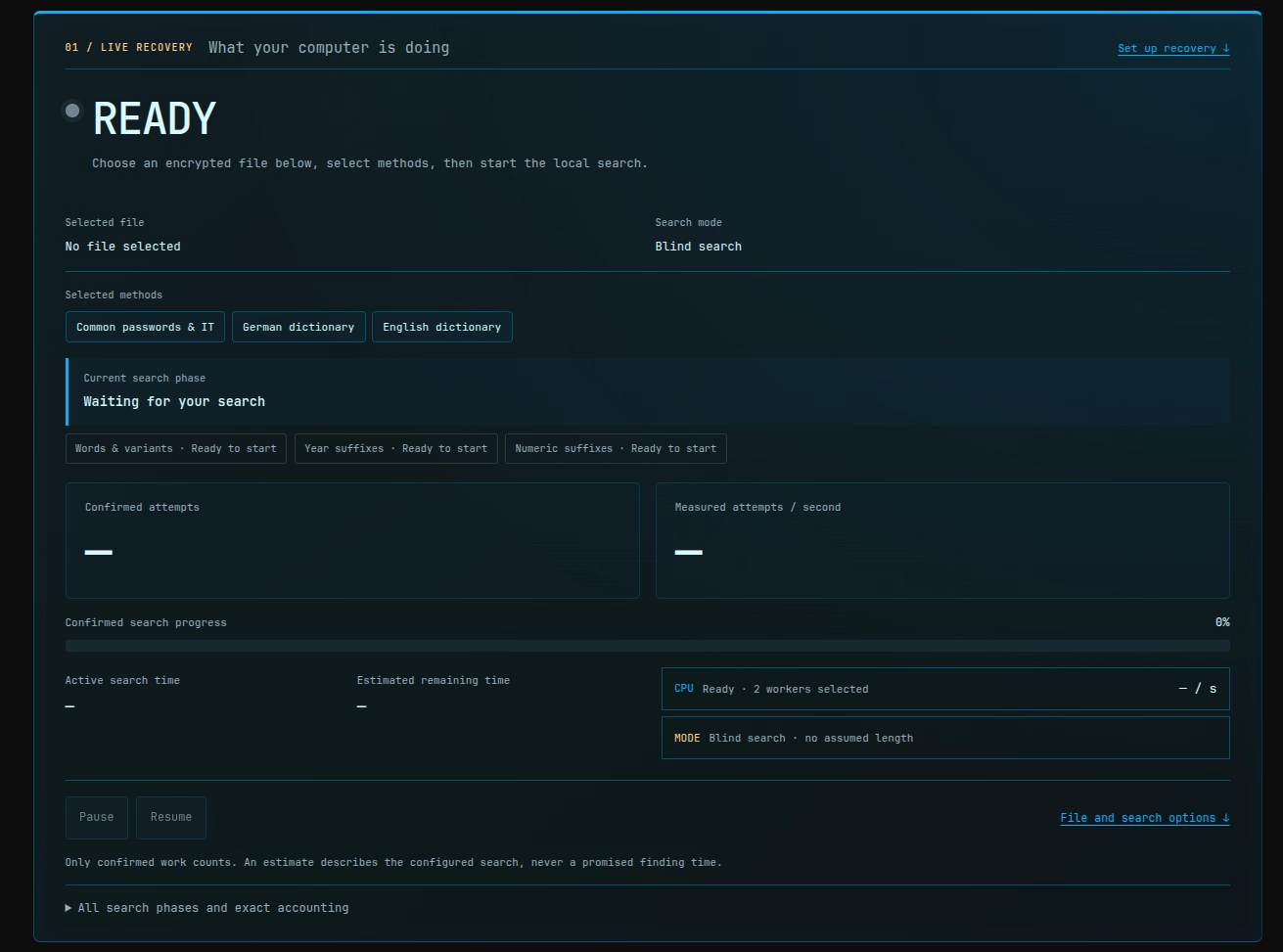
- Start the local search. Watch the phase name, confirmed attempts and measured attempts per second. Use pause/resume if needed.
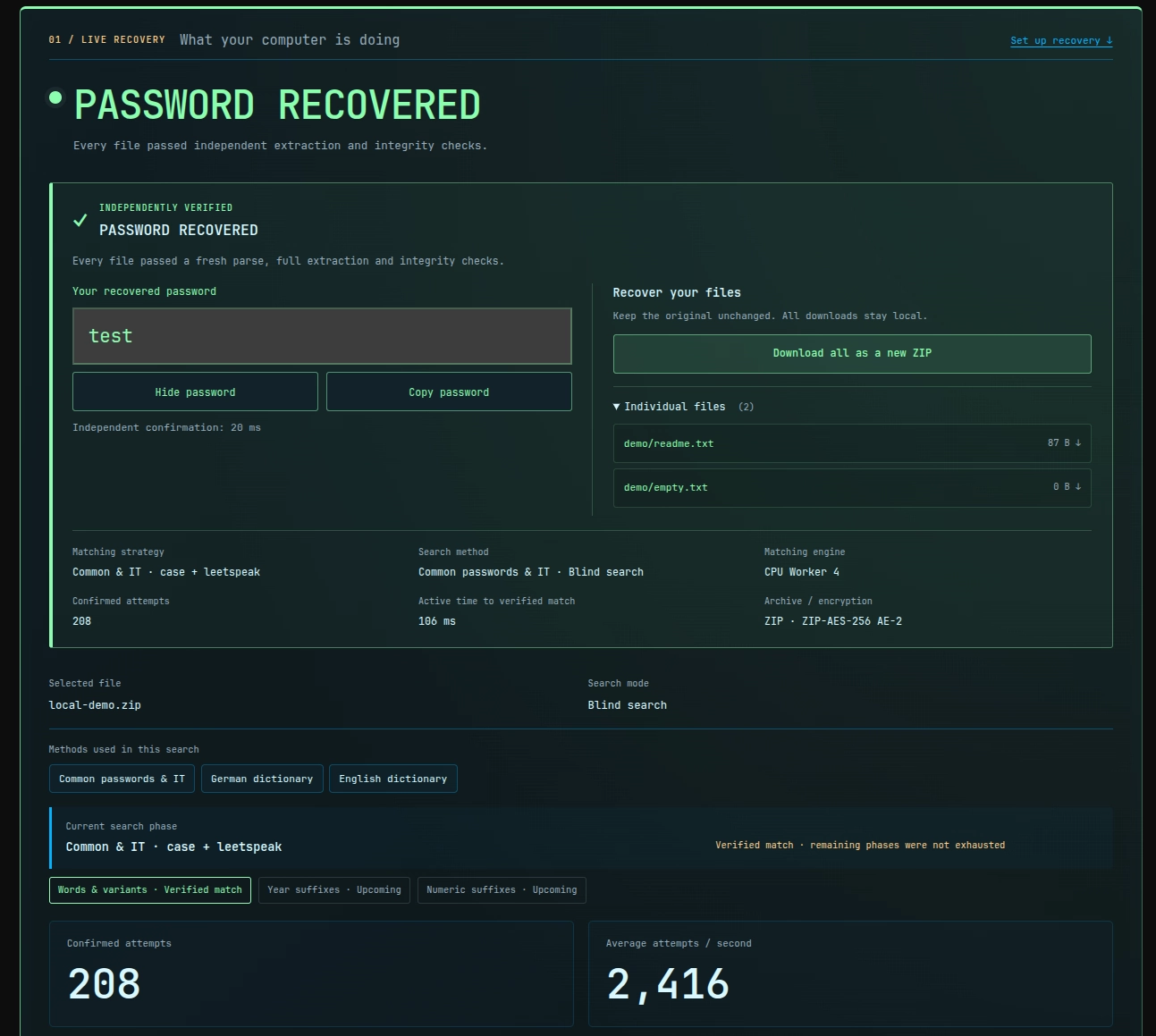
- After independent verification, reveal or copy your password. Download recovered individual files, or a newly created ZIP when that operation is supported.
5. Real numbers, with the runs kept separate
A real ZipCrypto recovery on Cthulhu, a NixOS workstation with a Ryzen 7 5800X3D, is recorded in the German results screenshot. The file was test-zipcrypto-test9.zip; the recovered password was test9. Four CPU workers were configured; CPU Worker 3 reported the matching Common & IT / one-digit suffix candidate.
| German ZipCrypto observation | Screenshot value |
|---|---|
| Confirmed attempts | 11,220,531 |
| Active search time | 127.2 s |
| Displayed average rate | 88,219 attempts/s |
| Independent confirmation | 24 ms |
| Result | Verified recovery and download controls |
Scope: This is one run, not a guaranteed ZipCrypto speed. File size, format, password position, selected transformations, implementation and CPU workload all matter. The dashboard's notion of confirmed work is not interchangeable with every wall-clock operation.
The English success screenshot is a different demonstration: local-demo.zip, ZIP-AES-256 AE-2, example password test, 208 confirmed attempts, 106 ms active time, a displayed average of 2,416 attempts/s and two recoverable files. These values are not directly comparable to the German ZipCrypto run. These are separate test observations, not a CPU/GPU speed comparison.
Automated real-browser acceptance now verifies supported RAR4, RAR5, 7Z and PDF recovery, including real decrypted downloads and the original Zstandard 7Z/AES-256 PDF fixtures. Per-format Cthulhu speed figures are still unknown, and SwiftShader correctness checks must not be described as physical Radeon benchmarks.
6. Why encryption types change the search cost
A password is usually not the final encryption key. Many formats first derive keys from a password and a salt, often deliberately performing extra work for each candidate. That makes a single attempt more expensive.
Older ZipCrypto allows comparatively cheap initial checking, although the Lab still requires actual decryption and integrity validation before celebrating. WinZip AES uses PBKDF2-HMAC-SHA-1 key derivation and authentication information. The RAR5 format specifies AES-256 and a PBKDF2-based cost parameter. 7Z has its own key-derivation and container rules; encrypted PDFs vary substantially between legacy revisions and modern AES-based protection.
That is why “my CPU checks N passwords per second” is an incomplete claim. Meaningful comparisons require controlled measurements of actual files, comparable candidate strategies and the same hardware. We cannot responsibly say every RAR5 file is slower than every ZIP file on the evidence available.
7. Why wordlists can beat a blind search
The Lab shares 488,971 base entries with the Password Cracking Lab: 26,652 common/IT candidates, 213,096 German dictionary entries and 249,223 English dictionary entries. These are the bundled base entries, not a promise of that many unique final attempts. Case changes, leetspeak substitutions, years and numeric suffixes expand the candidates.
Take an old backup password such as backup9. If the base word is included, testing it alongside short numeric suffixes can be vastly more efficient than enumerating all combinations of printable symbols. The German test9 example illustrates a real one-digit-suffix match, not a guarantee that every common-looking password is present.
A high-entropy random password can remain infeasible. Search order matters, but it cannot abolish combinatorics.
8. Privacy benefits and limits of browser-local recovery
When you upload a private archive to a third-party recovery service, you expose its ciphertext and potentially sensitive metadata to that service. With this Lab, the chosen file stays in the browser's local processing flow. Worldnode serves the static app, dictionaries and WASM; after the resources are loaded, the Lab states that the search can continue offline.
“Runs locally” is a practical privacy advantage, not an absolute security certification. Malicious browser extensions, bugs or compromised delivered code can undermine trust. For highly sensitive information, consider a more isolated environment and review the implementation yourself.
Resource limits also protect against problematic decompression and archive entries. The Lab neither recursively opens embedded archives nor runs programs from them. Resetting terminates workers and revokes object URLs, but JavaScript memory collection cannot promise secure overwriting of every byte.
9. Generate a genuinely encrypted test ZIP
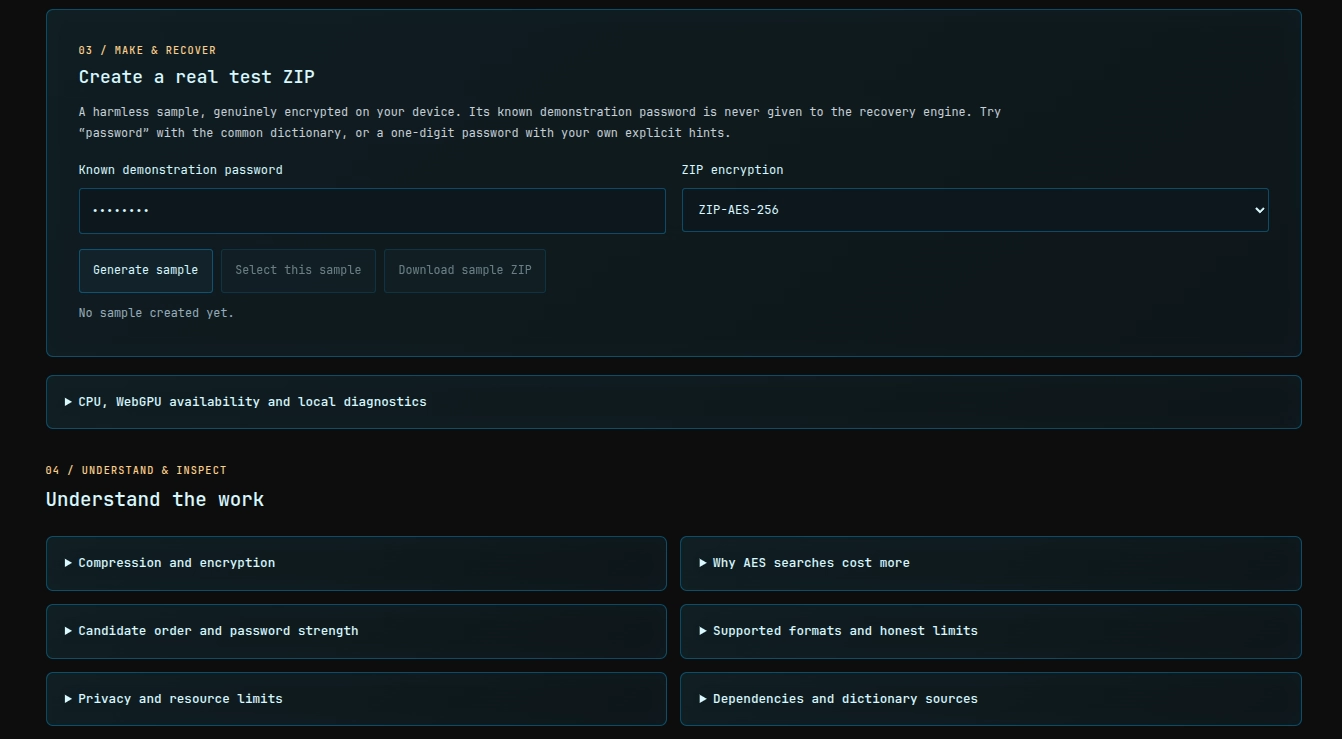
The Create a real test ZIP section is an excellent first experiment. Enter a known example password and pick ZIP encryption, such as ZipCrypto or ZIP-AES-256. The browser constructs a genuinely encrypted ZIP. You can select it for recovery or download it to inspect independently.
The known demonstration password is not secretly passed to the recovery worker. Your enabled search methods must actually discover it. Choose a short, intentionally easy password for the first test; a long random one is a demonstration of impractical search spaces, not a functional smoke test.
10. Frequently asked questions
Can I open a ZIP file without knowing the password?
The correct password or an equivalent key is still needed for genuine encrypted ZIP contents. The Lab tries candidates and verifies one if it is found. It does not bypass arbitrarily strong encryption.
Is ZIP password recovery free?
The Archive Recovery Lab is free to use. Your computer supplies the CPU time, and the documented format and resource limits apply.
Do I have to install WinRAR or 7-Zip to attempt recovery?
No additional recovery executable is required for the supported RAR and 7Z variants handled by this browser tool. The relevant WebAssembly code loads locally. Unsupported archives may still need another solution.
Can it recover a forgotten PDF password?
It can try candidates for its implemented PDF opening-password encryption variants. Owner-only permission restrictions are not the same problem.
Why is the estimated time so enormous?
The estimate describes the chosen search space at an observed rate. It is not a promised time to success: the matching password may appear early, late, or not at all.
Can this slow my computer down?
Yes. CPU workers, plus WebGPU in compatible explicitly selected modes, execute genuine cryptographic checks. Reduce worker count, pause or stop the search to free resources.
Will I get my original files back?
For verified supported results, the Lab provides local downloads of decrypted files and, where appropriate, a new ZIP of the recovered contents. The original archive is left unchanged.
What if my password is never found?
Stopping or exhausting the configured candidates does not prove the password is mathematically unbreakable. It may simply be absent from the selected search, or the format variant may be unsupported.
11. Try the recovery tool
Start small with a file you own and a plausible password pattern: Open the Archive Recovery Lab. For a separate experiment – testing an invented SHA-256 password target – visit the Password Cracking Lab and read How Fast Can Your Computer Crack a Password?. The two articles answer different questions.
Only use files you own or are expressly authorized to access.