In this article
- Eagle's descent was a shared task
- What was the Apollo Guidance Computer?
- Apollo 11 computer specifications, with the units kept honest
- DSKY: asking a computer a precise question
- Software, erasable memory and core rope
- Luminary 099: the original Apollo 11 landing code
- P63, P64 and P66: three different descent jobs
- Why the 1201 and 1202 alarms did not end the landing
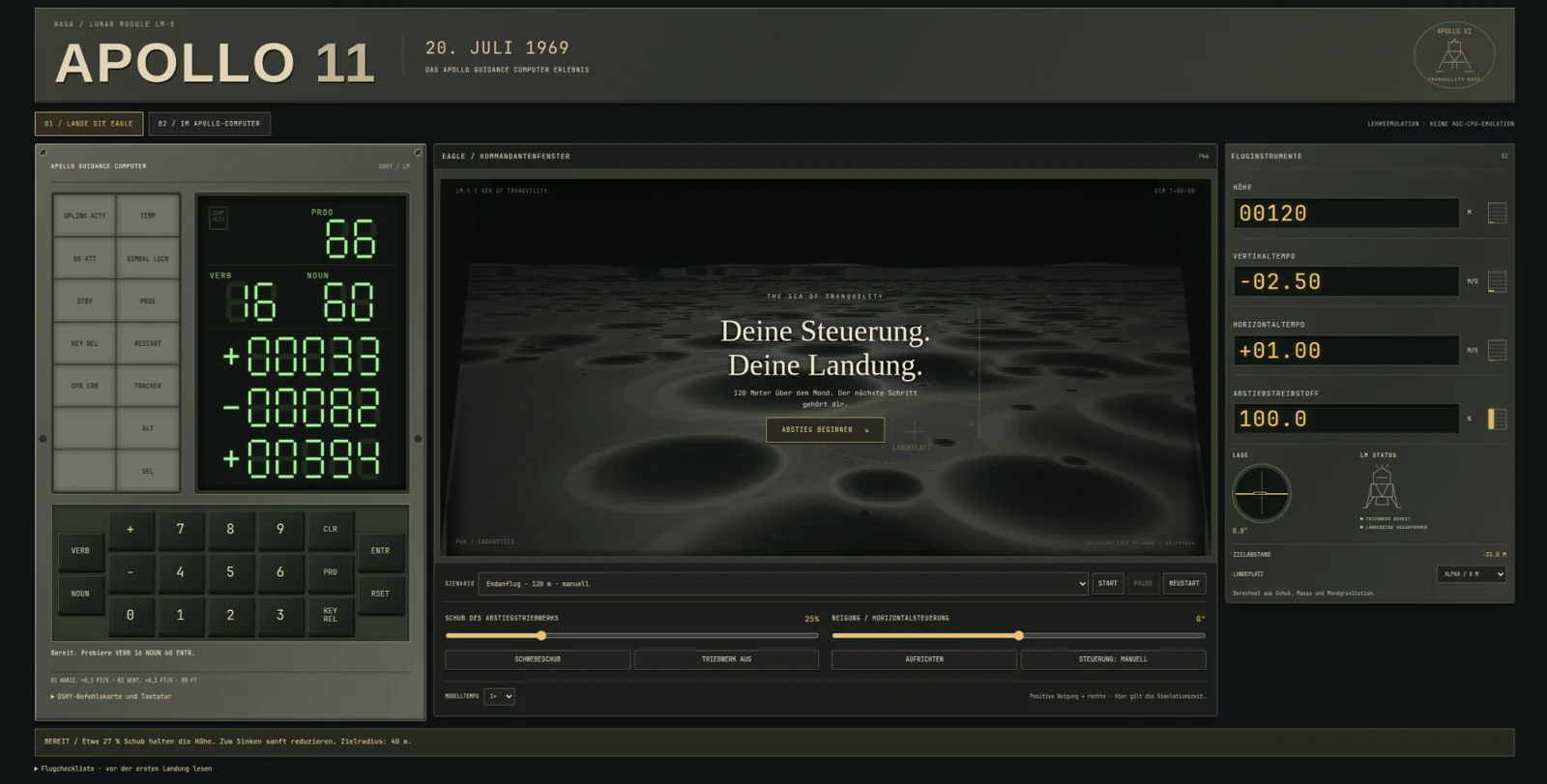
- What my lunar landing experience simulates
- Try landing the Eagle
- The lasting achievement was dependable cooperation
- Sources and historical code
July 20, 1969. Eagle is descending toward the Moon. Neil Armstrong and Buzz Aldrin have a limited supply of propellant, a changing view of the landing site and a computer reporting program alarms. Michael Collins remains in lunar orbit aboard Columbia. In Houston, controllers must judge whether an unfamiliar warning means the descent should stop.
The Apollo Guidance Computer is often introduced through a comparison with a phone or calculator. That misses the more interesting question: how did a small machine, astronauts, spacecraft systems and a large engineering team cooperate well enough to land? Apollo 11 is a story about computing under constraints, including what a computer should preserve when it cannot finish everything.
Eagle's descent was a shared task
The landing was not a computer operating in isolation. Armstrong assessed the terrain and controlled the final approach; Aldrin monitored instruments and called out information. Mission Control interpreted telemetry and advised the crew. Guidance calculations depended on sensors, while physical control depended on engines and spacecraft hardware responding correctly.
The Apollo Lunar Surface Journal preserves the exchanges and their context. Reading them reveals simultaneous work: measurements, confirmation, decisions and piloting. The computer helped make those actions possible, but “the computer landed Apollo 11” removes the cooperation that made the achievement remarkable.
For a beginner, keep three questions separate. Navigation asks where the spacecraft is and how it is moving. Guidance asks which path will reach the goal. Control asks how to change thrust and attitude to follow that path. A correct answer to one does not automatically solve the other two.
What was the Apollo Guidance Computer?
Developed at MIT's Instrumentation Laboratory and manufactured by Raytheon, the Block II AGC was part of the spacecraft's guidance, navigation and control system. Command Module and Lunar Module carried their own computers with mission-specific software. The landing software was therefore not the same program as the Command Module's flight load.
Its defining requirement was real-time work. A useful calculation had to arrive when the spacecraft needed it. A beautifully accurate result delivered after the relevant control moment would be too late. That gives computer performance a different meaning from the time needed to render a modern webpage.
Reliability also reaches beyond code. Sensors can produce troublesome inputs, interfaces consume processing time, and operators need interpretable displays. Testing had to cover the relationships between these parts. Apollo's engineers were designing a working system, including what to do when its assumptions were disturbed.
Apollo 11 computer specifications, with the units kept honest
| Property | Block II AGC | What it means |
|---|---|---|
| Stored word | 15 information bits + 1 parity bit | Signed single-precision data uses a sign within those 15 bits. |
| Erasable memory | 2,048 words | Changing data and working storage; 4 KiB if each stored word is counted as two bytes including parity. |
| Fixed memory | 36,864 words | Core-rope program storage; 72 KiB under the same storage-counting convention. |
| Timing | 2.048 MHz oscillator; 1.024 MHz derived timing | Neither figure is instructions per second. |
| Memory cycle | About 11.7 microseconds | Instructions can require different numbers of cycles. |
| Electrical power | 70 W at 28 V DC in NASA's hardware history | A documented hardware figure, not a complete spacecraft power budget. |
| Crew interface | DSKY: numeric displays, keys and annunciators | Connected to a computer that also exchanged data with spacecraft equipment. |
The memory counts describe words, not modern eight-bit bytes. Dividing or multiplying an isolated specification can easily produce a misleading comparison. Parity checks storage integrity; it is not an extra application-data bit. The underlying number representation and instruction set also differ from those of a modern processor.
A modern microcontroller can have more memory and a much faster clock while still lacking Apollo's tested spacecraft interfaces and flight software. Conversely, the AGC would be poorly suited to modern multimedia. “More powerful” needs a defined workload. For this story, the useful measure is whether the required navigation and control work met its deadlines.
DSKY: asking a computer a precise question
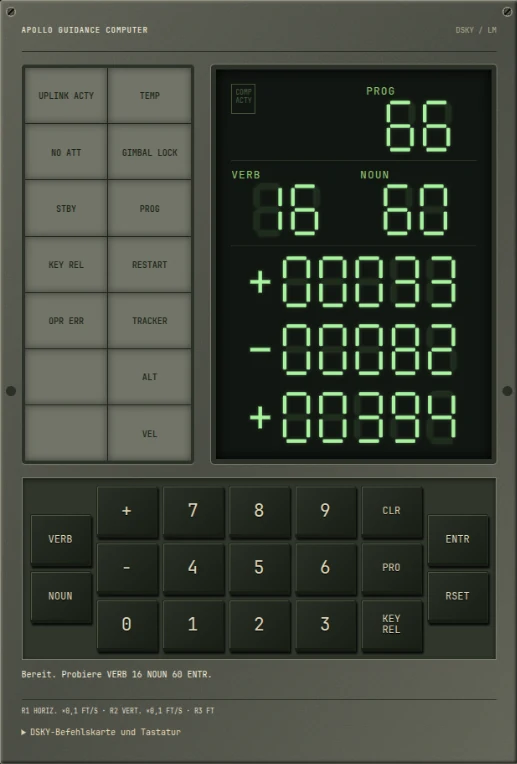
Display and Keyboard, shortened to DSKY, was the crew's numerical interface. PROG identified the program. VERB selected an action; NOUN identified data. Three signed numeric register displays carried values, while annunciators drew attention to conditions such as a program alarm or an operator error. There was no general-purpose graphical screen hiding behind the keys.
A useful museum exercise is VERB 16 NOUN 60 ENTR. In our Apollo 11 exhibit this monitors horizontal speed, vertical speed and altitude. Luminary099's noun tables establish N60's field order: VHORIZ, HDOTDISP and HCALC. Our interpreter uses simplified scaling: the first two registers show tenths of feet per second; the third shows whole feet.
That distinction is deliberate. The field order has a historical source, but the displayed values come from my model. V06 N60 E takes a snapshot; KEY REL restores live monitoring. V35 E demonstrates lamps and digits, with RSET ending the demonstration. These are the commands supported here, not a promise of full historical Pinball behavior.
For a focused exploration of the interface, there is also the earlier Apollo DSKY exhibit. The landing article and simulator complement it by putting numerical information beside a moving vehicle.
Software, erasable memory and core rope
Fixed memory held instructions that were meant to survive throughout the mission; erasable memory held changing state and intermediate results. The fixed store used core rope: information was represented through wiring paths associated with magnetic cores. This was manufactured program storage, not RAM that astronauts could casually rewrite.
That physical process connected software release to hardware production. A program needed review, validation and a controlled version before its rope could be made and tested. Finding an error late could become an operational and manufacturing problem, rather than an ordinary download-and-restart update.
AGC source contains assembly instructions and assembler directives. A separate interpretive system provided compact operations useful for guidance mathematics, at a cost in execution work. Neither should be confused with the Intel 8080 instruction set discussed in the IMSAI article; these machines came from different architectures and purposes.
Scheduling added another layer. The Executive assigned work according to priority, while other mechanisms handled short, time-sensitive tasks and interrupts. Protected restart points let selected essential work be reconstructed after a software restart. Reliability came from deciding what state mattered and how to recover it, not from assuming every calculation would always finish.
Luminary 099: the original Apollo 11 landing code
Luminary 1A build 099 was the Lunar Module guidance software used for Apollo 11. Surviving listings have been digitized and transcribed through preservation efforts including Virtual AGC. The archived LMY99 revision 001 printout bears July 14, 1969; that is a listing date, not evidence that the entire program was written or revised that day.
Our exhibit hosts three original files: LUNAR_LANDING_GUIDANCE_EQUATIONS.agc, EXECUTIVE.agc and ALARM_AND_ABORT.agc. Their retained headers credit the MIT Museum material, Paul Fjeld's digitization, Deborah Douglas's arrangements and the transcription work. A local provenance record identifies the upstream commit, sizes and SHA-256 hashes.
This short excerpt comes from the public-domain transcription of EXECUTIVE.agc, in the no-core-set path:
        TC      BAILOUT1    # NO CORE SETS AVAILABLE.
        OCT     1202
TC transfers control; OCT is an assembler directive that emits an octal value. Here the following word supplies alarm information to the bailout path. OCT is not a CPU operation that displays an error by itself. Elsewhere in the same file, the no-VAC path contains OCT 1201.
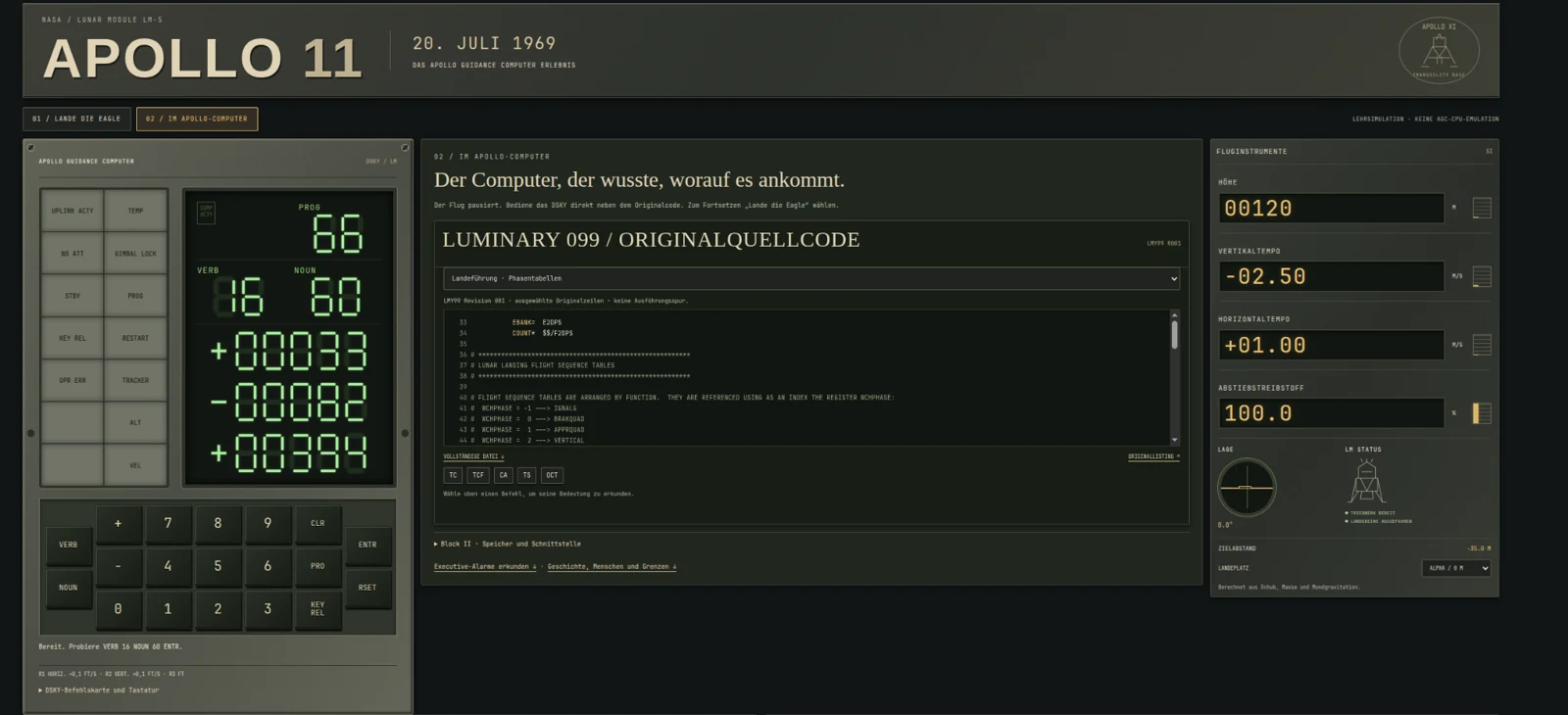
Looking at these lines replaces a famous anecdote with inspectable engineering. Labels, comments, memory management and recovery routines sit alongside guidance calculations. The viewer is a historical source window, not an execution trace: no moving highlight claims that Luminary is flying our model.
P63, P64 and P66: three different descent jobs
| Program | Role | Human-computer relationship |
|---|---|---|
| P63 | Braking phase | Guidance reduces the spacecraft's motion toward the approach. |
| P64 | Approach phase | The changing attitude reveals the landing area; the crew can assess and redesignate it. |
| P66 | Rate-of-descent assistance | The commander controls attitude and requested descent rate while the computer provides assistance. |
“Armstrong took manual control” can suggest that the computer was switched off. P66 makes the reality more interesting: human judgment and computer control could remain coupled. The commander could redirect the vehicle while the system helped manage descent.
Our simulator borrows these phase names to explain a progression. Its transitions at 1,800 m and 150 m are chosen teaching thresholds. They do not reproduce Luminary's actual phase-selection logic or Eagle's historical trajectory.
Why the 1201 and 1202 alarms did not end the landing
The alarms reported Executive resource exhaustion: 1202 meant no available core sets; 1201 meant no available VAC areas. These were workspaces needed for scheduled jobs, not a notice that the fixed program memory had suddenly filled up. Their names describe allocation failures inside a system already managing competing work.
NASA's mission report traces the overload to the rendezvous-radar/coupling-data-unit/computer interface. Unexpected counter activity consumed processing cycles. Calling it “too many useful radar measurements” is an inadequate explanation, and blaming a defective CPU misses the interface behavior. The report documents five alarms during powered descent.
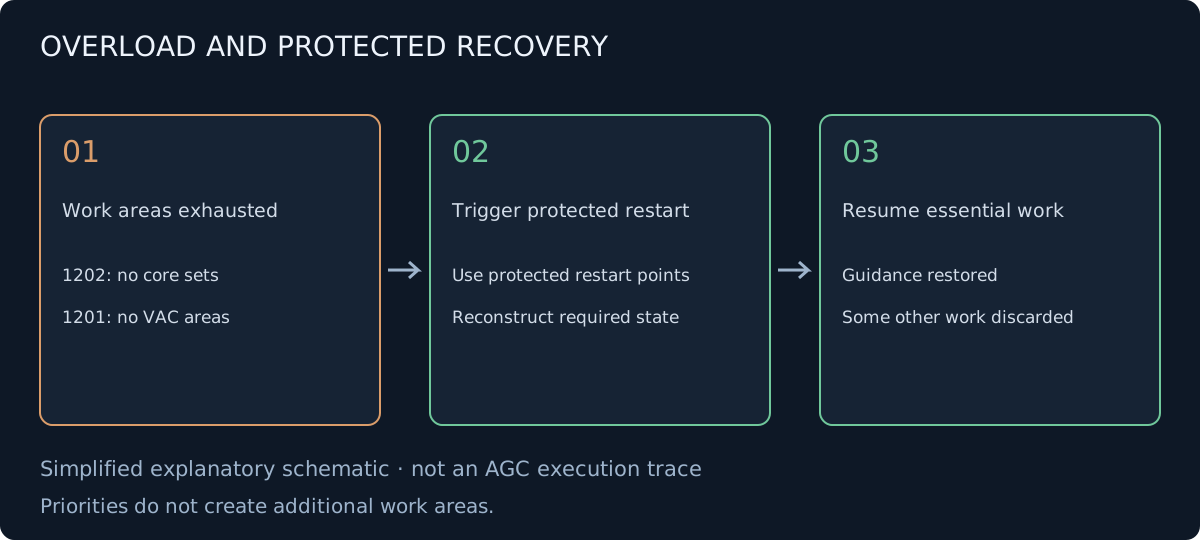
Imagine a small workshop with a limited number of benches. Work already occupies them, and additional requests keep arriving. Giving urgent jobs priority helps decide who works next; it does not create new benches. A prepared recovery procedure can clear temporary arrangements and restore the essential jobs from known points. That is an analogy for protected recovery, not a complete description of the AGC scheduler.
The restart machinery rebuilt protected essential work while some other work was discarded. It did not guarantee that every task survived, or that every error was safe to ignore. In Houston, Steve Bales and Jack Garman helped assess the situation; the continue decision depended on recognizing the alarm behavior and evaluating the continuing guidance.
The important engineering lesson is therefore conditional: a system can survive a known class of overload when its recovery and operational response are designed together. It is not an argument for dismissing warnings. NASA's program-alarm account and the mission report provide complementary explanations.
What my lunar landing experience simulates
The cockpit combines a lunar viewport, DSKY, altitude and speed instruments, thrust and attitude controls, fuel consumption and landing outcomes. Guided descent and manual flight use the same independent two-dimensional physics. Tilting redirects thrust, fuel changes vehicle mass, and a poor approach can end in an unsuccessful landing.
The terrain is an original illustration with a flat collision surface. The model omits full six-degree-of-freedom dynamics, actual radar errors, orbital navigation, propellant slosh and ascent or abort operations. Its scenarios are training setups, not historical Eagle state vectors. The guided controller follows model errors rather than replaying an Apollo trajectory.
The mission timeline is historical reading alongside the flight, with its own event selector. The alarm lesson is an explanatory interaction, not a randomly injected flight failure. Engineering mode brings original source into the cockpit. All three help distinguish learning from history from claiming to reproduce every historical subsystem.
Try landing the Eagle
- Open Apollo 11 — Land the Eagle. Locate altitude, vertical and horizontal speed, fuel, thrust and tilt.
- Choose Guided descent · 6,000 m · P63–66 under SCENARIO and press START. Observe how braking changes into approach and final descent.
- Use PAUSE to read the instruments. Watch units: the instrument panel and DSKY do not present every quantity in the same units.
- Choose Final approach · 120 m · manual for your own attempt. Adjust thrust and tilt in small steps; horizontal motion matters as much as height.
- Use SET HOVER THRUST as a reference. Hover thrust balances weight at the current mass; it does not instantly cancel an existing downward velocity.
- Focus the DSKY keypad and try
V16 N60 E. RSET acknowledges lamps; the separate RESTART button resets the flight. - Select 02 / INSIDE THE APOLLO COMPUTER. The flight pauses, while DSKY and instrumentation remain beside the engineering view.
- Select Executive · 1201 / 1202 in the source viewer, inspect the original code and try the separate alarm lesson. Return to mode 01 and explicitly resume when ready.
The lasting achievement was dependable cooperation
MIT's software effort involved many people, including Margaret Hamilton and Hal Laning, whose Executive design helped organize competing work. Guidance specialists, programmers, manufacturing workers, testers, controllers and astronauts all contributed different kinds of knowledge. No single photograph or code fragment represents that entire system.
For me, preserving these details makes the landing more impressive. Limited memory demanded careful choices, but disciplined interfaces, validation and recovery made those choices usable. A computer's most important quality can be how clearly it cooperates with people when conditions stop being ideal. Enter the cockpit and explore that relationship →
Sources and historical code
- NASA: Apollo 11 Mission Report, MSC-00171 — §5, Table 5-I and the computer-alarm analysis.
- NASA: Apollo Lunar Surface Journal, The First Lunar Landing and Program Alarms — crew interaction and recovery context.
- NASA: Computers in Spaceflight, AGC hardware and software — hardware and development history.
- Apollo equipment familiarization manual: computer subsystem — oscillator and derived timing.
- Virtual AGC: computer architecture, assembly manual, DSKY documentation and Luminary archive.
- MIT: Behind the scenes of the Apollo mission — people and engineering context.
- Pinned Apollo-11 source archive, Virtual AGC project and our implementation's accuracy contract.
Visuals show the museum implementation and original explanatory artwork; no historical NASA photographs or film material are included. The source excerpt retains its public-domain provenance.