In this article
- The computer in WarGames: a real machine in a fictional crisis
- Real technology, Hollywood capabilities
- What was the IMSAI 8080?
- How eight switches become a byte
- Enter your first machine-code program
- Inside the Intel 8080: registers, flags and instructions
- WarGames, telephone networks and computer curiosity
- What actually runs in my IMSAI exhibit?
- A first visit: give the lights a reason
- Sources and implementation notes
It is 1983. A teenager sits at a terminal, a telephone becomes a data connection, and a computer with red and blue switches turns a bedroom into a doorway to somewhere much larger. In WarGames, curiosity about games leads David Lightman into a fictional nuclear-defense system. The suspense depends on a frightening question: what happens when a machine cannot distinguish an exercise from a real attack?
The box beside the terminal was real. The IMSAI 8080 belonged to the first wave of personal microcomputers, years before the film appeared. Understanding that machine makes the story more interesting: behind the cinematic intelligence are simple bytes, registers, telephone signals and a very physical way of entering instructions.
The computer in WarGames: a real machine in a fictional crisis
Matthew Broderick plays David Lightman, a young computer enthusiast who connects to remote systems from home. His search for new games reaches WOPR, the film's fictional military computer; Joshua is the identity through which the game-playing system becomes a conversational character. Neither is an actual service that this museum connects to.
The setting joins three things that were easy to imagine separately and alarming together: personal computers becoming accessible, telephone networks reaching beyond the home, and Cold War fears about automated decisions. A connection could carry text without revealing who, or what, was really at the other end. The film turns that uncertainty into its central dramatic device.
The equipment has an unusually useful production history. In his firsthand account, IMSAI supplier Thomas “Todd” Fischer describes providing an IMSAI 8080, an IKB-1 keyboard and an FDC-2 floppy enclosure. He also describes an acoustic coupler retained for visual effect and a modem presented as an IMSAI 212A. Most revealingly, an off-camera CompuPro system drove the monitor imagery: visible hardware and screen effects had different jobs.
That distinction matters more than a prop inventory. A recognizable computer on camera does not establish that it generated every display or ran the fictional software. The IMSAI is part of the history of the scene, while the scene itself remains a constructed performance.
Real technology, Hollywood capabilities
| What the film draws on | What to keep separate |
|---|---|
| Microcomputers, terminals and removable disks | Owning that equipment did not provide the fictional WOPR's intelligence. |
| Modems carrying data over telephone lines | A working connection did not automatically confer permission or military access. |
| Remote logins and password prompts | The plot's route into a defense system is a screenplay, not a documented incident. |
| Programs that play games | Joshua's personality and the strategic-war narrative are fictional. |
| Computer-generated text and graphics | The film's displays were effects, not evidence of an IMSAI's stock capabilities. |
A terminal is easiest to understand as the conversation end of a system: keyboard input goes out, characters come back, and the monitor displays them. It need not be the machine doing the main calculation. A modem translates between digital information and signals suited to a communications link. An acoustic coupler adds a recognizable physical bridge by using the telephone handset's speaker and microphone.
These layers explain why the room looks convincing even when its narrative is extravagant. The keyboard, display, computer and communications equipment have distinct roles. Today those roles often disappear inside one laptop, which makes the older arrangement look more mysterious than it really was.
What was the IMSAI 8080?
IMS Associates introduced the IMSAI 8080 in 1975. The Computer History Museum places it beside the Altair 8800 and describes the close relationship between them. It was an expandable microcomputer, not a sealed consumer appliance with a built-in graphical desktop.
The Intel 8080 processes eight-bit quantities, while its sixteen-bit addressing can select 65,536 byte locations: 64 KiB. Addressable space and installed RAM are different things. An empty memory slot does not become usable storage because the CPU can name its addresses; the system needs actual memory hardware there.
The expansion connector family associated with these machines became known as the S-100 bus. CPU, memory and interface cards could share the backplane. Think of it as a common set of electrical conversations between boards, not as a guarantee that every card combination works without configuration. A terminal or disk system needed appropriate interfaces and software.
This modularity put ownership and understanding unusually close together. Before asking which application to open, a hobbyist might have to establish where memory lived, how a terminal was connected and how the first instructions would get into the machine. The front panel provided a way to begin when no comfortable software environment was already running.
How eight switches become a byte
A switch does not need a character set. It represents a bit: zero or one. Give eight bits the weights 128, 64, 32, 16, 8, 4, 2 and 1, from left to right, and their combined states represent a number from 0 to 255.
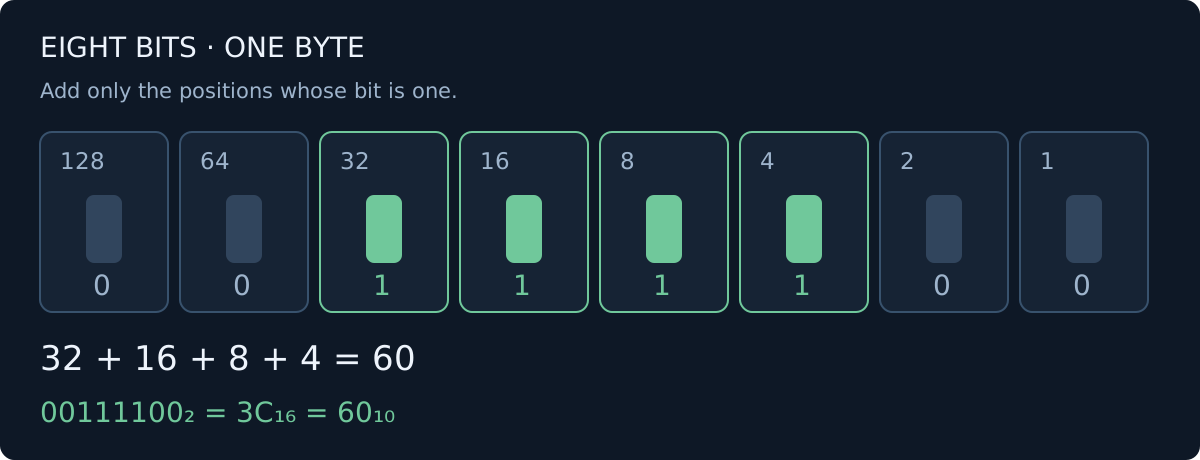
For 00111100, add only the weights whose switches are one: 32 + 16 + 8 + 4 = 60. Hexadecimal groups the same byte into two four-bit chunks. 0011 is 3; 1100 is twelve, written C in hexadecimal. Therefore binary 00111100, hexadecimal 3C and decimal 60 describe the same byte.
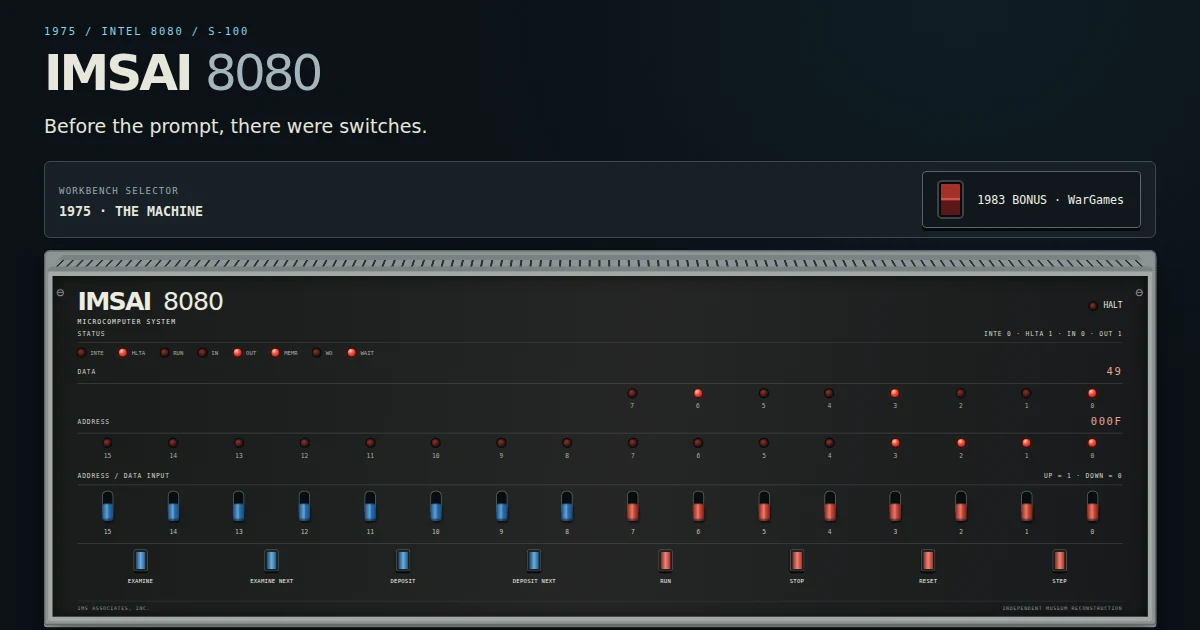
The exhibit has sixteen input switches. Together they select a sixteen-bit address; the lower eight also supply a data byte. EXAMINE copies the switch word to the inspection pointer and shows that memory byte. DEPOSIT writes the lower eight switch bits at that pointer. Changing switches alone does neither operation.
The LEDs make those invisible values visible. Address lights answer “which location?”, and data lights answer “which byte?”. Our reconstruction shows inspected memory and summarized state. It does not pretend to be an electrical bus analyzer sampling every physical transaction.
STOP pauses execution, STEP executes one instruction at the program counter, and RUN begins at the inspection pointer. These are related controls, but the pointer and program counter are separate state. That difference becomes useful when examining data without moving the next instruction.
Enter your first machine-code program
Here is a complete, deliberately small Intel 8080 program, also provided as the exhibit's custom-code example. It stores decimal 42 at address 0200 hexadecimal, then halts:
MVI A,2Ah     ; put hexadecimal 2A (42) in A
STA 0200h     ; store A at memory address 0200
HLT           ; halt instruction execution

Hex bytes: 3E 2A 32 00 02 76
MVI means move immediate: the following byte is the value itself. STA stores the accumulator at a specified address. Its address bytes appear low byte first, so 0200 becomes 00 02. HLT ends this demonstration. These are Intel 8080 instructions; no Z80 extensions are required.
| Address, hex | Byte, hex | Purpose |
|---|---|---|
| 0000 | 3E | MVI A opcode |
| 0001 | 2A | Immediate value: 42 |
| 0002 | 32 | STA opcode |
| 0003 | 00 | Low address byte |
| 0004 | 02 | High address byte |
| 0005 | 76 | HLT opcode |
To enter it through the panel, first press STOP. Set the hexadecimal switch word to 0000, apply it with Set switches, then press EXAMINE. Set 003E, apply it, and press DEPOSIT. Set 002A, apply it, and press DEPOSIT NEXT. Repeat DEPOSIT NEXT for 0032, 0000, 0002 and 0076.
In this exhibit, DEPOSIT NEXT advances before writing. Once all six bytes are entered, set and examine 0000 again. Press RUN, then set and examine 0200: the data display should read 2A. The program has changed memory, rather than merely animating the lights.
Prefer a gentler start? Open Enter your own machine code, use Load bytes on the six-byte example, then RUN. Loading clears RAM and CPU state, so it replaces any earlier experiment. RESET, by contrast, preserves RAM while resetting the museum CPU state.
Inside the Intel 8080: registers, flags and instructions
The accumulator A is a small working value used by many operations. B, C, D, E, H and L provide other eight-bit registers; pairs can serve wider operations, and HL can point into memory. The program counter names the next instruction byte. The stack pointer locates a memory-based stack used for saved values and subroutine return addresses.
Execution repeats a simple pattern: fetch an opcode, read any operand bytes, perform the operation, then continue or branch. Assembly gives that pattern readable names; machine code is the actual byte representation. A processor does not discover that 2A is an instruction or a number from the byte alone. The executing instruction determines how subsequent bytes are interpreted.
Flags record results such as zero, sign, parity, auxiliary carry and carry. A conditional jump can use them to repeat an operation or finish a loop. The supplied SUM demo adds 1 through 10 and leaves 37 hexadecimal, or 55 decimal, in A and RAM at 0200. Stepping through it connects arithmetic with branching.
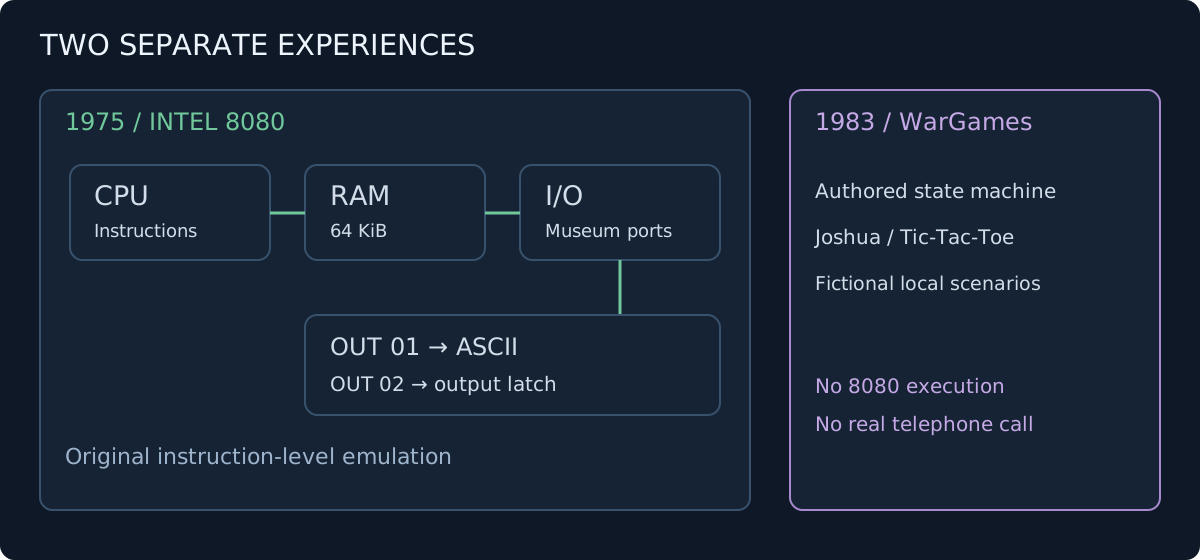
IN and OUT communicate through I/O ports. For this reconstruction I chose a small teaching interface: OUT 01 prints ASCII to the terminal, and OUT 02 changes a visible output latch. These mappings belong to the exhibit, not to every historical IMSAI configuration.
WarGames, telephone networks and computer curiosity
Before an always-connected browser became ordinary, reaching another computer was an event. A number, a call and a successful modem connection could lead to a remote login. War dialing names the historical search for telephone numbers answered by modems. It helps explain the film's premise; it supplies no permission to enter a discovered system.
The film's enduring tension comes from placing small acts of exploration beside institutions with enormous consequences. David can recognize a prompt and type a response while misunderstanding the organization behind it. For a viewer, that becomes a question about interfaces and authority: does a machine's invitation to interact tell us what interaction is appropriate?
Curiosity, authorized security research and unauthorized access remain different activities. The museum makes that boundary concrete by keeping the story inside fictional local scenarios. Its lesson is about the relationship between a model and reality, rather than a claim that a clever password grants legitimate access.
What actually runs in my IMSAI exhibit?
The hardware workbench executes instructions using my original instruction-level Intel 8080 interpreter. Its memory, register changes and demo output are functional. It is not a cycle-accurate reproduction of an entire IMSAI, and it includes no original CP/M, IMDOS, UART or floppy-controller system. Accumulated instruction timings do not reproduce electrical bus timing or turn browser scheduling into a vintage clock.
HELLO prints a greeting. SUM demonstrates arithmetic. COUNTER repeatedly updates a byte and output latch. ECHO connects queued keyboard input to terminal output. The browser bounds continuous runs, and switching away stops the CPU. Those limits keep an exploratory webpage manageable.
The separate WarGames-inspired bonus uses an authored state machine, not the 8080 CPU and not an AI language model. Its school records, airline reservations and telephone connection are fictional. Joshua includes a curated chess problem, minimax Tic-Tac-Toe and an authored strategic scenario. Nothing dials a number, changes a real school record or reaches NORAD.
There is also an existing WOPR museum entry and WOPR experience for readers who want to continue exploring the cinematic side.
A first visit: give the lights a reason
- Open the IMSAI workbench and select HELLO in Choose a program.
- Press Load demo, then STEP. Watch the program counter and registers change.
- Press RUN and let the greeting appear in the terminal.
- Load SUM, step through several instructions, then RUN to completion. Inspect address 0200 for
37. - Try the six-byte program above or select ECHO to experiment with terminal input.
- Use the WarGames mode button for the independent fictional bonus.
A front panel turns computing into a sequence you can follow: choose a location, deposit a byte, execute an instruction, observe a consequence. The film supplies the atmosphere; the workbench supplies something a film cannot pause to teach.
For a striking contrast, visit the Apollo Guidance Computer story: an earlier, different architecture built around real-time spacecraft work. Two machines, two very different purposes, and the same reward for looking beneath the interface. Start with the IMSAI switches →
Sources and implementation notes
- Thomas “Todd” Fischer: The WarGames IMSAI — firsthand production account; equipment and film-effects distinction.
- Official IMSAI history and Computer History Museum: IMSAI 8080 — historical context and Altair relationship.
- Intel: 8080 Microcomputer Systems User's Manual, September 1975 — CPU architecture and instruction reference.
- Exhibit accuracy contract, programs and controls; original interpreter source — current implementation checked for this article.
Images are screenshots of my museum reconstruction and an original explanatory diagram. No film frames, posters or historical hardware photographs are reproduced.