In this article
- 21 October 2026: What Debian announced
- Five vulnerabilities, five different conditions
- Which configurations actually matter?
- Why nginx 1.26.3 does not automatically mean “unpatched”
- Worldnode: My real four-screenshot investigation
- What unattended-upgrades can and cannot guarantee
- Verify your own server with read-only commands
- Common conclusions to avoid
- Administrator checklist
- Conclusion: Trust the evidence, not just a green status light
- Primary sources
21 October 2026: What Debian announced
On 21 October 2026, the Debian Security Team published DSA-6575-1 for nginx. The advisory groups five distinct flaws whose possible consequences range from memory corruption and service interruption to backend request injection or bypass of client-certificate authentication. Those are conditional outcomes, not a claim that all nginx deployments expose every attack path.
For Debian 13 “Trixie”, the advisory names the corrected package version 1.26.3-3+deb13u10. nginx and F5 document upstream fixes separately, while Debian distributes its own patched package revisions. That difference is central to verifying a stable Debian server.
The observed result: My Debian 13 production server, Worldnode, already had 1.26.3-3+deb13u10 installed on 22 October. On 26 October I independently reconstructed the update from APT, dpkg and systemd records. This proves a package update and observed service state, not the outcome of a penetration test.
Five vulnerabilities, five different conditions
The table follows Debian's advisory and nginx's official security register. It separates the affected functions from the potential impact rather than describing every item as a universal remote-code-execution flaw.
| Identifier | Relevant feature | Potential consequence |
|---|---|---|
| CVE-2026-15176 | Rewritten request URI mapped to a file path in a location using alias. | Buffer overflow and memory corruption; possible worker disruption. |
| CVE-2026-93479 | String-expression evaluation in HTTP and stream modules, including variable document roots or access-log paths. | Overwriting reserved buffer space. |
| CVE-2026-95101 | Fragmented unknown HTTP/3 frames, with particular significance when proxying to a backend. | Request-body confusion, backend request injection or bypass of body-size limits. |
| CVE-2026-97205 | Overflow of a counter for pending asynchronous file-I/O operations (AIO). | Use-after-free, memory corruption or denial of service. |
| CVE-2026-97629 | Synchronization of automatically rotated TLS session-ticket keys across workers. | Under specific TLS settings, possible session forgery and client-certificate-authentication bypass. |
There is an especially useful Debian-specific detail: according to DSA-6575-1, the code involved in CVE-2026-93479 reached Trixie through an earlier security backport. Therefore, the upstream version-range table cannot be used as a substitute for Debian's own security status.
Which configurations actually matter?
The first issue involves the combination of URI rewrite and alias-based mapping. The HTTP/3 issue requires the relevant protocol processing, and the backend injection scenario additionally depends on proxying. The AIO flaw involves asynchronous file I/O. The TLS-session issue is described for deployments using ssl_session_cache shared:... with automatically rotated ticket keys and without explicit ssl_session_ticket_key files; the authentication implications particularly matter when access is gated by client certificates.
Evaluating a particular deployment would require reviewing its actual configuration and exposed features. My Worldnode checks were not a complete configuration audit or an active exploit assessment. They establish that the corrected Debian package was present and the service was running.
Why nginx 1.26.3 does not automatically mean “unpatched”
The upstream nginx advisory register lists corrected upstream versions including 1.30.6+ and 1.31.7+. Debian Stable generally retains a supported base version and integrates appropriate security fixes into distro-specific package revisions. For Trixie, the relevant Debian threshold for this advisory is 1.26.3-3+deb13u10, or a later Debian revision carrying the correction.
apt-cache policy nginx
# Installed: 1.26.3-3+deb13u10
# Source: trixie-security
An upstream version string without the packaging context is not adequate evidence. Likewise, merely seeing a patched package on disk does not, by itself, prove that every running process has loaded the updated executable.
Worldnode: My real four-screenshot investigation
On 26 October, I inspected Worldnode to find out whether the fix was already there. Rather than running an update and guessing what had happened, I examined the installed package, the service, the historical dpkg transactions and finally the APT command that performed the change. These are my original terminal captures. The WebP renditions below are compressed for delivery without altering the displayed output; the original PNGs are retained as evidence.
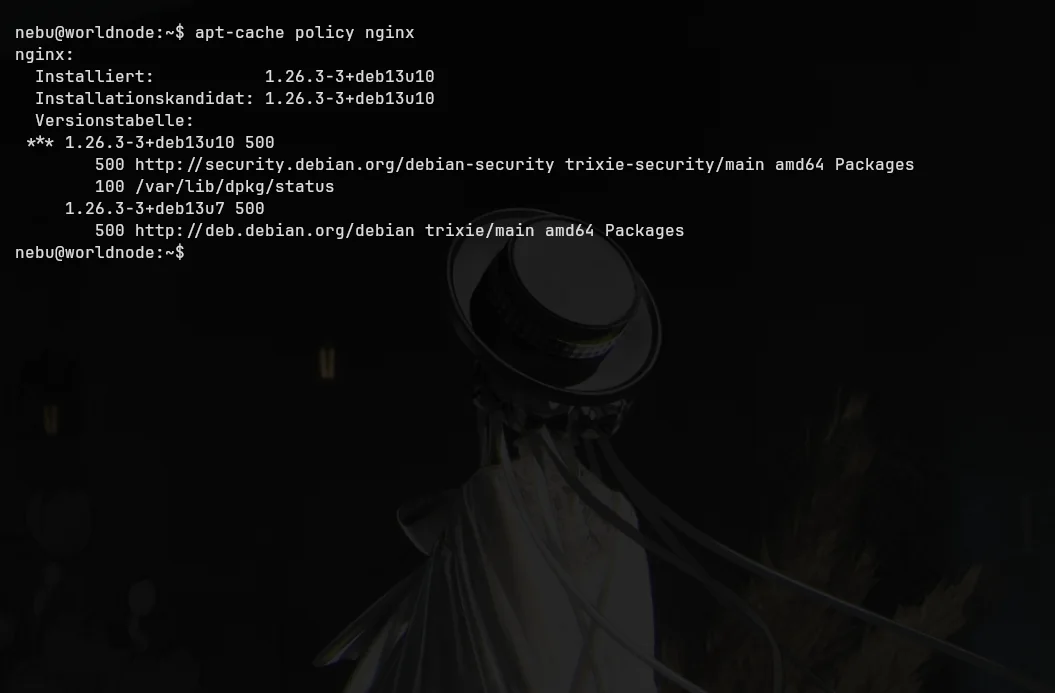
apt-cache policy nginx shows both installed and candidate versions as 1.26.3-3+deb13u10 from trixie-security. The base Trixie repository still presents deb13u7. This directly establishes the installed security revision.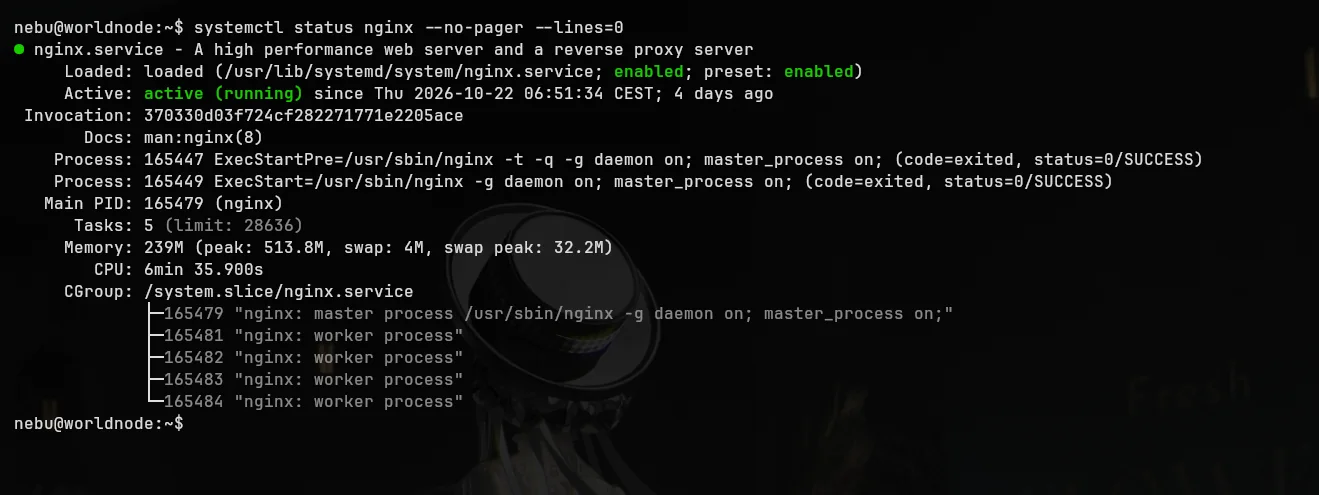
nginx.service is running and its recorded start time is 22 October at 06:51:34 CEST. A pre-start configuration check completed successfully. Service health is not the same as a comprehensive security audit.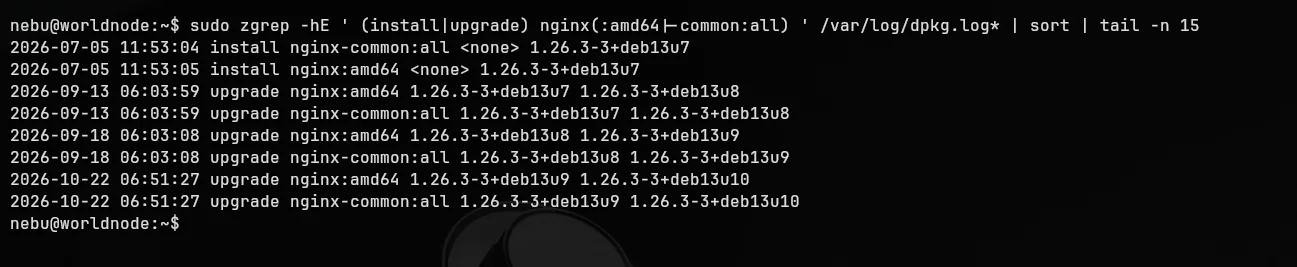
deb13u7 through deb13u8 and deb13u9 to deb13u10. Both nginx and nginx-common were upgraded at 06:51:27 on 22 October.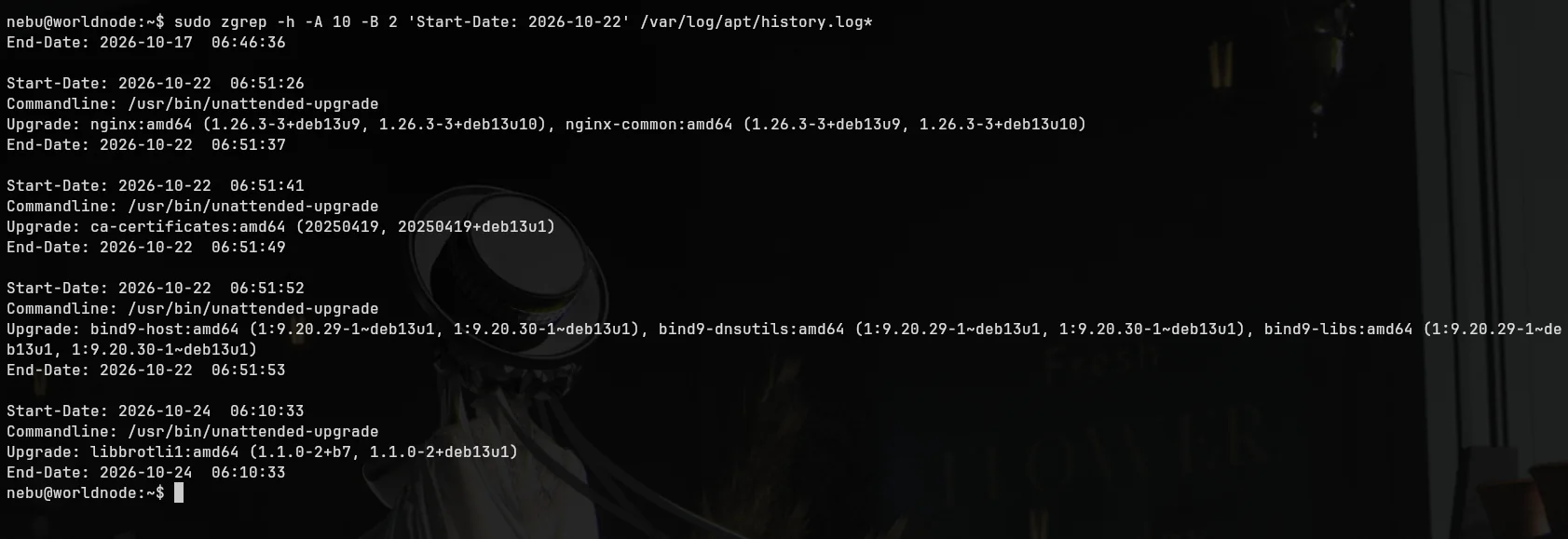
Commandline: /usr/bin/unattended-upgrade. Between 06:51:26 and 06:51:37 it upgraded nginx and nginx-common from deb13u9 to deb13u10.Debian publishes DSA-6575-1.
The automated APT transaction begins.
nginx and nginx-common receive deb13u10.
systemd reports nginx running from this time.
I reconstruct the event from the records.
The package transaction and the recorded service start are close in time. However, these four checks do not identify the exact mechanism that triggered the service start. The APT history also contains automated updates for ca-certificates, bind9 and libbrotli1; these are supporting context, not the focus of this investigation.
What unattended-upgrades can and cannot guarantee
Debian's unattended-upgrades can automatically install security fixes from configured APT sources. Worldnode's APT history demonstrates that it performed this particular update successfully. On other machines, the mechanism may be disabled, the relevant repository may be absent, or packages may be held or pinned. The existence of a timer or the package alone is not evidence that every update was applied.
In production, separate the package revision, running process and configuration exposure questions. Automated patching helps, but verification and monitoring remain necessary.
Verify your own server with read-only commands
The following commands inspect state only; they do not install software or restart services. Run each independently.
apt-cache policy nginxShows installed and candidate package versions and repositories. Debian 13's corrected release for this DSA is 1.26.3-3+deb13u10.
dpkg-query -W -f='${binary:Package} ${Version}\n' nginx nginx-commonDisplays the real dpkg versions. nginx -v alone cannot resolve whether Debian backported a patch.
systemctl status nginx --no-pager --lines=0Checks service state and the recorded start time, not the whole security posture.
sudo zgrep -hE ' (install|upgrade) nginx(:amd64|\-common:all) ' /var/log/dpkg.log* | sort | tail -n 15Reads the dpkg upgrade trail, including compressed historical logs. Adapt the architecture filter where necessary.
sudo zgrep -h -A 8 'Start-Date: 2026-10-22' /var/log/apt/history.log*An example tied to Worldnode's date; use the relevant date for another installation. The separate /var/log/unattended-upgrades/ logs can add useful diagnostic detail.
State-changing commands are different: apt update updates package indices; apt upgrade installs upgrades; systemctl restart affects running services. For production maintenance, arrange backups, a recovery path, an appropriate window and a second admin session before making changes.
Common conclusions to avoid
- “1.26.3 is older than 1.30.6, so it must be vulnerable.” Not without examining Debian's patched revision and security tracker.
- “The service is active, therefore all fixes are installed.” Service status alone cannot establish package security status.
- “Every nginx installation is exposed to all five CVEs.” Configuration and enabled features matter.
- “Automatic updates are enabled; verification is unnecessary.” Failed upgrades, holds and stale processes are still possible.
- “This service restart must have been triggered by mechanism X.” That requires evidence beyond the four checks presented here.
Administrator checklist
- Identify the distribution, release and actual nginx package origin.
- Read the matching Debian advisory and security tracker entry.
- Compare installed and candidate versions using APT and dpkg.
- Inspect the transaction history and running service separately.
- If the corrected revision is missing, plan and safely execute an update.
- Monitor automatic-upgrade results rather than only enabling the timer.
- Assess alias/rewrite, HTTP/3, AIO and client-certificate exposure from the actual configuration.
Conclusion: Trust the evidence, not just a green status light
The most satisfying part of this investigation was discovering on 26 October that Worldnode had already installed Debian's nginx fix on 22 October without me manually triggering the upgrade. The point is not that automation makes servers invulnerable; it is that four matching pieces of original evidence can tell us what actually happened.
A sound routine remains straightforward: understand the advisory, inspect the distro-specific package revision, check the service and review the history when necessary. Automatic updates are one helpful component of that routine, not a substitute for it.
Primary sources
- Debian: DSA-6575-1 (21 October 2026)
- Debian Security Tracker: nginx
- Debian Package Tracker: nginx
- nginx: official upstream vulnerability and fix listings
- Debian Wiki: PeriodicUpdates
- Debian manual: unattended-upgrade(8)
Sources checked: 26 October 2026. All Worldnode statements are based on the original terminal captures shown above, not an external live security scan.