
In this article
- Installing the Epic Games Launcher on Arch Linux
- Which Wine or Proton version does Epic use?
- Castlevania Anniversary Collection on Arch Linux
- Farming Simulator 22 on Arch Linux
- Can you play Fortnite on Linux?
- Easy Anti-Cheat Linux v2: TPM 2.0 and Secure Boot are only the beginning
- Which Linux distributions are ready for Fortnite and EAC v2?
- CachyOS is already preparing for EAC Linux v2
- My test plan: Debian, Ubuntu and Universal Blue on a separate M.2 SSD
- What the Cthulhu test showed
- Sources and image credits
I only meant to see whether the new Epic Games Launcher would open on Cthulhu. A few minutes later I was standing outside the castle in Castlevania, with the old NES tune stuck in my head again. Then I downloaded Farming Simulator 22 to try a bigger 3D game. Both ran in my test on Arch Linux with dwm on X11.
Updated 13 November 2026: Epic plans Fortnite on Linux with EAC v2. The new Fortnite section covers TPM 2.0, Secure Boot and CachyOS preparation.
Installing the Epic Games Launcher on Arch Linux
On 10 November 2026 I ran Epic Games Launcher Preview 0.113.1. I installed version 0.113.1-1 of epic-games-launcher-bin from the AUR. The community package takes Epic’s Linux download and packages it for Arch. Epic’s official Linux requirements do not list Arch.
yay -S epic-games-launcher-binReview the AUR PKGBUILD when prompted. Once installed, I launched it from a terminal as my normal user.
epic-games-launcherThe launcher opened and the library loaded after I signed in. Cthulhu has a Ryzen 7 5800X3D, a 16 GB Radeon RX 9060 XT, and dwm on X11. My Arch and dwm setup has its own write-up.

Which Wine or Proton version does Epic use?
On the first click of Play for Castlevania Anniversary Collection, the launcher offered a one-time setup for Windows games. I accepted and it downloaded 493 MB of extra components in this test. I could leave runner selection and Wine prefix setup to the launcher. The dialog said that subsequent Windows games would use the same setup.
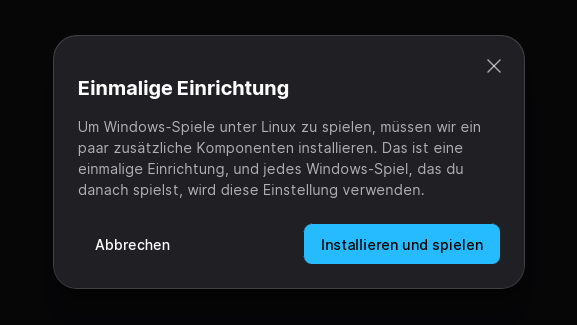
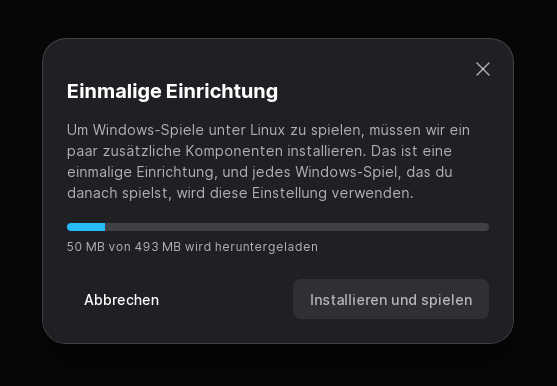
Epic’s release notes document the launcher version. I couldn’t find an exact Wine or Proton build listed there. GamingOnLinux had already found GE-Proton in the Preview, so I read the version file in the launcher’s runtime directory on Cthulhu. This command also works in fish and uses the default path under ~/.local/share.
find "$HOME/.local/share/com.epicgames.eglv2/compat/runtime" -maxdepth 4 -type f -name version -print -exec head -n 2 {} \;/home/nebu/.local/share/com.epicgames.eglv2/compat/runtime/GE-Proton10-34/version
1774238111 GE-Proton10-34GE-Proton10-34 was the runtime I found in Epic’s directory for this test. The later top screenshot also shows active Wine processes. I didn’t trace each component build separately for each game. The part I noticed while playing was simpler. I could click Play in the launcher.
Castlevania Anniversary Collection on Arch Linux
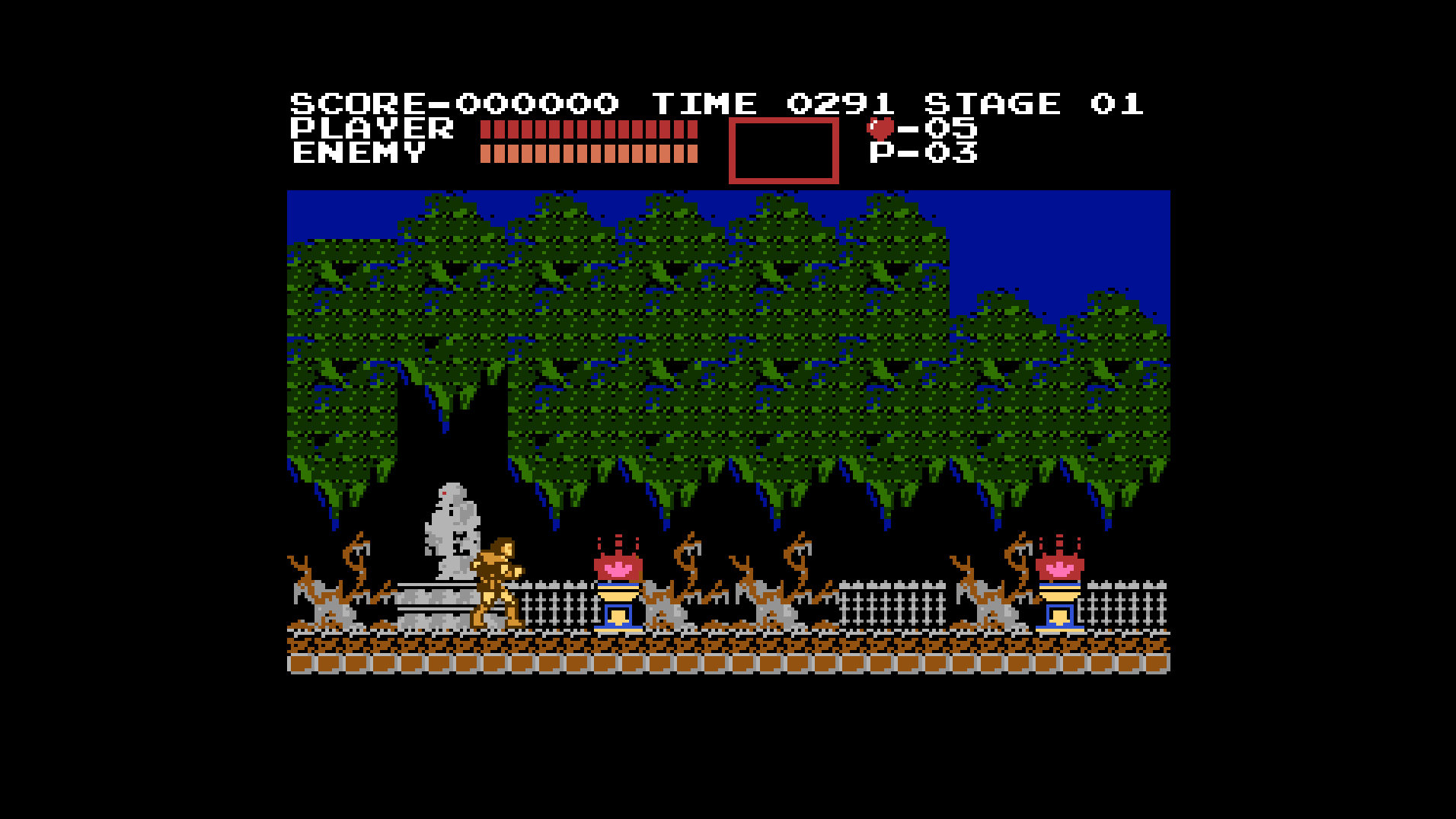
The collection launched after setup. I opened the original Castlevania and played Stage 01. By the time I was outside the castle, the tune was already back in my head. The music is one of the things I remember most about playing it on the NES. A quick launch test had turned into a return to a game from my gaming journey.
Farming Simulator 22 on Arch Linux
I know nothing about farming. When my neighbour drove his tractor out into the field, I’d look over the top of my monitor to see what he was doing, then try it in Farming Simulator. The rest of my agricultural education comes from Clarkson’s Farm. I laughed enough at Top Gear and The Grand Tour. Apparently a tractor will do it now.
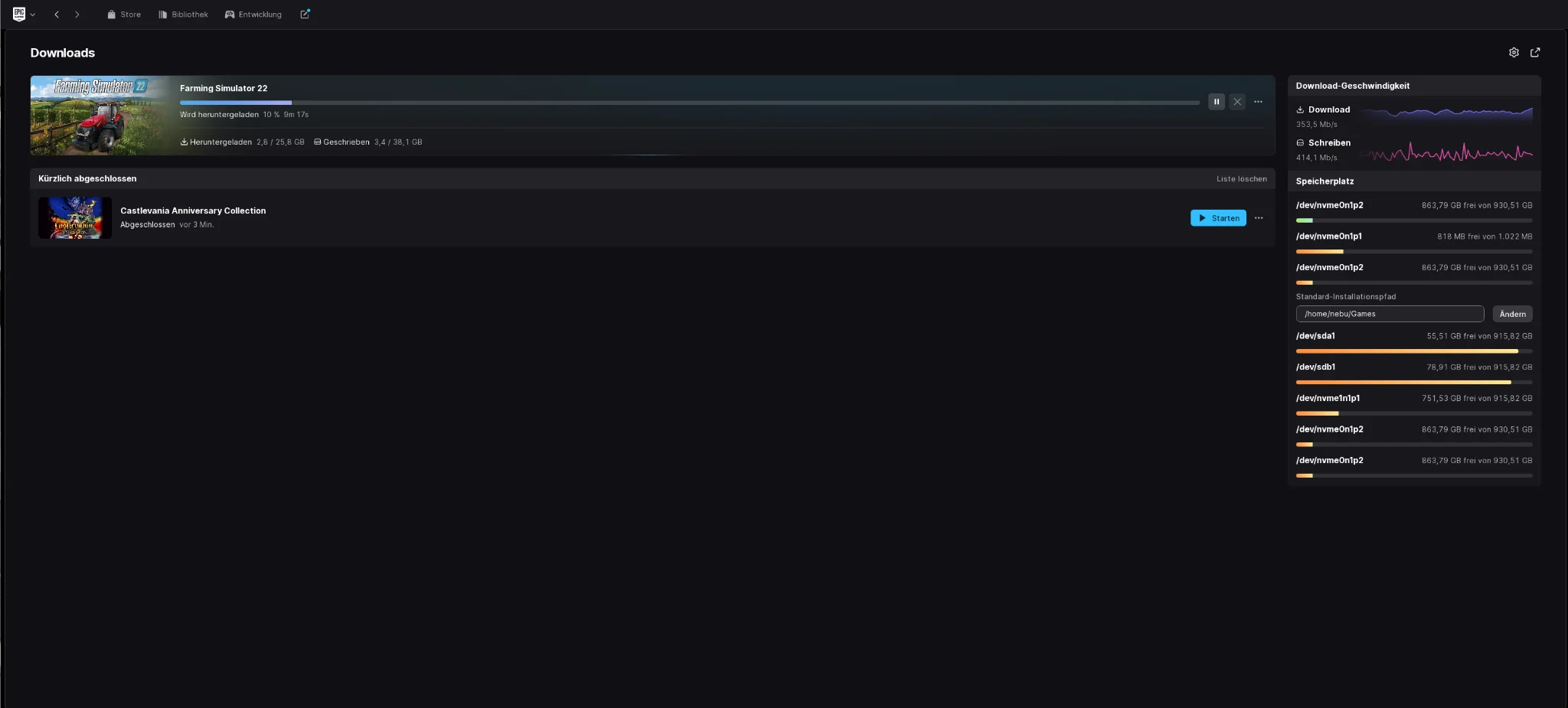
I liked the download screen. It separates network and disk write speeds and puts free space and the install location alongside them. For FS22 the screenshot shows a 25.8 GB download and 38.1 GB to write. Having both figures makes it easier to see what the install is going to need.
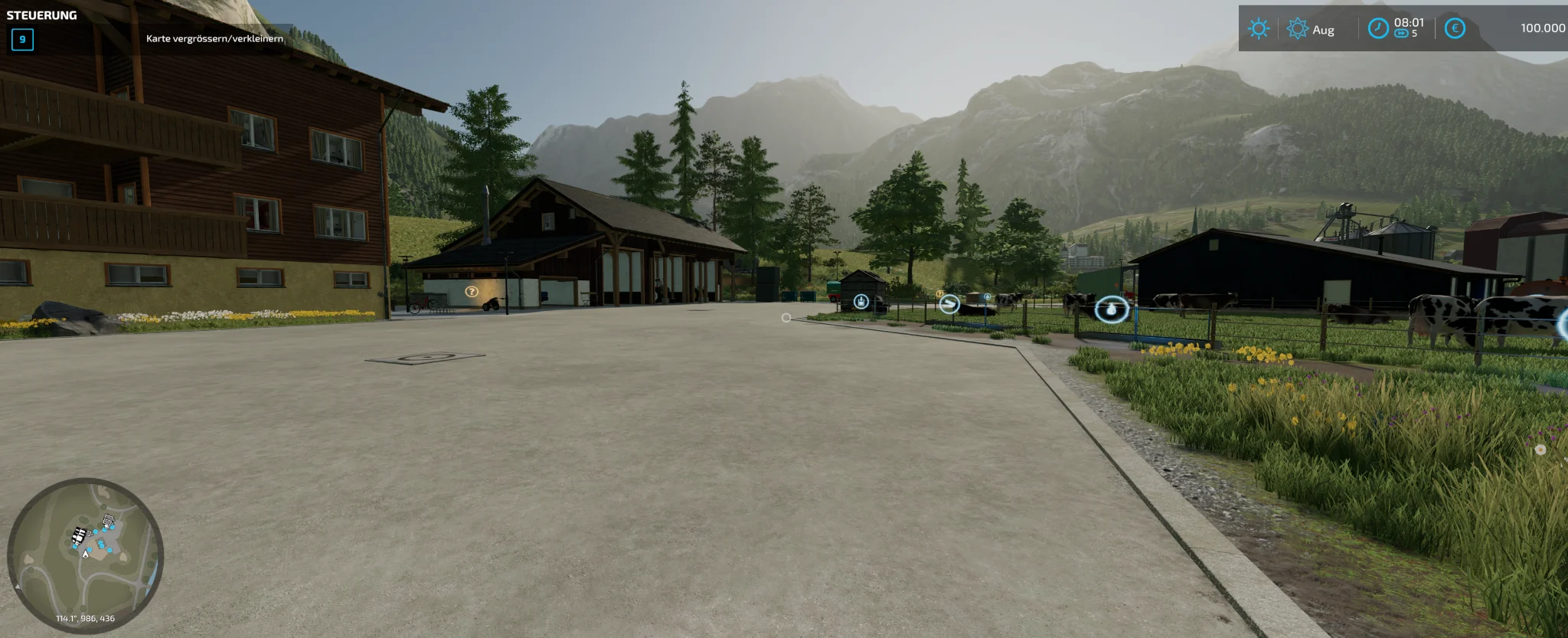
Farming Simulator 22 launched and ran smoothly into the playable 3D world in my test. The screenshot shows me on the farm with the HUD, minimap and interaction markers visible. The numbers below come from a single top sample taken during the session.
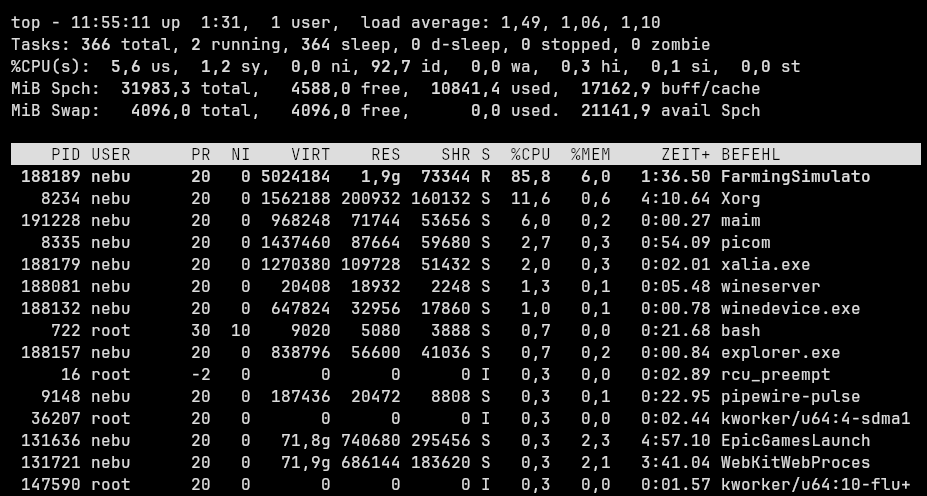
The list shows the simulator, wineserver, winedevice.exe, Xorg and the Epic launcher. The simulator shows about 1.9 GiB of resident memory (RES). The 85.8% is in the game process’s CPU column. The separate system summary shows 92.7% CPU idle. This is a snapshot of CPU and RAM. I didn’t measure FPS, GPU load or long-session stability here.
Can you play Fortnite on Linux?
As of 13 November 2026, Fortnite is not officially playable on Linux. It appears in my Epic library, but that does not mean it launches. Epic plans to pilot Easy Anti-Cheat Linux v2 in Fortnite first; no release date has been confirmed. See Epic's Fortnite Linux FAQ and the official announcement from 14 October 2026.
Easy Anti-Cheat Linux v2: TPM 2.0 and Secure Boot are only the beginning
Epic requires TPM 2.0 (not “TPM 3”), Secure Boot, a kernel signed with recognized keys and appropriately signed kernel modules. Its list also includes measured boot, an enabled IOMMU without passthrough on ordinary PCs, kernel lockdown in integrity mode, disabled kexec and an enabled BPF LSM. Just flipping the Secure Boot switch will not be enough. Custom kernels and unsigned out-of-tree modules may be challenging.
Unlike on Windows, Epic says EAC Linux v2 will not use its own anti-cheat kernel module. It will instead use Linux security features, eBPF and a systemd service that runs only while a protected game is running. The requirements may change before launch. Working today with older EAC support under Proton does not automatically establish EAC v2 compatibility.
Which Linux distributions are ready for Fortnite and EAC v2?
Gaming performance and anti-cheat compatibility are not the same. In the October 2026 Steam Hardware Survey (Linux only), CachyOS leads the individually listed distributions at 16.39%. Selected other entries are Arch Linux (8.92%), Linux Mint 22.3 (8.41%), Bazzite (6.74%), Ubuntu 26.04.1 LTS (3.63%) and Debian 13 (1.88%). This voluntary Steam survey is not a count of all Linux users, and it does not establish their ages or whether they recently migrated from Windows.
| Distribution | Secure Boot / keys | Fortnite with EAC v2? |
|---|---|---|
| Ubuntu and Linux Mint | Canonical key recognized by Epic; signed default boot chain available. | Good basis, but not automatically approved. |
| Debian | Debian Secure Boot CA on Epic's list. | Promising test candidate; configuration matters. |
| Fedora and Silverblue | Fedora Secure Boot CA on Epic's list. | Recognized signing path, no launch guarantee. |
| Universal Blue: Bazzite, Bluefin, Aurora | Universal Blue key explicitly listed by Epic. | Interesting basis for later testing. |
| openSUSE | openSUSE Secure Boot CA listed by Epic. | Signing basis available; other checks still apply. |
| Arch Linux and EndeavourOS | Secure Boot can be configured, but the default kernel is not automatically recognized by Epic. | Not ready without additional changes. |
| CachyOS | Dedicated signed EAC kernel and separate boot path are documented. | Ordinary install is not automatically compatible; Epic recognition remains open. |
This compares preparedness, not proven Fortnite compatibility. Epic lists trusted signing keys, not certified distributions. TPM 2.0 is a hardware/firmware feature, not something the distro simply ships. Secure Boot state, loaded modules and kernel settings must be evaluated on each machine.
CachyOS is already preparing for EAC Linux v2
CachyOS is popular for Linux gaming, but an ordinary installation is not automatically compatible with Fortnite's planned EAC v2 checks. Its developers have already acted: the official CachyOS Easy Anti-Cheat Linux v2 guide documents a specially signed linux-cachyos-eac kernel, matching signed systemd-boot and a separate EAC boot entry. Normal boot options remain in place.
sudo eac-setup prepares this route, checks TPM and IOMMU, enrolls keys and installs matching packages. Firmware settings remain the user's responsibility. sudo eac-setup boot selects the EAC environment for one reboot; sudo eac-status checks local setup. For Limine and rEFInd, the wiki requires the specially signed systemd-boot route. Booting the EAC kernel directly from Limine fails the checks, and arbitrary DKMS modules cannot be loaded in the restricted EAC boot.
This is concrete preparation, not proof Fortnite works. The CachyOS EAC CA is not yet explicitly listed in Epic's published recognized-key list. Whether Epic ultimately trusts this route and Fortnite launches through it remains to be seen. A clean eac-status check is not enough. The official CachyOS wiki has complete setup instructions and warnings about Secure Boot key changes, BitLocker and TPM-bound LUKS.
My test plan: Debian, Ubuntu and Universal Blue on a separate M.2 SSD
My daily machine stays on Arch Linux with dwm on Cthulhu. I will not rebuild it for one game. Once Fortnite officially reaches Linux, I plan to disconnect my existing drives and test fresh installations of Debian, Ubuntu and Universal Blue one after another on a separate M.2 SSD. Then my regular Arch setup goes back in. These are future tests, not results.
Removing disks protects my everyday installations from accidental drive changes, but it does not isolate global UEFI, Secure Boot and TPM settings. I will document those before the tests and restore the appropriate configuration afterward. Once tested, I will publish actual outcomes and error messages.
What the Cthulhu test showed
| What I tested | Result on Cthulhu |
|---|---|
| Launcher and library | Preview 0.113.1 via the AUR. The launcher opened and the library loaded. |
| Windows compatibility | One-time setup in the launcher. GE-Proton10-34 found in the runtime directory. |
| Castlevania Anniversary Collection | Played Stage 01. Music worked, earworm included. |
| Farming Simulator 22 | The 3D world loaded and was playable in my session. |
For these two games the process was pleasantly simple. Download the components once and play. If you prefer choosing a runner per game for your Epic library, Heroic is another option. My Linux gaming guide to Steam, Proton and Lutris explains how launchers and compatibility layers fit together.
Sources and image credits
- Epic Games: launcher and system requirements, release notes and Fortnite on Linux.
- Arch User Repository: epic-games-launcher-bin and package source.
- GamingOnLinux: early Preview test and GE-Proton, the top manual and Heroic Games Launcher.
- New sources (13 November 2026): Epic: EAC Linux v2 and recognized keys; CachyOS: official EAC v2 setup guide; Valve: October 2026 Steam Hardware Survey.
- All screenshots are from my 10 November 2026 test on Cthulhu. Launcher and store materials belong to their respective rights holders. Castlevania is by Konami and Farming Simulator 22 is by GIANTS Software.