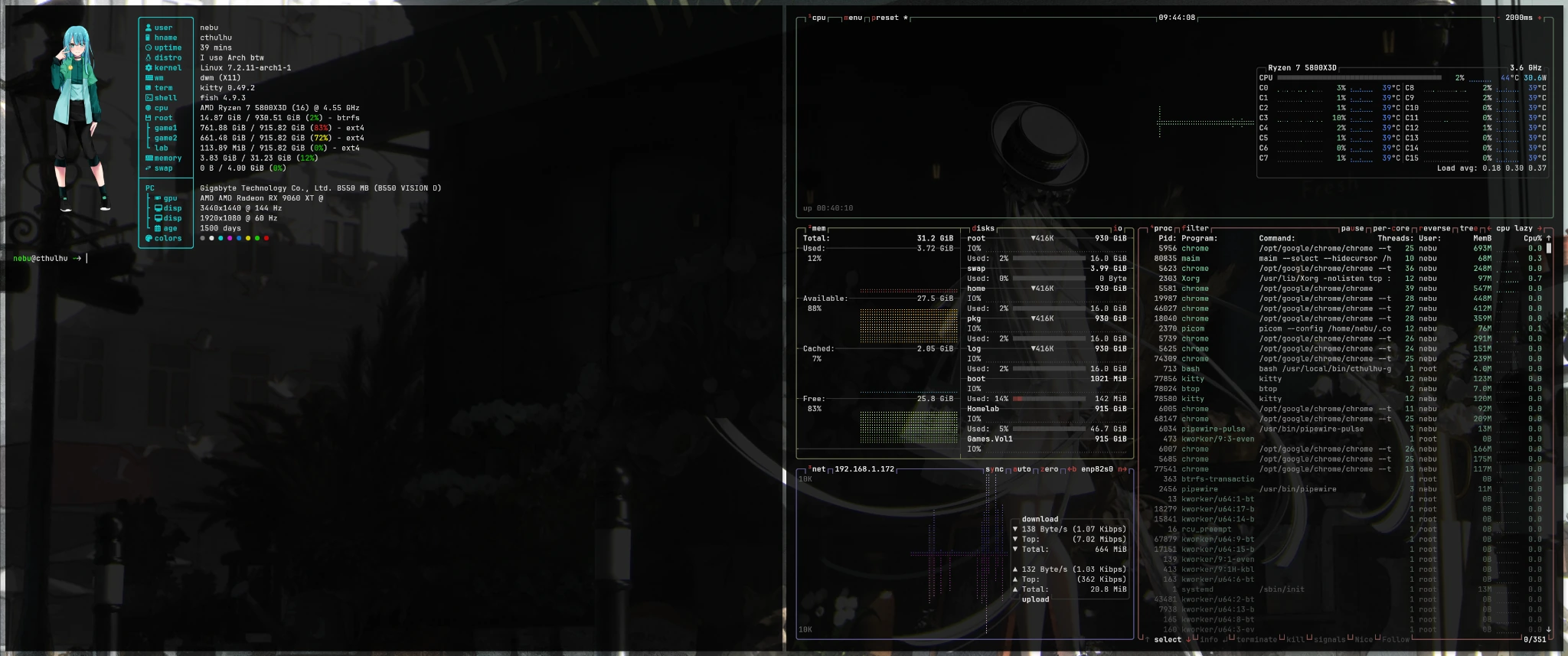
My main workstation is called Cthulhu. It runs a Ryzen 7 5800X3D, a PowerColor Radeon RX 9060 XT with 16 GiB and two monitors. I use it to develop GitHub projects, work on my website and NEBUVERSE, play games through Steam and Lutris, and occasionally record with OBS. This rebuild was not a contest to create the prettiest terminal screenshot. I wanted a fast, understandable system that can do all my real work.
On 20 October 2026, I started again with Arch Linux Minimal. By the next day, I had dwm 6.8 on Xorg, Fastfetch, Chrome, a German keyboard layout, custom shortcuts and my old game drives correctly mounted. The final milestone was successful Vulkan game capture in OBS — an actual seven-minute video, not a black recording window. This is the documented journey from a base install to that working result.
Why I rebuilt Cthulhu again
I still like NixOS and XMonad. My Kanagawa Dragon / XMonad build remains a separate, fully documented project. This time I wanted something different: install Arch Minimal, add a small, self-maintained dwm 6.8, and understand every component I chose. No temporary Plasma session, no full desktop environment sitting in the background, and no extra tool just because it comes bundled with a giant desktop.
My AMD graphics problems also shaped the plan. Heavy games had already produced GPU stalls and sometimes complete black-screen/full-fan lockups across several Linux distributions. Installing Arch was not an established fix. I wanted to build the daily driver first, then deliberately verify the driver stack, Vulkan, games, and recording.
1. Arch Minimal: the base comes first
The first safety question was storage. I wanted to reinstall only the intended system NVMe. The two Samsung 860 EVO game SSDs and the separate Homelab NVMe had to survive unchanged. On a workstation with multiple similarly sized drives, the target disk's serial number matters more than a transient name such as /dev/nvme0n1, which can change.
The result was a small Arch Linux installation with systemd, a normal local user account and no graphical display manager. Boot, network, mounts and the user account remained separate from the later desktop bootstrap. This boundary is explicit in the public Cthulhu GitHub repository.
2. Btrfs, systemd-boot, and my actual disks
Early planning included GRUB and several Btrfs snapshot approaches, but the boot setup actually checked on Cthulhu uses systemd-boot and a Unified Kernel Image (UKI) named arch-linux.efi. Root is Btrfs with the @ subvolume. The boot menu was configured with a three-second timeout, and a separate rescue UKI was kept available. Secure Boot was disabled at the time of inspection.
| Volume | Purpose |
|---|---|
| System NVMe | Arch Linux, Btrfs root @, EFI partition, systemd-boot |
/mnt/Games.Vol1 | Existing Samsung 860 EVO ext4 Steam library |
/mnt/Games.Vol2 | Second existing Samsung 860 EVO ext4 game library |
/mnt/Homelab | Separate ext4 NVMe for recordings, diagnostics and data |
| Swap | 4 GiB visible in the current monitor; the exact swap backend has not been independently confirmed |
The three data volumes were mounted using their UUIDs in /etc/fstab, then checked with findmnt and ultimately verified again in Steam. Anyone adapting the setup must use their own UUIDs and boot layout. Copying another machine's PARTUUID, disk paths or EFI entries without checking them is a particularly bad shortcut.
Our rule was straightforward: verify the boot and storage layers before touching the desktop. That prevented a cosmetic WM rebuild from disturbing already working boot files or precious game libraries.
3. My dwm desktop built from GitHub
The repository location was intentional from the beginning: dennishilk/cthulhu/Arch/dwm. I wanted the dwm checkout and its configuration inside my home directory, specifically ~/.config/dwm/. No scattered upstream source under system directories and no mysterious manual root-level build.
Once the Arch base was working, the reproducible desktop setup was compact. The commands below describe the documented bootstrap route; run one command at a time, read the output, and proceed only after it succeeds.
git clone https://github.com/dennishilk/cthulhu.gitcd cthulhu/Arch/dwmbash ./install.shThe script installs Xorg/Xinit, Kitty, Fish, Rofi, Fastfetch, feh, Picom, Thunar, PipeWire and other daily-driver tools; it also supplies Mesa/RADV and the required 32-bit Vulkan support. It fetches upstream dwm tag 6.8, applies our small targeted source changes, and compiles the window manager locally. yay and Google Chrome come from the AUR; as with any AUR software, the third-party build recipes deserve review.
The script first checks for Arch, sudo and an enabled multilib repository. It does not partition, format, rewrite the bootloader or edit fstab. The compiled dwm executable ultimately lives in ~/.local/bin/dwm.
4. dwm 6.8: The window layout and keyboard shortcuts
dwm is tiny and configured through its source. Our variant is deliberately restrained: no dwm bar, no tray, no animated effects, no unnecessary tags. Each monitor has one working area; windows follow a master/stack tiling layout. With two ordinary windows the split is 50/50, outer gaps are 12 px, inner gaps 8 px, and window borders are disabled.
| Shortcut | Action |
|---|---|
| Super + Enter | Kitty with Fish and Fastfetch |
| Super + B | Google Chrome |
| Super + D | Default Rofi drun launcher |
| Super + T | Thunar file manager |
| Super + F | Real EWMH fullscreen toggle |
| Super + Q | Close focused window |
| Super + mouse | Move or resize a window |
Select an area using maim and save in ~/Screenshots/ | |
| Hardware volume keys | Use wpctl for PipeWire volume and mute |
We kept Rofi's stock design on purpose. dmenu was no longer needed and was removed. The initial screenshot tool flameshot was also replaced with maim: hit Print, drag a rectangle, and a PNG is saved automatically. No extra confirmation window, screenshot portal or notification service.
Changing a compiled source-based WM means rebuilding it. We gave the everyday operation a tiny script:
~/.config/dwm/rebuild.shThe new executable is installed under ~/.local/bin/dwm and picked up by the next Xorg session. The full implementation is available in Arch/dwm/config.h and the repository's patch scripts.
5. Kitty, Fish, Fastfetch, wallpaper, and btop
The screenshot shows a transparent Kitty terminal with our custom Fastfetch on the left and btop monitoring on the right. This is not a mockup: it was captured on Cthulhu on 22 October. Fastfetch identifies Arch with the familiar “I use Arch btw” gag, dwm, the AMD GPU, and all mounted volumes. The custom image is part of Arch/fastfetch/ in the project.
Kitty uses JetBrains Mono Nerd Font at 12 pt, 10 px internal padding and 0.85 background opacity. picom supplies restrained window shadows, with neither blur nor fading. The wallpaper is visible without turning the terminal into an unreadable sheet of glass.
Fish is the interactive shell. One small final refinement mattered: Fastfetch runs only in interactive Kitty windows, not on a text console, over SSH or inside a script. We removed the stock Fish greeting. The Fastfetch “system age” was also given a personal 1,500-day value — a deliberate flourish, not a measurement of how long this fresh Arch install has been running.
No display manager is involved. A login on local TTY1 causes Fish to start startx, which invokes ~/.config/dwm/start.sh. SSH sessions explicitly do not start Xorg. The route from terminal login to actual window manager remains short and understandable.
6. Two monitors at 144 Hz and 60 Hz
With an ultrawide display and a Full HD monitor, automatic placement rarely matches what I want. We checked the real XRandR connector names under native Xorg:
| Output | Resolution | Position |
|---|---|---|
DP-2 (primary) | 3440 × 1440 at 144 Hz | left: 0x0 |
HDMI-1 | 1920 × 1080 at 60 Hz | right: 3440x180 |
The second display is vertically centered. The startup script checks that both outputs and the native 144 Hz mode exist before applying the layout; feh handles wallpapers on each screen. These connector names are hardware- and driver-specific — for example, a DRM name like HDMI-A-1 need not match the XRandR name.
7. Audio, files, clipboard, and system services
A window manager alone is not a workstation. I also need Chrome, Thunar with removable-volume handling, Mousepad, archives, VLC, reliable clipboard behavior and sound. The installation therefore includes PipeWire, pipewire-pulse, WirePlumber and wpctl. Hardware volume keys control the default output directly, without installing an entire desktop environment.
Thunar is backed by Tumbler, GVfs, udisks2 and a Polkit agent. xfce4-clipman runs standalone without an XFCE panel, preserving clipboard text after the source window closes while disabling permanent history storage on exit. The setup also covers NetworkManager, time sync, periodic SSD TRIM and weekly Pacman cache cleanup. The intended firewall policy denies unsolicited inbound traffic while allowing outbound connections; crucially, the bootstrap avoids turning on UFW during an SSH session.
GIMP was installed later for image editing alongside the minimal desktop. We deliberately skipped Bluetooth daemons, printer services, extra notification programs and unnecessary panels. This is not about claiming an unmeasured RAM-performance miracle. It is about knowing which components are running and why.
8. RX 9060 XT: Mesa, RADV, and 32-bit Vulkan
The RX 9060 XT is an RDNA4/Navi44 GPU. Seeing an Xorg desktop is not proof that the whole Linux gaming stack works. We explicitly checked the amdgpu driver, Mesa/RADV, Vulkan and especially 32-bit graphics support for Steam and Proton. The Arch packages involved include mesa, lib32-mesa, vulkan-radeon, lib32-vulkan-radeon, vulkan-icd-loader and lib32-vulkan-icd-loader.
This requires the enabled multilib repository. We verified OpenGL, Vulkan and 32-bit library availability before moving on to games. Mixed Windows titles under Proton are precisely why checking only the 64-bit Vulkan path can produce misleading confidence.
Neither a working dwm session nor a functional Chrome window proves that the older Radeon hardlocks are solved. A later AMDGPU Blackbox investigation on this very Arch install documented a real GFXHUB page fault, ring timeout and automatically preserved device coredump. The underlying cause remains unknown.
9. Steam, Proton, and existing game libraries
Only after the graphics and audio foundation was ready did we install and check the gaming applications. Steam works, and the existing ext4 game libraries on Games.Vol1 and Games.Vol2 were made available again. Lutris was added for non-Steam gaming. That matters more to me than an abstract desktop benchmark: I do not want to redownload hundreds of gigabytes whenever I change distributions simply because the mounts were overlooked.
Windows games are launched through Steam Play/Proton; the later S.T.A.L.K.E.R. test used Proton 11.0.2. This does not establish compatibility with every Windows game or prove a fix for our intermittent AMDGPU crashes in demanding titles.
10. OBS: VAAPI/AV1, then native Vulkan game capture
This is where the installation story reaches the result I cared about most for a minimalist X11 setup: not merely launching OBS, but recording a game properly and smoothly.
First: working hardware-encoded video
We installed OBS Studio and first checked picture and sound. Recording used the Radeon hardware encoder through FFmpeg VAAPI with AV1. The tested settings were 3440 × 1440, 60 FPS, CQP/QP 24, and the MKV container. The recordings went to the separately mounted NVMe at /mnt/Homelab/Obs.
The initial recording test showed 60.00 FPS and no dropped frames. Audio and video worked, and OBS reported roughly 0.5% CPU utilization. That is an OBS-reported figure, not an independently established performance benchmark. With the encoder path validated, we could focus on capturing the game itself.
Then: real Vulkan game capture
Next we needed actual game capture for Linux Vulkan applications, rather than capturing the whole desktop or an arbitrary window. We installed obs-vkcapture-git and lib32-obs-vkcapture-git from the AUR. After restarting OBS, the source menu included “Game Capture” (German interface: “Spielaufnahme”).
yay -S --needed obs-vkcapture-git lib32-obs-vkcapture-gitWe tested the result using Quake II launched from Steam. The game's Steam launch options contained exactly this variable:
OBS_VKCAPTURE=1 %command%The result was seven minutes of real Vulkan game capture, excellent video quality and only around 0.1–0.3% CPU usage as reported by OBS. That was the finish line: Arch Minimal → dwm → AMD/RADV → Steam → a Vulkan game captured successfully in OBS.
11. What works — and what this does not prove
At the end I had Arch Linux, dwm 6.8, Google Chrome, Fish, Kitty, Fastfetch, btop, Thunar, Rofi, maim for screenshots, PipeWire, Steam, Lutris and OBS working together as a usable daily-driver stack. Both differently sized and refreshed displays were configured, the existing game libraries were preserved, and I could record the tested Vulkan game on my Radeon.
I am not claiming that Arch, dwm or Proton completely fixed the earlier RX 9060 XT GPU hangs. We do not have proof of that. Nor did we benchmark dwm against Plasma or XMonad for game frame rates. This setup was motivated by clarity, configuration control and real-world functional tests, not fictional speed claims.
That makes the screenshot more interesting to me than an ordinary “look at my rice” post. It shows the result of a traceable build that lets me work, develop, play and record again.
Rebuild it yourself: sources, safety, and limits
The complete desktop configuration is public on GitHub: install.sh, config.h, source patches, startup and rebuild scripts, Rofi/Kitty/Picom settings, Fish hooks and Fastfetch assets. This article is a firsthand story with a reproducible desktop layer, not a universal Arch partitioning installer. Read any script before running it, and verify your own disk and monitor configuration separately.
If you need only one component, start with the files themselves: Xorg and monitor startup, dwm shortcuts and layout, Kitty configuration, and the complete repository README. For Vulkan capture, see the open-source obs-vkcapture project.
My conclusion: I wanted a desktop that fits Cthulhu without becoming a constant distraction from real work. Now I log in on TTY1, open Kitty with Super+Enter, play through Steam and capture Quake II directly from Vulkan. That is the result I wanted this rebuild to deliver.
And if the Radeon acts up again, there is now an AMDGPU Blackbox ready to record what happened. 🐙
As of: 22 October 2026. Installation and OBS / Quake II tests: 20–21 October. Screenshot: authentic Arch/dwm desktop from 22 October, converted to a web-optimized WebP without changing the desktop scene; no claim of ownership over third-party wallpaper artwork. Based on personal terminal tests and the versioned Cthulhu project files. These observations do not guarantee equivalent results on other hardware.