In this article
- Was the UNIX system in Jurassic Park real?
- Silicon Graphics: a workstation built around seeing
- Which computers appeared in the 1993 film?
- IRIX: UNIX with windows, graphics and development tools
- fsn: a filesystem becomes a landscape
- Historical fsn, a fan recreation and this browser exhibit
- Nedry, Arnold and Lex: the computer story
- The other SGI story: computers behind the dinosaurs
- Rebuilding the interaction with JavaScript and Canvas
- Try the park recovery: dependencies before green lights
- Doctor Nebu and a few suspicious details
- A few questions before you explore
- Back to that cinema seat
- Sources, dates and reconstruction notes
When Jurassic Park reached German cinemas in 1993, I was eight. Dinosaurs already fascinated me. So did computers. The film had opened in the United States earlier, and I had read about it before seeing it here. Somewhere in that reading I had encountered a particularly exciting connection: Silicon Graphics and a three-dimensional file browser called fsn.
During a screening, someone nearby wondered about the unusual interface on the cinema screen. I explained that it was Silicon Graphics technology, that the browser was called fsn, and that this was a UNIX workstation rather than Windows. The surprise was apparently less the computer than the eight-year-old who knew its name. I could recognize the idea, but I could not run that software at home.
Years later I tried an fsn recreation, probably through a GitHub project; I no longer know the exact repository. Now, in 2026, I have built my own browser exhibit around that memory. To explain why, we need to look past the famous line and into the machines, operating system and graphics experiment that made it possible.
Was the UNIX system in Jurassic Park real?
Lex Murphy’s It’s a UNIX system! I know this!
became one of cinema’s most recognizable computer moments. The landscape she navigates was based on File System Navigator, an experimental Silicon Graphics application. SGI’s own archived documentation identifies the film connection and describes the program’s limitations. This was a real graphics experiment finding its way into a blockbuster, not a completely invented Hollywood file manager. [1]
There are nevertheless three things to distinguish: the computer cabinet visible on the set, the source of the monitor’s pictures, and the fictional application those pictures represent. A real workstation can display specially prepared imagery. Real directory navigation does not automatically make a park’s door locks work. Keeping those layers separate makes the scene more interesting: its visual vocabulary came from actual computing, while its urgency came from storytelling.
Silicon Graphics: a workstation built around seeing
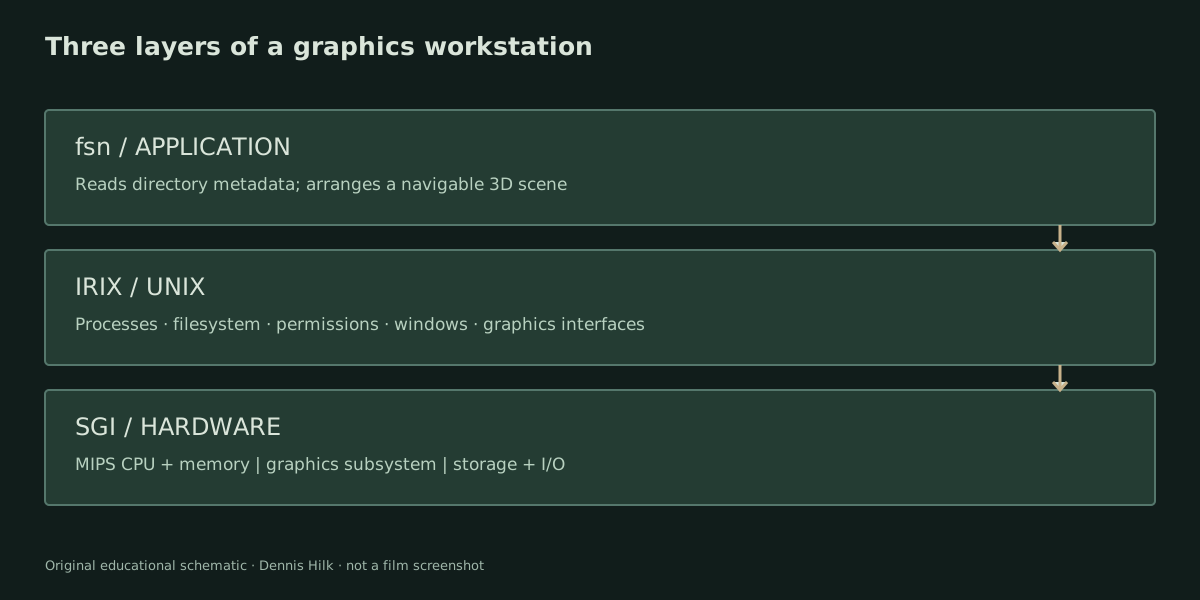
Silicon Graphics, Inc., usually shortened to SGI, sold systems for people whose work involved manipulating complex visual information. Scientific visualization, engineering design and animation were professional markets, not decorative extras. The company’s 1991 Indigo announcement explicitly addressed technical, scientific and creative users. Its promise was to bring workstation graphics into a more compact personal machine. [2]
A useful way to understand that difference is to follow a rotating model. The processor runs the application and prepares work. Geometry must be transformed from the model’s coordinates into a camera view. Surfaces must be clipped, shaded and turned into pixels. A depth buffer helps decide which surfaces hide others. Dedicated graphics hardware can take over parts of this work; precisely which parts depends on the installed graphics subsystem.
That is why “an SGI” is not one performance specification. Entry graphics and a high-end 3D configuration are different machines for practical purposes, even when they share a case. SGI’s Indigo Family Technical Report separates processor boards, geometry, raster and display subsystems. The architecture is more revealing than a single headline clock speed. [3]
The relevant systems used MIPS processors, a different instruction-set family from the x86 processors common in PCs. RISC designs emphasize a regular set of operations working with registers, including explicit loads and stores to memory. A compiled executable must match its processor and operating-system interfaces; a familiar keyboard does not make an IRIX application a Windows program. The R4000’s 64-bit architecture also should not be confused with a guarantee that every contemporary operating-system component or application ran as 64-bit software.
Which computers appeared in the 1993 film?
The control room is a mixed environment. Fabien Sanglard’s shot-by-shot hardware archaeology identifies a Crimson at Nedry’s station, an Indigo at Ray Arnold’s, Quadra 700s at their desks and a PowerBook 100 in the scientists’ trailer. It also documents external storage and period displays. These are visual identifications, not an inventory of every machine’s installed memory or internal boards. [4]
| Machine | Manufacturer / period | CPU family / software | Screen context |
|---|---|---|---|
| IRIS Crimson | Silicon Graphics / 1992 | MIPS R4000 family; IRIX | Nedry’s SGI station; associated with the fsn sequence |
| IRIS Indigo / Elan configuration | Silicon Graphics / family introduced 1991 | Original R3000A, later R4000-family variants; IRIX | Arnold’s workstation |
| Macintosh Quadra 700 | Apple / 1991 | Motorola 68040; System 7-era Macintosh software | Control-room desks |
| PowerBook 100 | Apple / 1991 | Motorola 68000; System 7-era Macintosh software | Grant and Sattler’s trailer |
| CM-5-style façade | Thinking Machines / 1993 film appearance | No processor or operating system inferred from a display shell | Set decoration |
The table identifies families and periods, not verified set configurations. SGI’s promotional material describes the Crimson’s R4000SC and professional graphics options; Apple’s own specifications date both Macintosh models to October 1991 and identify their processors. I have deliberately omitted RAM totals and performance comparisons that would imply knowledge of the actual set machines. [5] [6]
Contemporary reporting distinguishes CM-5 shells from operational supercomputers. [7] That distinction prevents an imposing row of lights becoming an invented account of the film’s render farm. Computerwoche’s September 1993 report is also valuable evidence that the competing hardware brands attracted attention at the time, rather than only in later nostalgia. [8]
Sanglard’s later production recollections describe off-camera systems feeding displays. They are another reason not to infer a running configuration from a visible cabinet. CRT displays, keyboards and external storage make the room convincing, but none independently proves which executable generated a particular shot. The orderly and cluttered desks also tell a visual story about the people occupying them.
IRIX: UNIX with windows, graphics and development tools
IRIX was SGI’s UNIX operating system. The platform provided processes, files, permissions and networking alongside graphical software. SGI’s later programming overview describes its System V Release 4 base, BSD networking, X Window System and graphics interfaces. That manual explains the platform; it does not establish the exact IRIX release used for every 1993 shot. [9]
For a period-correct graphical reference, the 1991 Indigo announcement already describes IRIX 4.0, X11/R4, IRIS GL and graphical workspace tools. A windowed UNIX workstation was therefore entirely plausible before the film. A text terminal and a graphical application are simply different programs using the same underlying operating system. UNIX did not require every interaction to be a command typed on a black screen. [2]
Permissions belong to that underlying structure. A filename identifies an object; it does not grant authority over it. Read, write and execute permissions apply differently to ordinary files and directories. Directory search permission, for example, concerns traversing a path. A custom control service still needs its own policy for deciding whether someone may operate a door. The appearance of a three-dimensional icon does not bypass those decisions.
Here is a general UNIX lesson, assuming a shell is already inside a suitable park directory. These are teaching commands, not a transcript from the film and not the bonus console’s complete command language:
pwd
ls -la
cd Research
ls
pwd prints the current directory. ls -la requests a long listing including dot-prefixed entries. cd Research changes into a child directory with that exact name; the final ls lists its contents. Case and starting location matter. Those simple operations expose the same hierarchy that a graphical browser can represent spatially.
IRIX was also a development environment. SGI’s documentation catalog covers compilers, libraries, debugging and system programming. Graphics applications were built on a substantial software stack, not conjured into existence by a special monitor. The shell was one useful tool among many. [10]
fsn: a filesystem becomes a landscape
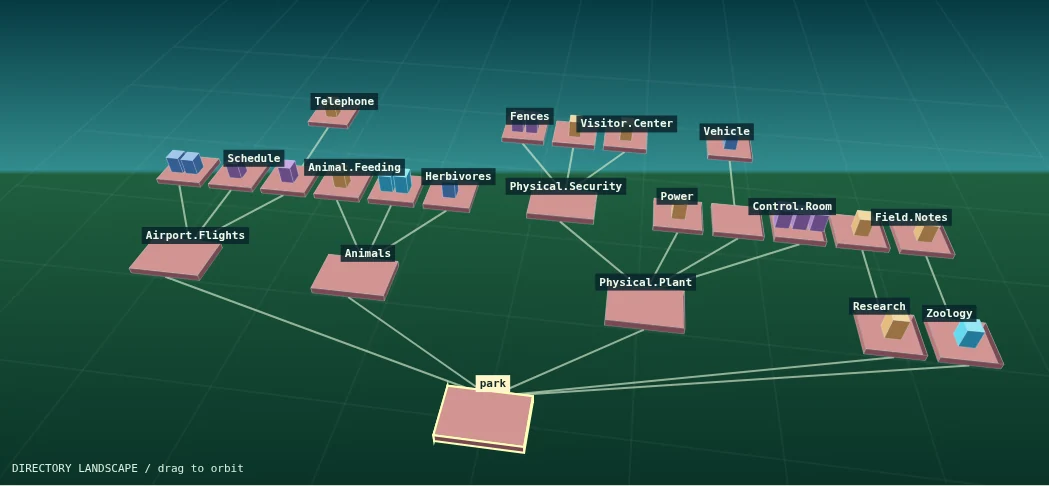
SGI pronounced fsn “fusion”. Its documentation describes directories as connected pedestals and files as boxes; height encodes size and color encodes age. Selection, opening and overview navigation let people explore that information landscape. The documentation explicitly calls it an experimental prototype, not a complete replacement for an everyday file manager. [1]
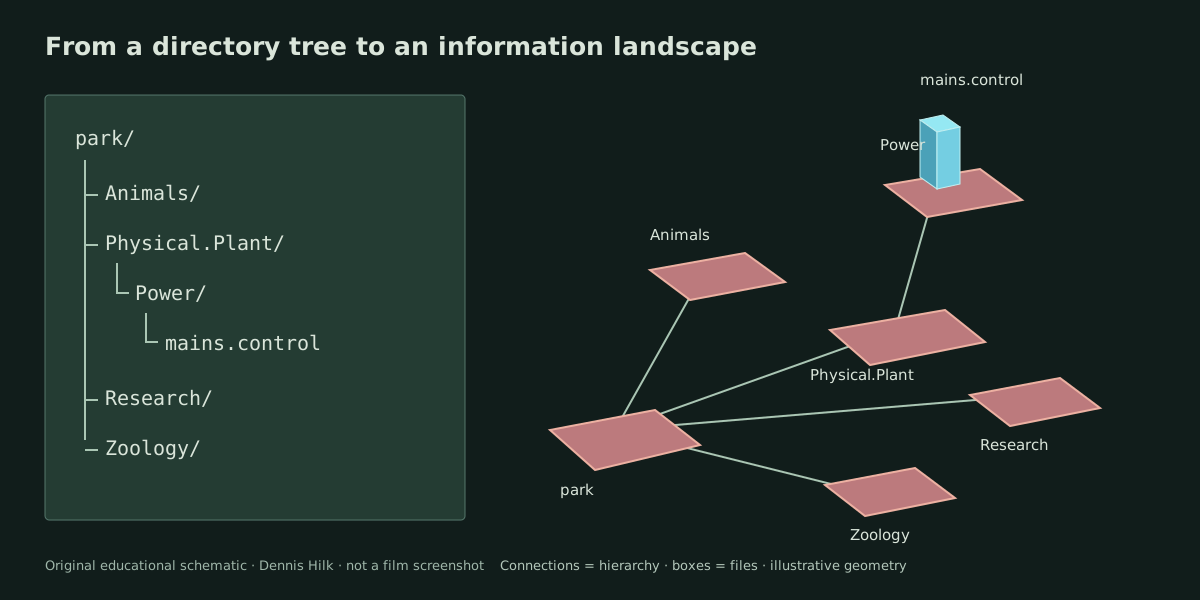
The underlying idea is easier to understand with a small example. A directory tree is a collection of parent-child relationships. If Power belongs inside Physical.Plant, a connecting line can communicate that relationship. A file named mains.control can become a box resting on Power’s platform. Moving between platforms then gives navigation a spatial counterpart.
Our explanatory diagram uses a subset of the museum’s authored hierarchy. It is not a recovered copy of the movie’s filesystem. In particular, our /park root is a teaching convention. Film-inspired names give the landscape context while the actual records are newly written.
A spatial display changes the questions you can ask at a glance. Which branch has many objects? Which file stands out? Where is the route back to the parent? It also creates new problems. Tall objects can hide smaller ones, distant labels become hard to read, and a beautiful camera angle may be a poor angle for selecting a particular item.
That is the useful tension in the experiment. A list is excellent when you know the name you want. A landscape encourages orientation and discovery, but asks you to manage a camera as well as a hierarchy. Neither metaphor removes the need for accurate metadata. Our exhibit deliberately provides both: the same object can be selected in the scene, found by name, or inspected in a conventional directory list.
Historical fsn, a fan recreation and this browser exhibit
The unixmonkey/fsn_jurassic_park project provides a filesystem-generation script and configuration resources for recreating the film-like appearance on an existing fsn installation. Its README shows a later SGI O2. That is a recreation environment, not proof that an O2 appeared in the 1993 movie. The O2 arrived in 1996; contemporary launch reporting makes the chronology clear. [11] [12]
It is worth being precise about what gets recreated. A folder-generation script supplies names and structure. The original program supplies the historical visualization. An emulator would have to supply a compatible machine environment. My exhibit instead implements the interaction directly in browser code. These approaches can all be interesting without being interchangeable, and I cannot confidently identify that repository as the one I tried years ago.
Nedry, Arnold and Lex: the computer story
Dennis Nedry’s sabotage turns the park’s dependence on computer-controlled infrastructure into a crisis. Ray Arnold works through the control-room systems while the consequences unfold elsewhere. Later, Lex recognizes the workstation interface and navigates the files to help secure the visitor center. This is the computing arc of the original film, rather than a claim about an actual industrial-control incident. [16]
The dramatic idea remains effective: concentrating many operations in one room creates convenience and dependence. Monitoring animals, coordinating transport and controlling access may look like separate windows, yet the story connects their failures. For an engineer watching today, the interesting questions concern isolation, authority and recovery. Which services depend on power? Which status reports can still be trusted? What must be checked before a green indicator means anything useful?
Those are questions the film invites; they are not a diagnosis of IRIX itself. The fictional park’s architecture was written to support a thriller. Likewise, recognizing a familiar operating system is different from understanding a custom control application. Lex’s confidence remains a lovely character moment even when the screenplay compresses the work needed to restore a complex system.
| Real technical foundation | What the film adds |
|---|---|
| SGI workstation hardware | A particular role inside the fictional park |
| IRIX, a UNIX operating system | A custom security application and its access rules |
| fsn and navigable directory metadata | The connection between navigation and saving the characters |
| Programs, services and recovery operations | Compressed timing and dramatic consequences |
The other SGI story: computers behind the dinosaurs
SGI also belongs to the film’s production history. ILM’s own retrospective identifies new work in texturing, camera tracking and animation tools, including the Dinosaur Input Device developed with Tippett’s team. The achievement depended on artists, engineers and production decisions working together. It was not the result of opening one application on the workstation visible behind an actor. [13]
The fxguide interview with visual-effects art director TyRuben Ellingson discusses the collaborative process. Its technical account identifies modeling in Alias, animation in Softimage, texturing with Viewpaint and rendering through Pixar’s RenderMan on SGI-based workflows. Those stages describe different jobs: building a surface, giving it movement, controlling its appearance and calculating the final images. [14]
Practical effects remained fundamental. Physical dinosaurs, photographed sets, lighting, live-action plates and digital creatures had to agree enough for the audience to believe the scene. A workstation could let an artist inspect and change a model interactively while final image rendering remained a separate task. Interactive graphics and finished film frames are different workloads, even when they share source assets.
That double role is part of the pleasure of watching the film as a computer enthusiast. Advanced computing contributes to the images we watch, and recognizable computing appears inside those images as part of the story. The two deserve to be connected historically without confusing a control-room prop with ILM’s production infrastructure.
Rebuilding the interaction with JavaScript and Canvas
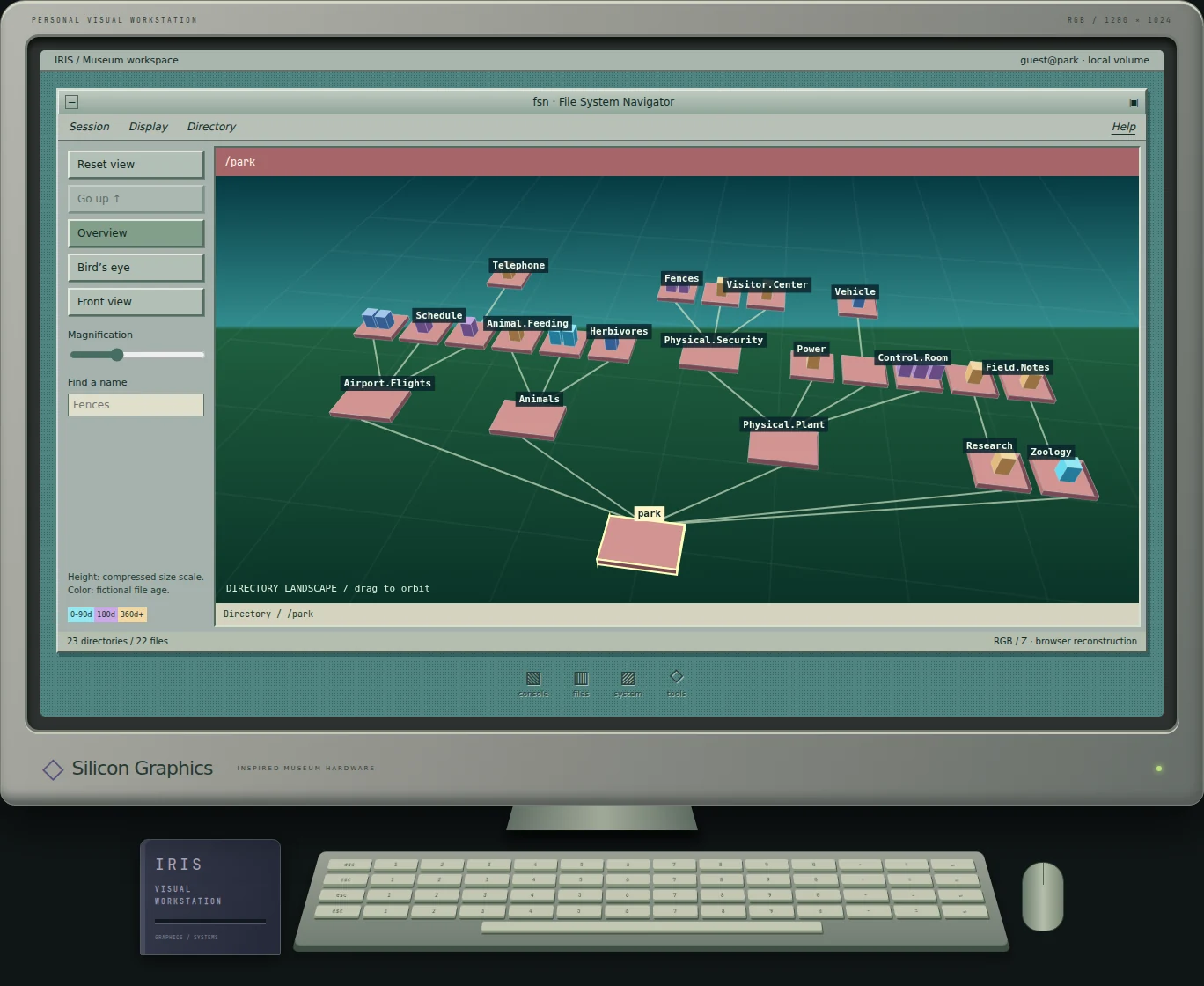
The museum workstation translates the central idea into a small independent implementation. An authored tree currently contains 23 directories and 22 files. Each object has a path, parent relationship and readable content or description. Selection links that model to the scene, inspector and list. No visitor files are scanned. [15]
The renderer builds three-dimensional cuboids, projects their coordinates into a camera view and paints depth-sorted faces on Canvas 2D. This is real spatial geometry drawn through a two-dimensional browser API. It uses no large 3D library. The illustrated workstation case combines period references rather than claiming to replicate one exact SGI model.
There are three camera presets, drag-to-orbit and tilt controls, and a magnification slider. Name search locates objects across the authored volume. Selecting one exposes its path, type, size, fictional age and permissions in the inspector. File height uses a compressed scale, so small differences remain legible without enormous towers dominating the screen.
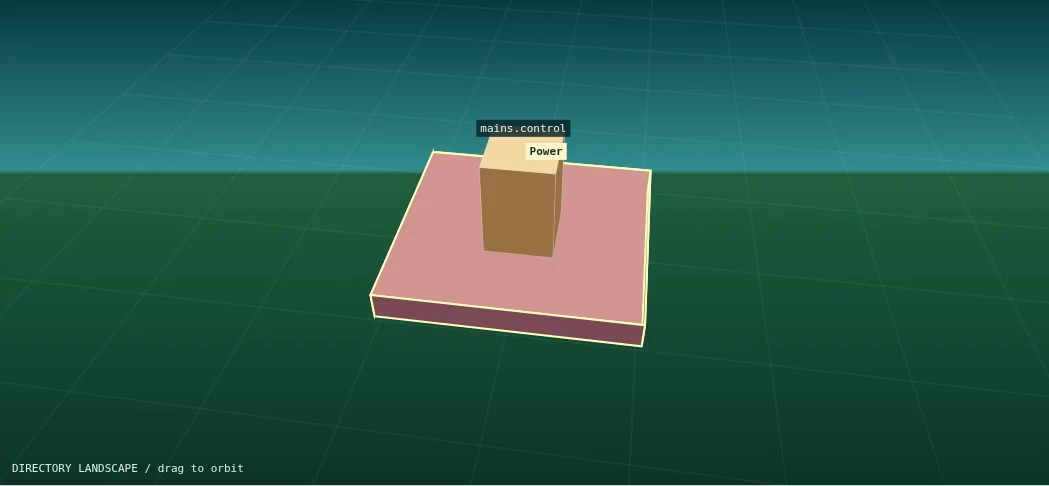
With the canvas focused, arrow keys cycle through visible objects, Enter opens them and Backspace moves up. The directory list provides equivalent selection without requiring spatial pointing. Entering a branch reveals deeper levels, while resetting returns to the root view. Drawing responds to input and resizing; there is no continuous animation loop spending resources while the scene sits still.
The implementation does not boot IRIX, execute MIPS instructions or load the original fsn binary. Its achievement is more direct: it makes the relationship between directories, geometry and navigation available to someone opening an ordinary webpage.
Try the park recovery: dependencies before green lights
The separate Jurassic Park bonus has its own fictional recovery model. Its terminal accepts a deliberately limited vocabulary; buttons perform the same state changes. These are museum commands, not authentic IRIX administration instructions or recovered movie source code:
help
status
diagnose
ls /park
help lists the implemented commands. status reports the recovery stages. diagnose begins the scenario, while ls /park lists the authored root. The bonus also supports bounded path navigation with cd, cat and open. It does not execute arbitrary shell programs; the general UNIX example above and this scenario parser should not be confused.
- Diagnose the system and identify the maintenance bypass.
- Isolate that bypass.
- Restart the fictional control services.
- Restore the power bus.
- Restore communications.
- Test the three fence circuits.
- Find and inspect the door-control module, then restore the locks.
The final module is /park/Physical.Plant/Physical.Security/Visitor.Center/door.control. Use the explorer or its name search to inspect it. Its action button returns you to the bonus console. Attempting later stages too soon produces a dependency message; a successful sequence changes the service markers and final banner. Reset clears the scenario, including the recorded inspection.
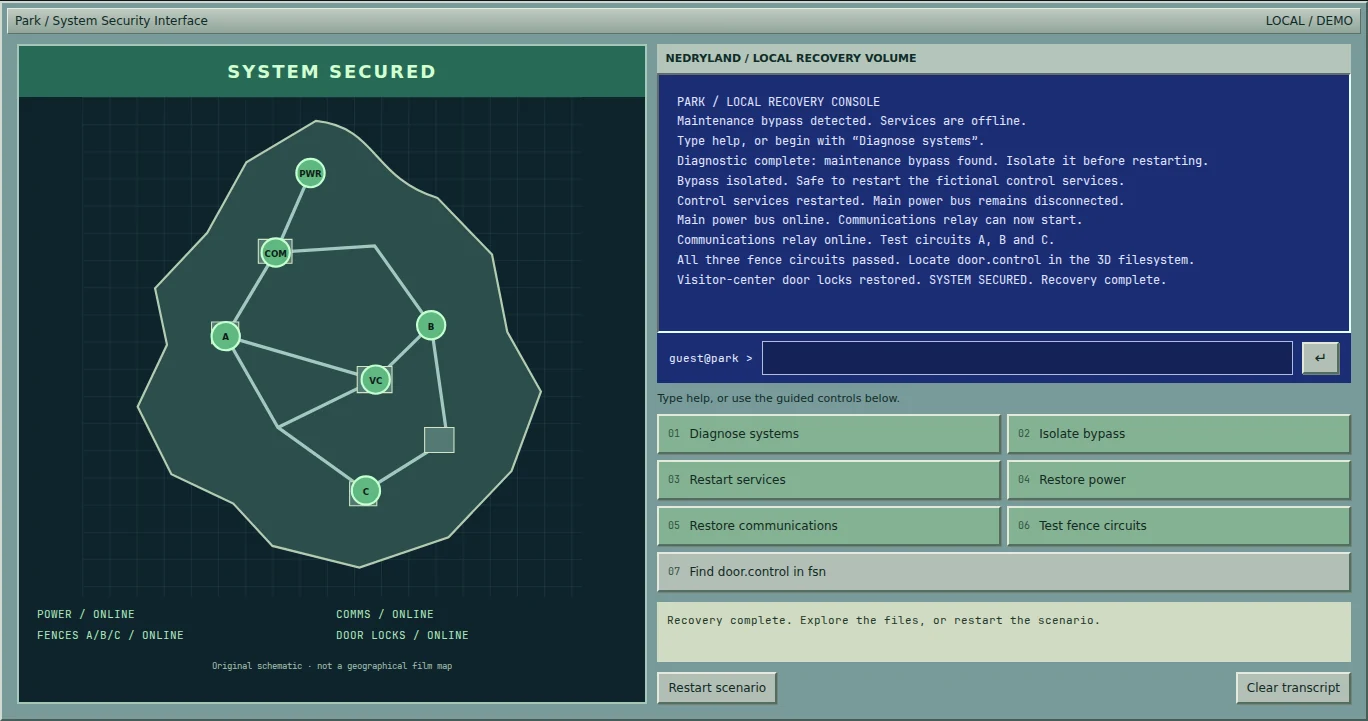
The teaching point is the relationship between state and evidence. A restart is not the same operation as reconnecting power. A communication service cannot be treated as restored merely because another button was clicked. Our small model makes those dependencies visible without claiming to represent a real park safety system.
Doctor Nebu and a few suspicious details
I could hardly build a Nedry-inspired computer experience without acknowledging that we share a first name. The result is Doctor Nebu: an original cartoon of me in a white technician’s coat, with three pairs of sunglasses and an opinion about manners. Repeated fictional access denials can bring him onto the screen. A polite word is a surprisingly effective way to continue.
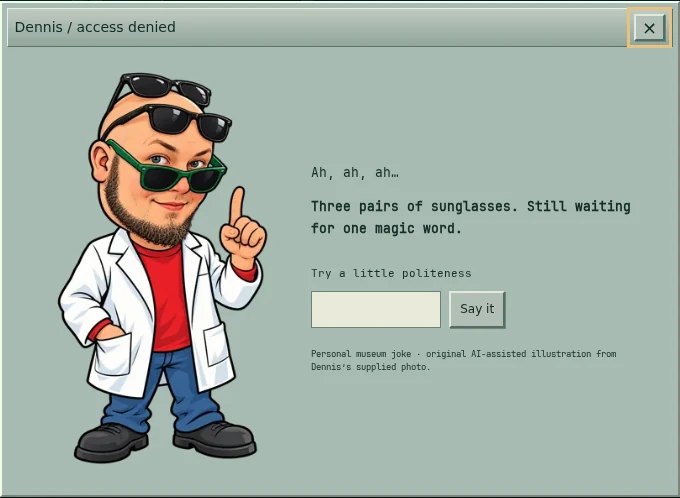
The cartoon is an authorized, AI-assisted illustration made from my supplied photo. The private source photograph is not part of the article. Elsewhere, a hidden raptor-support note recalls my observation of what looks like a helping hand in the kitchen sequence. It remains an observation and a joke, not an attribution to a named crew member. The reference is my reading of the film’s kitchen sequence, not a production interview. [16] Another small ocean-themed detail nods to something I thought I recognized on a background monitor; I am not presenting that as independently verified evidence of a particular film playing there.
I will leave the remaining filenames and routes for visitors to find. The exhibit is much more fun when every joke has not already been printed on the entrance ticket.
A few questions before you explore
Could a filesystem really be navigated in three dimensions?
Yes. The historical application visualized directory information spatially. That did not make its files different from those accessible through other tools.
Was fsn the IRIX operating system?
No. It was an application running in that environment. A recognizable application can suggest a platform without explaining every other program installed on it.
Can I try it without installing vintage software?
You can operate my independent browser reconstruction. Visiting it does not give you an emulated SGI machine or the original executable.
Back to that cinema seat
The attraction was never just knowing a name that surprised someone. It was realizing that the strange thing on the screen belonged to a larger world I could learn about. I could not take an SGI home in 1993, but the idea stayed with me.
If the real IMSAI behind WarGames offers another doorway into that feeling, the SGI landscape is mine from a dinosaur film: a place where technical curiosity and cinema overlap. You can visit the IMSAI exhibit, browse the Computer Museum, or begin here. Open the workstation, select a directory, and see where it leads →
Sources, dates and reconstruction notes
Researched for publication on 16 October 2026. Manufacturer documents establish platform characteristics; the film and production research establish appearances. Later manuals are identified as later documentation. My cinema memory is a personal recollection, not an independently documented production fact.
- SGI: 3D File System Navigator for IRIX 4.0.1+; archived distribution notes. Original prototype description and controls.
- SGI: Silicon Graphics Introduces New RISC Personal Computer, 22 July 1991. Original announcement.
- SGI: Indigo Family Product Technical Report. CPU and graphics subsystem structure.
- Fabien Sanglard: Jurassic Park computers in excruciating detail, 13 July 2026. Shot-based identifications; later production recollections distinguished from manufacturer specifications.
- SGI promotional material preserved by the Computer History Museum. Crimson and R4000SC product context.
- Apple technical specifications: Quadra 700 and PowerBook 100.
- Mike Langberg: Going Out for a Byte in Jurassic Park, The Washington Post, 28 June 1993.
- Computerwoche: Silicon Graphics im Pech, 24 September 1993. Contemporary hardware-brand context.
- SGI: Programming on Silicon Graphics Systems, chapter 1. IRIX 5.3-era platform overview, not a set-version identification.
- SGI: IRIX Developer Documentation. Compilers, libraries and development tools.
- unixmonkey/fsn_jurassic_park. Fan setup resources, not a full emulator.
- Computable: SGI vernieuwt produktaanbod, 17 October 1996. Contemporary O2 launch reporting.
- Industrial Light & Magic: Jurassic Park. Production team’s technical retrospective.
- Ian Failes / TyRuben Ellingson: Welcome (back) to Jurassic Park, fxguide, 4 April 2013. Firsthand interview and workflow account.
- Museum implementation and accuracy notes; renderer, recovery model and actual command parser.
- Jurassic Park (1993), directed by Steven Spielberg, Universal / Amblin. The film is the primary work for narrative and screen observations; the distributor page confirms release and credits, not the proposed goof.
All screenshots show my independently authored exhibit. Diagrams are original explanatory work. No film stills, promotional art or film audio are reproduced. This independent article and museum are not affiliated with Universal Pictures, Amblin or Silicon Graphics.