In this article
- Understand the chipset, driver and firmware
- Identify the USB adapter: six read-only checks
- Check firmware and understand the MT7662 filenames
- Debian, Ubuntu, Linux Mint and Arch packages
- Common symptoms and the next useful check
- NetworkManager, association and IP connectivity
- USB speed, wireless link rate and real throughput
- Monitor mode and the mac80211 stack
- When would an external driver or DKMS help?
- MT7612U Linux questions answered
- Follow the evidence to a working connection
- Sources and review scope
Understand the chipset, driver and firmware
The name printed on a USB adapter is only a starting point. Similar cases may contain different chipsets, and manufacturers can change hardware between revisions. The MT7612U hardware reference records 0e8d:7612 as a checked USB family candidate. That identifier also appears in the kernel driver’s device table. It does not uniquely identify a retail product or certify a working wireless connection.
| Component | What it does |
|---|---|
| MT7612U chipset | The radio hardware inside the adapter. |
| USB adapter | The complete product: chip, antennas, power circuitry and USB connection. |
| mt76x2u kernel driver | Lets Linux control the USB wireless hardware. |
| Firmware | Program code the driver uploads to the chip. |
| Network manager | Handles connection profiles, authentication and IP configuration. |
The MT76x2 USB family supports 802.11ac, commonly called Wi-Fi 5, and the 2.4 and 5 GHz bands. Its 802.11ac operation uses 5 GHz; dual-band support does not add both bands together. CONFIG_MT76x2U is already present in the Linux 4.19 source tree. This establishes historical in-kernel support, not a reason to run an obsolete kernel or a guarantee for every hardware revision.
For another USB identifier, start with the Linux Hardware & Driver Explorer. The reference stays compact; this guide explains how to move from one observation to the next. Stop at the first stage that fails instead of installing unrelated software.
Identify the USB adapter: six read-only checks
Run commands individually and interpret each result before continuing. “Command not found” means a diagnostic tool is missing, not that the radio lacks support. lsusb is supplied by usbutils, iw by the iw package, and modinfo/lsmod by kmod. If necessary, install these tools from your distribution’s repositories. The checks in this section do not change network settings.
Read the USB identifier
lsusbIllustrative example: Bus 002 Device 003: ID 0e8d:7612 MediaTek Inc.
This establishes USB detection. The descriptive name depends on the hardware database and can differ. It does not establish driver binding. If the adapter is absent, compare output before and after plugging it in, try another direct port and inspect kernel messages. A correction to a common command: lsusb -nn is not portable usbutils syntax. Unlike lspci -nn, plain lsusb already prints numeric vendor and product identifiers.
Inspect binding and USB speed
lsusb -tIllustrative excerpt: Port 2: Dev 3, If 0, Class=Vendor Specific Class, Driver=mt76x2u, 5000M
Match the bus and device to the previous listing. The driver field identifies the driver bound to this USB interface. The 5000M field describes the USB connection, not wireless throughput. An empty driver field calls for module and log checks. Even a bound driver does not by itself establish successful firmware initialization.
Check the kernel actually running
uname -rIllustrative example: 6.12.0-example-amd64
This is the running kernel, which may differ from the latest installed one. After an update, its module directory may no longer match what is on disk. Establish that relationship before adding drivers. A version number alone says nothing about distribution backports, configuration or successful initialization.
Find the driver module
modinfo mt76x2uIllustrative field: filename: /lib/modules/6.12.0-example-amd64/kernel/drivers/net/wireless/mediatek/mt76/mt76x2/mt76x2u.ko.xz
Metadata shows that the module can be found for the selected kernel. It does not show that it is loaded. “Module not found” calls for checking the distribution’s kernel package and installed modules. For a custom kernel, inspect CONFIG_MT76x2U: m builds a module and y builds the driver into the kernel. Built-in support need not produce an lsmod entry.
Check loaded modules
lsmod | grep -E 'mt76|mt76x2'Illustrative excerpt: mt76x2u 28672 0
A matching line means a module is loaded; sizes and usage counters vary. It does not bind that observation to your particular adapter, so compare lsusb -t again. No output may be expected with the adapter unplugged or the driver built in. If the interface is missing too, inspect kernel configuration and initialization logs.
Find the wireless interface
iw devIllustrative excerpt: phy#1 / Interface wlx001122334455 / type managed
An interface means Linux registered a wireless network device. It does not mean the device joined your router. With multiple radios, the read-only command readlink -f /sys/class/net/INTERFACE/device/driver helps map an interface to its driver. Replace INTERFACE with its real name. If USB detection succeeds but no interface appears, investigate the initialization log next.
Check firmware and understand the MT7662 filenames
A driver module and firmware are separate files with separate roles. In the checked Linux 6.12 source, the USB loader uses shared definitions to request mt7662_rom_patch.bin followed by mt7662.bin. The first is a ROM patch; the second is operating firmware. MT7662 names are therefore consistent with MT7612U hardware. Shared family code explains the naming, but does not make similarly named images interchangeable.
modinfo -F firmware mt76x2uThis reads the filenames declared by your installed module. For your machine, those declarations are more useful than a universal checklist. Firmware packages can also contain mediatek/mt7662u.bin and other related images. Do not guess which to use from the name or rename files to satisfy an error message.
journalctl -k -b --no-pager | grep -Ei 'mt76|firmware|usb'On systemd systems this reads kernel messages from the current boot. If access is denied, start the same command with sudo journalctl; it remains a read-only query. On systems without a journal, use sudo dmesg. Inspect the unfiltered log when context is unclear, because a text filter can hide adjacent errors.
A “Direct firmware load … failed with error -2” message usually means the named file could not be found for that request. Read its complete pathname and subsequent messages. A successful fallback is different from a final probe failure. A timeout starting an image that was found is also different from a missing file.
find /lib/firmware/ /usr/lib/firmware/ -name 'mt7662*' -printDistributions use /lib/firmware or /usr/lib/firmware, sometimes linked together. Duplicate results can therefore be harmless. Files ending in .bin.zst or .bin.xz may be normal compressed firmware when the kernel supports that format. Compare package contents and the actual request before changing anything. File presence proves neither a successful upload nor a running device.
Debian, Ubuntu, Linux Mint and Arch packages
Start with cat /etc/os-release. Package names depend on the release and enabled repositories. Installation needs a temporary working connection, for example Ethernet, USB tethering or another adapter; package queries can use information already present locally.
Debian 13 Trixie
apt-cache policy firmware-mediatekdpkg-query -L firmware-mediatekDebian 13 supplies these images in firmware-mediatek, in the non-free-firmware component. Its file list includes the MT7662 images and compatibility paths. Older Debian 12 instructions often name firmware-misc-nonfree, whose Bookworm file list also contains these files. Do not assume the older package layout applies unchanged to Trixie. If there is no candidate, check the configured Debian suite and non-free-firmware component.
Changes the system; use only when the package is missing: After correcting repositories, sudo apt update refreshes package lists. Then install the firmware:
sudo apt install firmware-mediatekUbuntu: identify the release and package layout
apt-cache policy linux-firmware linux-firmware-mediatekdpkg-query -L linux-firmware linux-firmware-mediatekThe official Ubuntu 24.04 Noble file list includes MT7662 images in linux-firmware. Ubuntu 26.04 Resolute and 26.10 Stonking document a separate linux-firmware-mediatek package; the package search now also lists it in noble-updates. The configured release and update repositories therefore matter. A dpkg-query complaint that one of these packages is not installed is not automatically a fault.
Changes the system: If the checked package layout uses the split package and the required firmware is missing:
sudo apt install linux-firmware-mediatekWhere the applicable file list still assigns the images to linux-firmware, the corresponding installation is sudo apt install linux-firmware. Reinstalling both packages indiscriminately does not identify the fault. Verify the resulting file list against the kernel’s exact request.
Linux Mint
Ubuntu-based Mint follows the firmware packaging of its Ubuntu base. Read UBUNTU_CODENAME in /etc/os-release and run the two Ubuntu queries above. Driver Manager provides a useful overview, but an in-kernel mt76x2u driver need not appear as an additional download. LMDE instead follows its Debian base. An empty Driver Manager does not establish missing support. Use the package identified for your base, rather than searching for a special Mint driver.
Arch Linux
pacman -Q linux-firmware-mediatekpacman -Ql linux-firmware-mediatekArch provides MediaTek and Ralink images in linux-firmware-mediatek. Its official file list includes compressed MT7662 files and compatibility paths. The kernel module belongs to the selected kernel package, not the firmware package. A missing module therefore requires checking the running kernel as well.
Changes the system and performs a full upgrade: If the firmware package is missing, use:
sudo pacman -Syu linux-firmware-mediatekReview the transaction and current Arch notices before confirming. Avoid refreshing package databases and then installing an isolated package with pacman -Sy: a partial upgrade is not a suitable repair. After firmware installation, deliberately unplug and reconnect the adapter to retry initialization; this interrupts its connection. If the kernel changed, boot the matching updated kernel when appropriate and repeat the checks.
Common symptoms and the next useful check
| Symptom | Possible cause | Next check |
|---|---|---|
| Missing from USB listing | Port, cable, hub, power or hardware | lsusb; kernel messages |
| No wireless interface | Binding or initialization | lsusb -t; iw dev |
| Firmware error | Missing path or unsuitable package | modinfo; complete error message |
| Radio switched off | Software or hardware block | rfkill list |
| 5 GHz network missing | Regulatory rules, router channel or reception | iw reg get; iw phy |
| Connection drops | USB, radio, power saving or router | Time-correlated logs and link state |
| Slow connection | Signal, channel, standard or USB limit | Wireless link status; lsusb -t |
Radio blocks and missing 5 GHz networks
rfkill listDistinguish a software block from a hardware block. A physical switch or airplane-mode control may require a different response from a soft block. The rfkill troubleshooting guide separates those cases. Unblocking a radio cannot supply missing firmware.
iw reg getiw phyCompare the actual regulatory domain, available frequencies and router configuration. Disabled channels, DFS requirements and channel width can affect usability. A world domain of 00 is not itself proof of a driver fault. Configure the router only for channels allowed at your actual location; selecting another country is not a proper fix.
Instability and power saving
Check whether a drop coincides with USB disconnects or resets. If so, first compare another direct port and, where applicable, another cable. When USB remains stable, compare router logs, distance and other clients. Change one variable at a time so the result is interpretable. iw dev INTERFACE get power_save reads the reported wireless power-saving state. An enabled state does not establish causation; USB autosuspend is a separate mechanism. Do not disable global USB power management on speculation.
For missing images, continue with Wi-Fi firmware troubleshooting. For rejected association or login, use Wi-Fi authentication troubleshooting. The Linux Fix Lab keeps these observations separate.
NetworkManager, association and IP connectivity
nmcli devicenmcli radio wifiWhen NetworkManager is running, distinguish disconnected, unavailable and unmanaged. A disconnected interface may simply need a connection profile. Unmanaged can reflect deliberate configuration or another network manager. Systems using iwd, wpa_supplicant or systemd-networkd need checks appropriate to the components actually in control. Do not start a competing manager just because nmcli is absent.
iw dev INTERFACE linkip -brief address show dev INTERFACEReplace INTERFACE with the name found earlier. “Not connected” concerns radio association. A connected link without a suitable IP address instead leads to DHCP or IP configuration. If the local router works but names do not resolve, investigate DNS before blaming the USB driver. Use the desktop’s normal Wi-Fi dialog to join the network first. There is no need to place a plaintext password into shell history.
USB speed, wireless link rate and real throughput
A 480M entry in the USB tree indicates USB 2.0 High Speed; 5000M indicates a 5-Gbit/s SuperSpeed connection. These bus rates include protocol overhead and may share bandwidth with other devices. The kernel’s stated PHY capability of up to roughly 866 Mbit/s with two spatial streams is a different quantity: an ideal wireless link rate, not measured file-transfer or Internet throughput.
Wireless overhead, retransmissions, shared airtime, signal quality and router capabilities reduce payload throughput. An Internet speed test also includes the Internet connection itself. Compare USB binding, frequency and signal first, then use a local transfer under consistent conditions if measurement is needed. This guide claims no original speed measurements.
Monitor mode and the mac80211 stack
In normal managed mode the adapter joins an access point as a client. Monitor mode observes wireless frames on a radio channel. mt76x2u uses Linux’s mac80211 wireless infrastructure, which supports different interface roles.
iw phy phy1 infoReplace phy1 with the PHY associated with your adapter in iw dev. Check “Supported interface modes” for monitor and inspect “valid interface combinations” for concurrent-use restrictions. This read-only query does not switch modes. An advertised monitor mode guarantees neither reliable capture under every condition nor successful packet injection. Actual behavior depends on the installed driver and hardware combination. Use these capabilities only on your own or explicitly authorized networks.
When would an external driver or DKMS help?
An external driver becomes a reasoned option only after identifying a particular bug or missing capability in the distribution kernel. First verify the module, device binding, firmware and relevant upstream reports for your USB ID and kernel version. A report about a different MediaTek chipset is not evidence of the same issue here.
Third-party modules may replace the integrated driver and stop building after a kernel update. DKMS automates rebuilding, but cannot guarantee source compatibility. Secure Boot may also require a trusted module signature. Disabling Secure Boot indiscriminately does not repair missing firmware. Prefer a documented fix supplied through official distribution channels when available.
MT7612U Linux questions answered
Does MT7612U work with Debian 13?
The driver support exists. Check mt76x2u, the adapter ID and firmware-mediatek; your exact hardware still needs verification.
Does Arch require a special driver?
Usually no. Its kernel package supplies the module and linux-firmware-mediatek supplies firmware. Diagnose the two separately.
Why does lsusb detect the adapter while iw dev does not?
USB enumeration is only the first stage. A missing module, failed binding or failed initialization can prevent interface registration. Read the logs.
Which firmware does mt76x2u need?
The checked Linux 6.12 loader requests mt7662.bin and mt7662_rom_patch.bin. Local module metadata and logs determine your kernel’s requirements.
Why are the files named MT7662 rather than MT7612U?
The driver shares firmware definitions within the chip family. Follow the requested filename rather than the retail label.
Can I use MT7612U on Linux Mint?
Yes in principle through the same Linux driver. Check Mint’s Ubuntu base, or Debian for LMDE, and its firmware packaging.
Does it support monitor mode?
Inspect the modes offered by the correct PHY. That listing is not a promise of every concurrent combination or packet injection.
Is MT7612U suitable for 5 GHz?
The family is dual-band. Router channels, local regulations and reception also determine network visibility and usability.
Why is throughput low despite a high link rate?
PHY rate does not guarantee payload throughput. Check signal, airtime, USB speed and the complete transfer path.
How do I know the driver is actually working?
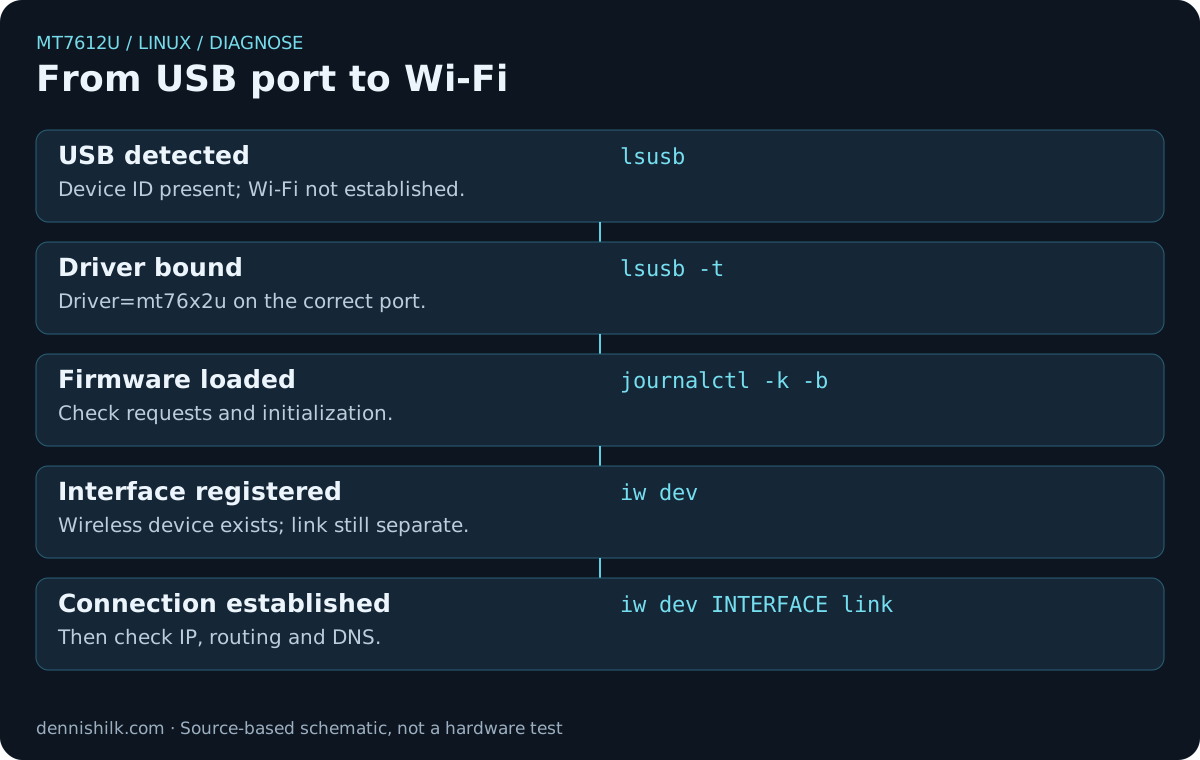
lsmod shows loading, lsusb -t shows binding, and iw dev shows registration. Link status then establishes wireless association.
Follow the evidence to a working connection
Identify the device first, verify driver binding and firmware next, then diagnose the wireless connection. Separating USB enumeration, initialization, radio blocks and router authentication gives each next step a clear purpose and avoids trial-and-error driver installations.
Sources and review scope
Reviewed on 19 November 2026. Firmware names are explicitly tied to Linux 6.12 source; the 4.19 configuration establishes historical support. Package lists reflect the retrieved state. For troubleshooting, use the actual local kernel messages and repositories. Graphics were created for this article; no product photographs were used.
- Linux v4.19: Kconfig / MT76x2U
- Linux v6.12: USB identifiers
- Linux v6.12: firmware names
- Linux v6.12: USB firmware loader
- Linux: MT76x2U configuration / 802.11ac
- Linux Wireless: MediaTek
- Linux Wireless: iw
- Linux Wireless: interface modes
- ALFA: MT7612U Linux support
- Debian 13: firmware-mediatek
- Debian 13: firmware files
- Debian 12: older firmware package
- Ubuntu 24.04: linux-firmware files
- Ubuntu 26.04: MediaTek files
- Ubuntu 26.10: MediaTek package
- Ubuntu: release-specific MediaTek package availability
- Arch: MediaTek firmware file list
- Linux Mint: Driver Manager
- NetworkManager: nmcli reference
- usbutils: lsusb manual
- Kernel: firmware search paths