In this article
- When data had weight
- Quake, nailgun boxes and Nine Inch Nails
- The soundtrack was not simply another game file
- Seven Quake disks are a separate story
- What happens inside a floppy
- A handbook from the drawer
- Windows 95 and unusually full disks
- ZIP was a substantial step, with its own drive
- 128 GB on a small Ventoy stick
- A modern game as floppy logistics
- Now try inserting the wrong disk
- Sources and image credits
Part 16. An error. And the neighbour had already gone home. That combination has stayed with me for decades. I no longer remember the archive utility, the precise file size or what had actually gone wrong. I do remember waiting for another stack of floppy disks. Apparently, the memory of a failed transfer is an unusually durable storage medium.
When data had weight
I was born in 1984. DOS, Windows 95, Windows 98 and PC games are part of my computing history: DOOM and Quake, alongside simulations and adventures. My interest rarely stopped at playing the finished game. How did all of this get onto the computer? What was the drive doing? Why did the program want another disk already? Those questions lived between the actual gaming sessions.
Sometimes a large file arrived on foot. Someone had it on their computer, spread it across several disks, and brought the stack over. A single disk was manageable. A disk-spanning archive became a small job: keep everything in order, find enough free space, wait for the drive, and hope every part remained readable. One missing piece could stop the whole reconstruction at the very end.
My memory is of archive parts with names roughly in the style of teil1.zip, teil2.zip, and so on. Those names illustrate what I remember; they are not a surviving directory listing. At part 16, there was an error. My neighbour was already home. I had to wait until he eventually returned with another large stack so that we could try again. I cannot give an exact year or a technical diagnosis. A faulty disk is a possibility, not an established fact.
Quake, nailgun boxes and Nine Inch Nails
Nine Inch Nails was exactly my kind of music. That is why the NIN markings on the ammunition boxes in Quake caught my attention. Specifically, they appeared on the nailgun ammunition. Here was a connection between two things I cared about: those letters were familiar, and I wanted to hear the music associated with the game.
The historical connection is documented. Trent Reznor and Nine Inch Nails contributed to the original 1996 Quake soundtrack. The contemporary WIRED feature The Egos at Id also mentions the NIN branding on ammunition boxes. This was not a connection invented years later. To me it was my music appearing in a game that was already fascinating enough.
The music and the floppy stack belong together in my personal recollection. That does not establish that the failed sixteenth part contained a particular soundtrack. I have no surviving contents list. Filling that gap would make a tidier anecdote, but it would also make the account less accurate. The distinction matters especially because the original game CD handled music differently from ordinary game files.
The soundtrack was not simply another game file
The original Quake disc is a useful example of a carrier holding different kinds of content. Its mixed-mode arrangement put game data in a data track and music in separate CD-Audio tracks. MusicBrainz records that track structure. It is a community discography, rather than a manufacturer’s technical standard, and should be read as that kind of evidence.
Copying normal files from the data track did not automatically preserve the audio tracks. Those tracks were not ordinary files in the data track’s filesystem. Extracting them into digital audio files required a separate operation. Uncompressed PCM and compressed audio formats then produced different file sizes. An image that preserves a mixed-mode disc’s structure is also different from a folder copied off its data track.
A multipart archive is another layer again. It can compress files and distribute them across volumes, but it contains only what was put into it. Splitting ordinary game files across floppy disks cannot recreate a CD-Audio track that was never included. This is why asking whether the music was present was a different question from asking whether the game would start.
CD minutes and data bytes must be kept separate too. An audio sector carries 2,352 bytes of audio payload. CD-ROM Mode 1 instead provides 2,048 user bytes per sector, with other space serving additional structures for data. At 75 sectors per second, the familiar 74-minute Mode 1 calculation is 74 × 60 × 75 × 2,048 = 681,984,000 bytes. That figure is not the size of an equivalent uncompressed audio extraction.
Seven Quake disks are a separate story
An archived id Software announcement explicitly describes a seven-volume Quake shareware distribution: qsw091_1.zip through qsw091_7.zip. The contemporary text is preserved in the Quake Official Archive. All seven parts were required for that installation; a single large ZIP file was offered as an alternative.
This independently documents the practice of distributing software in floppy-sized parts. It does not identify my neighbour’s stack. The fact that I remember reaching part 16 makes the separation especially necessary. Shareware distribution, the full retail game, CD music and a privately transported archive are different things. A historically plausible connection is not proof that they were the same collection of bytes.
What happens inside a floppy
A floppy disk contains a flexible disk with a magnetic coating. The drive rotates it while a head reads or writes encoded patterns on concentric tracks. Sectors divide those tracks into addressable pieces. The familiar 3.5-inch shell is rigid; the disk inside remains flexible. Its metal shutter protects the head opening during transport. The shutter itself does not hold the data.
A common PC high-density layout has 80 cylinders, two sides, 18 sectors per track and 512 bytes per sector. Multiplying those values gives exactly 1,474,560 bytes. The famous “1.44 MB” label mixes historical conventions: it means neither 1.44 million bytes nor exactly 1.44 MiB. A representative 720 KiB double-density disk uses fewer sectors per track. Similar-looking objects do not necessarily use compatible formats.
Some of those sector bytes belong to filesystem administration rather than your file. Boot information, allocation tables and directories occupy space. A comparison using every sector therefore gives a theoretical lower bound for the number of carriers. Real archive headers and the splitting software’s limits can require more space again. The drive’s label and the free-space counter are answering slightly different questions.
IBM’s historical account traces the technology back to its early 8-inch systems and shipments in 1971. Later 5.25-inch and 3.5-inch formats adapted it to different computers and everyday uses. There was never one universal floppy capacity across this history. The medium, drive, formatting and computer all needed to agree.
A handbook from the drawer
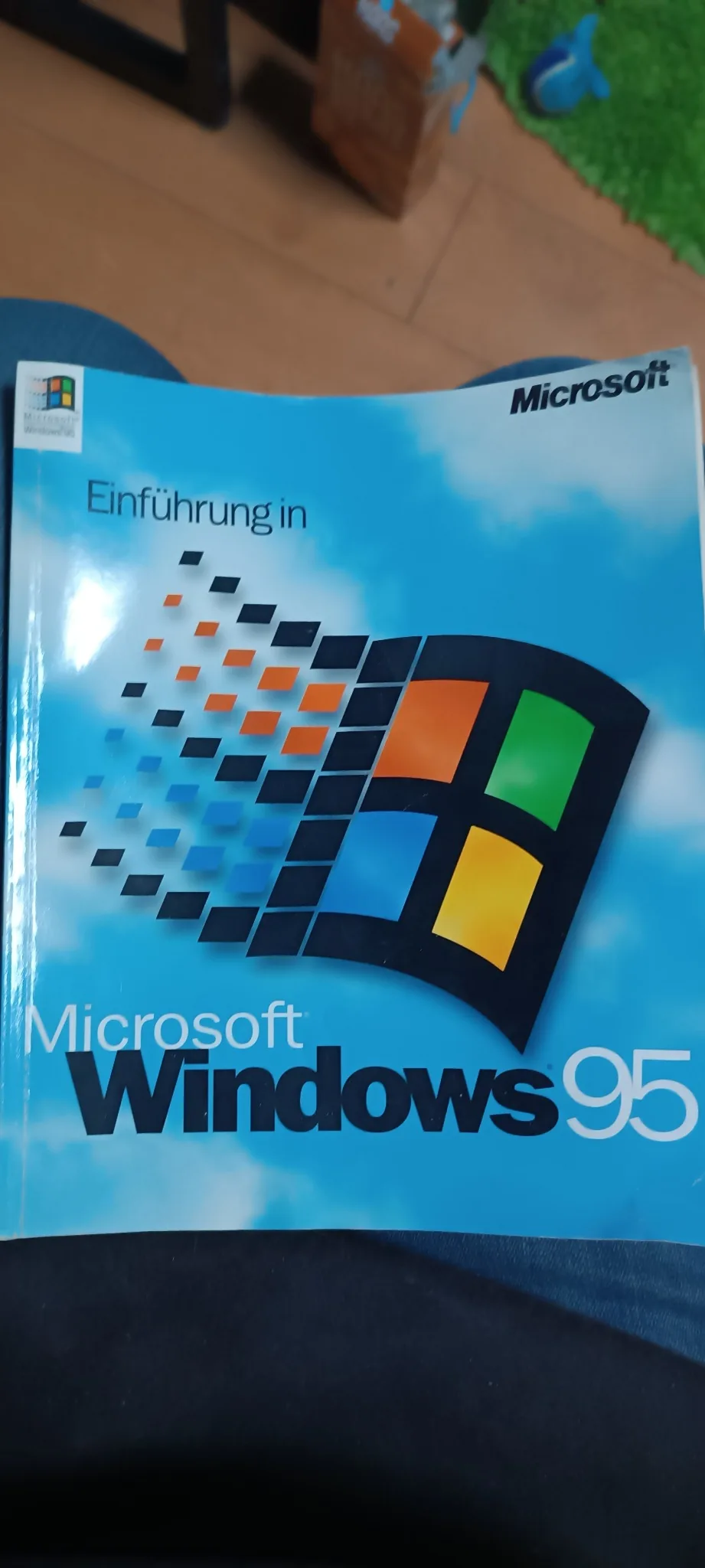
On 16 October 2026 I rediscovered my original German Windows 95 handbook. The blue cover reads “Einführung in Microsoft Windows 95”. Some objects can sit in a drawer for decades and bring a whole piece of computing history back when you see them again. The photographs here are my own pictures of that actual copy.
Inside is a particularly entertaining period advertisement. On the left is a neatly printed original disk; on the right, a floppy with a handwritten label carrying several entries. The German captions contrast updates with trouble. The original wording is visible in the photograph. It is a compact piece of evidence for how Microsoft wanted buyers to think about original software, support and private copies.
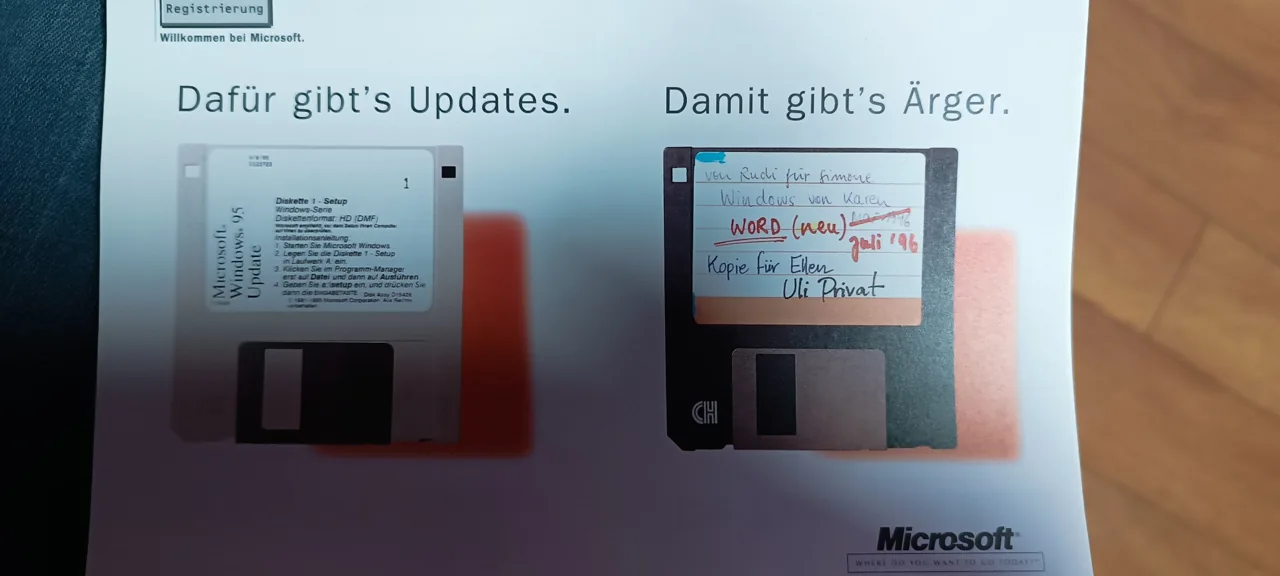
To me, the page is a tangible document of its era. The handwritten disk worked as an advertising image because labels like that were familiar parts of computing life. It does not establish that every handwritten disk was technically unreliable. The advertisement promotes original software. My failed-transfer memory concerns incomplete data; those are not the same claim.
The distinction extends to the images themselves. I took the photographs, but the handbook design, printed advertising artwork and Microsoft marks remain Microsoft material. Showing my copy as an editorial illustration does not turn the underlying artwork into a freely licensed graphic. The photographs also do not document what my neighbour brought over years earlier.
Windows 95 and unusually full disks
Microsoft engineer Raymond Chen answered the question of how many disks Windows 95 came on with thirteen, noting the use of Distribution Media Format, or DMF. His account from Microsoft’s development history describes a particular distribution example. It does not mean every language, edition or OEM package used the same physical installation set.
DMF fitted more sectors into the familiar medium than the standard PC high-density layout. The well-known 21-sector arrangement gives 80 × 2 × 21 × 512 = 1,720,320 bytes before filesystem administration. That provided room for more compressed setup data and reduced the number of disks required. It was a different formatting arrangement, not extra magnetic material magically appearing in the shell.
Reading and copying such distribution formats required software and hardware paths that understood them. A conventional disk-copy tool did not automatically handle every nonstandard layout. CD-ROM distribution changed the practical experience again, providing much more room on one carrier and far fewer swaps. The installed operating system’s space requirement was still different from the total size of its compressed setup files.
ZIP was a substantial step, with its own drive
My retro PC still has a working ZIP-100 drive. One hundred megabytes was a very different scale from a single ordinary floppy. The thicker removable cartridge also stored data magnetically, but relied on a dedicated drive and greater density. An ordinary 3.5-inch floppy drive was not a substitute for it.
The lab deliberately declares a nominal ZIP-100 comparison unit of 100,000,000 bytes. Iomega’s manual defines its MB claim decimally; actual formatted space can differ. A ZIP archive, meanwhile, is a file format. It does not need a ZIP cartridge, and a ZIP cartridge can carry whatever suitable files fit on it. Sharing a name does not make the compression format and the hardware the same technology.
CD, DVD and Blu-ray changed the scale again. Optical reading is different from magnetic storage. Pressed CDs use pits and lands, while CD-R and CD-RW use different recording layers. Smaller features, different optics and sometimes multiple layers made later capacity increases possible. A meaningful comparison must say which disc and which user-data convention it means. A single-layer DVD cannot silently become a dual-layer one halfway through the calculation.
128 GB on a small Ventoy stick
Alongside the retro hardware I have a 128 GB USB stick running Ventoy. That is flash-storage capacity, not RAM. Ventoy turns it into a useful collection of selectable boot images. The entire nominal capacity does not automatically belong to ISO files, though: partitions and filesystem structures need space too.
Flash storage requires neither a rotating disk nor a laser. NAND cells retain electrical charge states, while a controller maps logical addresses to physical storage and manages writing and erasing. Wear leveling distributes use rather than repeatedly wearing the same physical locations. Modern SSDs share those broad ideas while targeting different performance requirements. NVMe is a command protocol, not a type of memory cell.
None of that makes a USB stick an eternal object. Capacity alone does not specify transfer speed, endurance or long-term retention. The personal contrast remains enormous: waiting for someone to walk back with a stack of disks, versus carrying several bootable system images on one small device. The movement of your hand got smaller while the amount of data got much larger.
A modern game as floppy logistics
The lab turns published Windows storage requirements into examples. The sources checked on 16 October 2026 list 80 GB for DOOM Eternal, 70 GB for Cyberpunk 2077 and 150 GB for Baldur’s Gate 3. Those are planning figures from product or support pages, not measurements of every possible installation. Versions, language packs, platform and updates can change actual requirements.
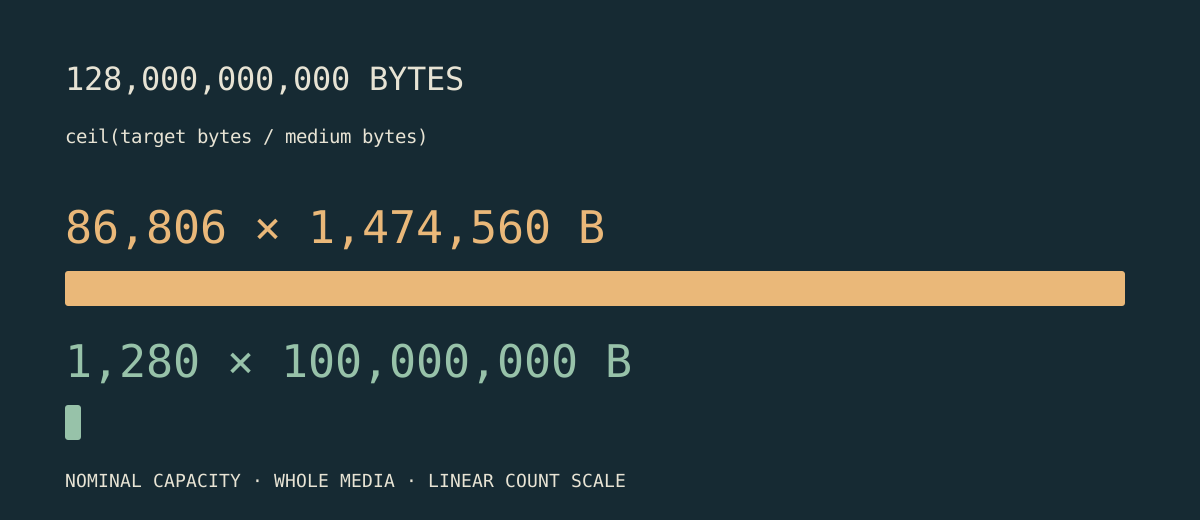
Using decimal GB and the floppy sector capacity above gives 54,254 disks for 80 GB, 47,472 for 70 GB and 101,726 for 150 GB. With nominal ZIP-100 units, the corresponding counts are 800, 700 and 1,500. A nominal 128 GB stick corresponds to 86,806 whole floppies or exactly 1,280 ZIP comparison units. A partially filled final disk still has to be carried.
These figures obviously do not describe playable floppy editions of modern games. They compare capacity only. Filesystems, archive spanning and the software’s behaviour would add their own practical constraints. The calculator therefore lets you select MB, MiB, GB or GiB explicitly and inspect the assumptions. A number can be surprising and still show its working.
The visualization groups disks instead of putting a hundred thousand individual objects on the page. Each symbol has a stated scale, and the exact total remains available as text. The purpose is to make the difference graspable, not to pretend that counting a drawn pile tells you the capacity of a real installation. You can enter your own size and watch the relationships change.
Now try inserting the wrong disk
The Storage Media Lab has five stations: objects on a shelf, their internal mechanisms, capacity comparisons, an archive transfer, and the ZIP-to-Ventoy finale. At station four you can deliberately choose a wrong volume, inspect the failure at 16, retry the same copy or insert a good backup. The transfer’s state determines whether it can continue.
The reenactment is an original educational interface. It does not diagnose my old disks or recreate a known surviving archive utility. It does explain why one volume can hold up the reconstruction of a whole archive. A checksum can identify inconsistent data, but it does not supply the missing bytes. Recovery information helps only within the redundancy actually available. A good replacement copy is a different kind of resource.
If that leaves you curious about other machines, the museum also has an IMSAI 8080 and the Jurassic Park SGI workstation. Different devices, the same pleasure in looking beneath the surface. The story behind this exhibit begins with a wait for another disk, but the interesting part is still the question of how the machine works.
Sources and image credits
The personal recollection and statements about my current ZIP drive and USB stick are supplied by me. The handbook photographs are my pictures from 16 October 2026; Microsoft retains its underlying artwork and marks. Other figures are original, labelled explanatory illustrations. No Quake or Nine Inch Nails audio is embedded. Technical references and game requirements were checked on 16 October 2026.
- IBM · Floppy disk storage
- Computer History Museum · 1971: Floppy disk loads mainframe computer data
- Ecma International · ECMA-130 (CD-ROM)
- Ecma International · ECMA-267 (DVD)
- Blu-ray Disc Association · Capacity
- Iomega · ZIP 100 User Manual (1998), manufacturer manual preserved by ManualsLib
- Kingston · Flash Memory Guide
- Raymond Chen · How many floppy disks did Windows 95 come on? (2005)
- Microsoft KB Q135542 · Windows 95 DMF Floppy Disk Directory Listing (archived manufacturer documentation)
- id Software · 1996 seven-volume announcement, transcribed in Quake Official Archive
- WIRED · The Egos at Id (1996), contemporary reporting
- MusicBrainz · Quake, original 1996 mixed-mode CD, community discography
- Steam · DOOM Eternal · Windows · 80 GB storage requirement
- Steam Support · Cyberpunk 2077 · Windows · 70 GB storage requirement
- Larian Studios · Baldur’s Gate 3 · Windows · 150 GB SSD requirement
- Ventoy · Getting started